Summer filled your calendar on its own. Now it's the Airbnb slow season, the next eight weeks look mostly gray, and your fixed costs haven't taken a holiday. The fix isn't one trick. It's working out which of three things is holding bookings back: price, stay rules, or the kind of guest you're built for.
Start with one action today: open your calendar for the next 60 days, count the open nights, and note how many of those gaps are one or two nights long. That single number tells you whether your problem is demand or your own settings.
Why does the Airbnb slow season hit some listings harder than others?
In the slow months for Airbnb, fewer guests search, so small differences in price, minimum stay and listing appeal decide who gets the remaining bookings. A listing tuned for peak weekends often filters itself out of the searches that are still happening.
Airbnb says its search ranking weighs quality, popularity, price and location, and that price is judged partly against comparable listings for the same dates. The same page notes that many hosts offer lower prices or discounts during less busy travel seasons. This suggests that if your neighbors drop rates in November and you don't, your listing can look worse value in search even though nothing about it changed.
Use this table to find your bottleneck before you change anything:
| What you see in your calendar | Likely cause | First thing to try |
|---|---|---|
| Few views and few inquiries | Price looks high against nearby listings | Compare your total price with 5 similar listings for the same dates |
| Views but no bookings | Photos, description or reviews don't fit off-season guests | Update photos and text for the season you're actually in |
| Many one- and two-night gaps | Minimum stay longer than gaps between bookings | Lower minimum stay for those dates only |
| Weekends book, weekdays stay empty | Listing aimed only at leisure weekends | Add a weekly discount and highlight workspace and Wi-Fi |
| Whole weeks empty, no inquiries at all | Genuine lack of demand in your market | Target longer stays or add another channel |
If you tick the last row, discounting nightly rates harder usually won't help much. You need a different guest.
How to get more bookings on Airbnb when demand drops?
Change the settings that decide whether your listing appears at all, then change who you market to. In practice that means seasonal pricing, shorter minimum stays for off-season dates, and weekly or monthly discounts for guests who need longer stays.
Set Airbnb seasonal pricing by date range, not across the year. Change the price of specific off-season dates in your calendar rather than your base rate. Our recommendation: lower the off-season dates you can't fill, and leave any local event dates (conferences, school holidays, festivals) at or above normal price. A blanket cut gives away money on the nights that would have sold anyway.
Revisit your Airbnb minimum stay setting. A three-night minimum that protected your cleaning schedule in July can block every short winter getaway. Lower it for the slow months only, and keep in mind that each extra turnover costs a clean. The minimum stay strategy guide walks through how to set rules per season.
Refresh the listing for the season. If your photos show a sunny terrace and your description sells the beach, off-season guests have little reason to click. Show what the property offers now: heating, a workspace, a kitchen for longer stays, anything nearby that runs year-round. Only list amenities you actually have.
Keep all pre-booking contact on Airbnb. Airbnb's Off-Platform and Fee Transparency Policy prohibits offering discounts to book off Airbnb and using guest contact details from Airbnb for marketing lists. So a "past guest" email campaign can only go to guests who booked with you directly and agreed to hear from you.
How to get longer bookings on Airbnb without losing money?
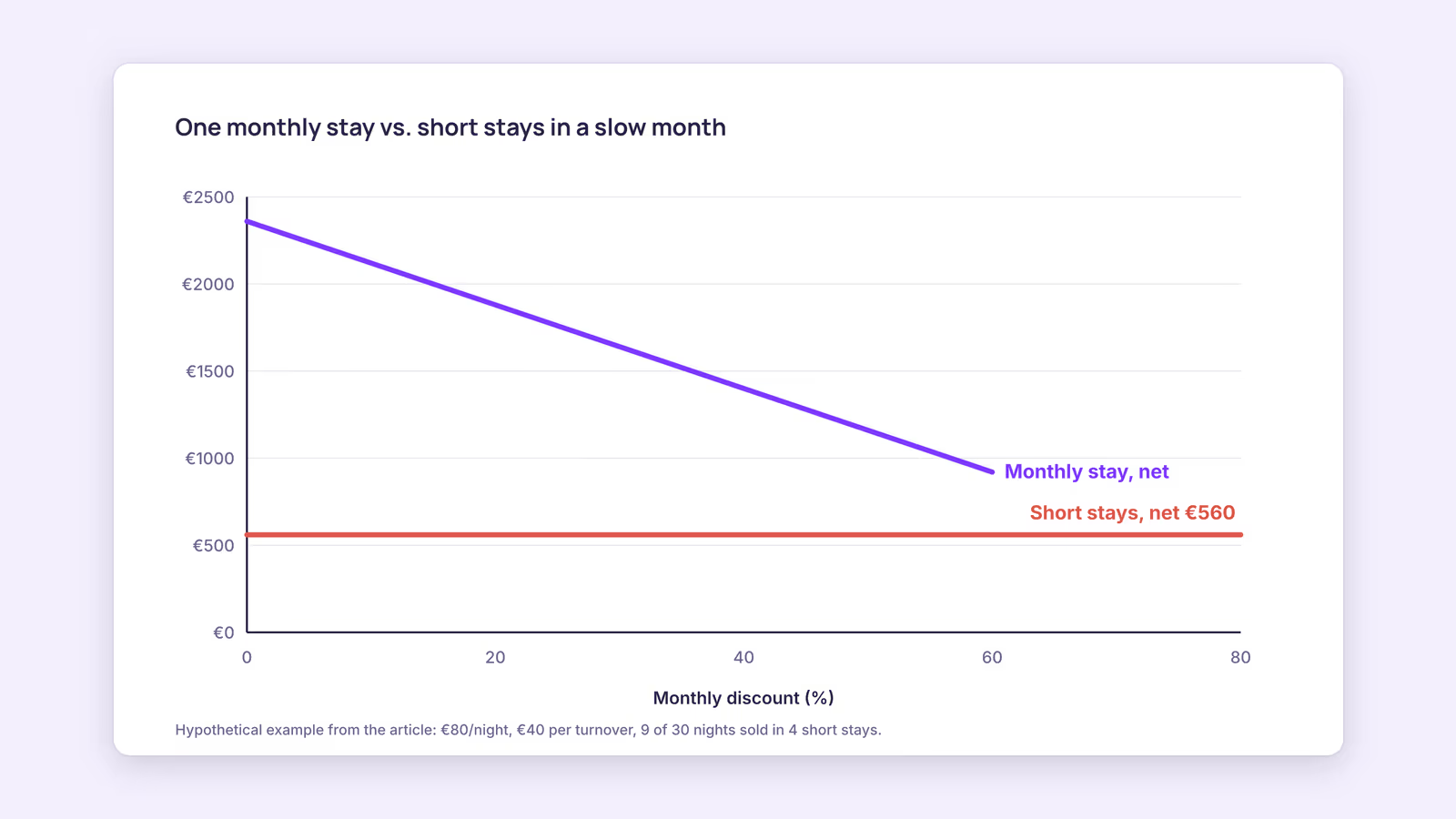
Offer a weekly or monthly discount only after checking that one long stay beats the short stays you'd realistically get in the same period. A simple break-even calculation, using your own numbers, tells you how deep the discount can go.
The formula:
- Expected short-stay income = nightly rate × nights you realistically expect to sell − (number of turnovers × cost per turnover)
- Long-stay income = nightly rate × 30 × (1 − discount) − one turnover cost
Consider a hypothetical one-bedroom with a €80 nightly rate and a €40 cost per turnover. Last off season it sold about 9 of 30 nights in four separate stays.
- Short stays: €80 × 9 − (4 × €40) = €720 − €160 = €560
- Monthly stay at a 40% discount: €80 × 30 × 0.60 − €40 = €1,440 − €40 = €1,400
- Monthly stay at a 60% discount: €80 × 30 × 0.40 − €40 = €960 − €40 = €920
In this example, even a steep monthly discount beats the short-stay pattern. The numbers change fast if your low-season occupancy is higher, so plug in your own. Before you commit, subtract the costs a long stay adds: utilities for 30 occupied nights, extra wear, and platform fees, which apply to both scenarios. If you're unsure how to measure last year's sold nights, calculate your occupancy rate by month first.
Two practical points about long stays on Airbnb. For stays of 28 nights or more, Airbnb pays out the first month after check-in and then monthly, rather than all at once. And a long stay blocks the whole month, so leave event dates out of the discounted window if they'd sell at a premium. The length-of-stay discounts guide covers how to tier weekly and monthly discounts.
Should you add another channel in the Airbnb off season?
Adding a channel can help when your market still has demand that doesn't search on Airbnb, but it adds calendar work and a second set of fees. It rarely fixes a pricing or minimum-stay problem, so solve those first.
If you do list on a second platform, such as Booking.com, both calendars have to stay in sync. Many hosts link them with iCal, and each platform fetches the other's calendar on its own schedule. Airbnb says it updates connected calendars every 3 hours, and Booking.com says it imports connected calendars every two hours. In the slow season, a double booking is less likely, but it's still possible when a last-minute booking lands inside that window. Before you list, check how each platform's commission works on your total booking amount with the OTA fee comparison.
When this advice does not apply
- Markets with no off-season demand at all: if searches for your area fall close to zero, pricing changes won't create guests. Consider mid-term tenants or a planned closure for maintenance.
- Local rules on stay length: some cities and buildings restrict stays by length or require registration for longer lets. Check your local rules before you target 30-night guests.
- Hotels and serviced apartments: different fee structures and search placement apply, so the break-even inputs will differ.
What to do next
- Count open nights and short gaps in the next 60 days, and match them to a row in the diagnostic table.
- Set seasonal prices for the off-season dates only, leaving event dates at normal rates.
- Lower your minimum stay for slow months, and compare the extra cleaning cost against the nights you fill.
- Run the break-even formula with your own rate, turnover cost and last year's sold nights before setting a monthly discount.
- Refresh photos and description for the season, listing only amenities you actually have.
FAQ
When is the Airbnb slow season?
It depends on your market, not on the calendar. Beach and ski destinations have opposite slow months. Your own booking history is the best guide: the months with the lowest sold nights over the past two years are your slow season.
Is it better to leave dates empty than to discount them?
Only if the discounted rate wouldn't cover the cost of the stay: cleaning, utilities, supplies and fees. If it covers those and adds something, an empty night earns less than a discounted one.
Should I turn on Instant Book in the off season?
It can remove a step for guests who are comparing several listings. Airbnb explains how Instant Book works and what requirements you can set. Weigh that convenience against how much you want to screen longer stays.
About BookBed: If you take direct bookings from returning guests, BookBed's seasonal pricing rules let you set different rates for slow-season date ranges on your own booking widget, separate from what you charge on Airbnb. See pricing
Sources
- Airbnb Help Center, "How search results work" — Verified 2026-09-30
- Airbnb Help Center, "Off-Platform and Fee Transparency Policy" — Verified 2026-09-30
- Airbnb Help Center, "When you'll get your payout" — Verified 2026-09-30
- Airbnb Help Center, "Sync your home host calendar to other websites" — Verified 2026-09-30
- Booking.com for Partners, "Updating your availability calendar in the extranet" — Verified 2026-09-30