You set your prices months ago, and now the calendar looks lopsided. A holiday week filled almost the day it opened, a few weekdays next month are still empty, and there's a stray two-night gap between bookings that nobody seems to want. Vacation rental revenue management is how you decide what to do about each of those dates, instead of guessing or cutting every price at once.
Start with one action today: open your calendar, look at the next 90 days, and count booked nights in each 30-day block. Write the three numbers down. Everything below works from that snapshot.
What is vacation rental revenue management?
Vacation rental revenue management is the habit of deciding the price, stay rules and sales channel for each future night based on how fast it's booking, so you judge success by revenue per available night rather than occupancy alone.
The reason it matters is simple. An empty night can't be sold later. Once the date passes, that revenue is gone, and a night you sold far below what a guest would have paid is gone too. Revenue management sits between those two mistakes.
You have four levers, and none of them needs a data-science team:
- Price: the nightly rate for a specific date or period.
- Stay rules: minimum and maximum nights, including shorter minimums for gaps.
- Booking window: discounts or restrictions that depend on how far ahead a guest books.
- Channels: where each night is for sale, and what each channel keeps.
To keep score, most hosts use revenue per available night, which captures price and occupancy in one number. Our RevPAR guide shows how to calculate it and how to tell whether a price change helped or just moved occupancy around.
How do you read booking pace in short term rental revenue management?
Booking pace is the number of nights already booked for a future period as of today, compared with the same point last year or with a target you set. It tells you whether a period is filling too fast, too slowly or on track.
Pace matters more than occupancy for a date that hasn't happened yet. A month that's 40% booked could be fine if it's four months away and worrying if it's ten days away.
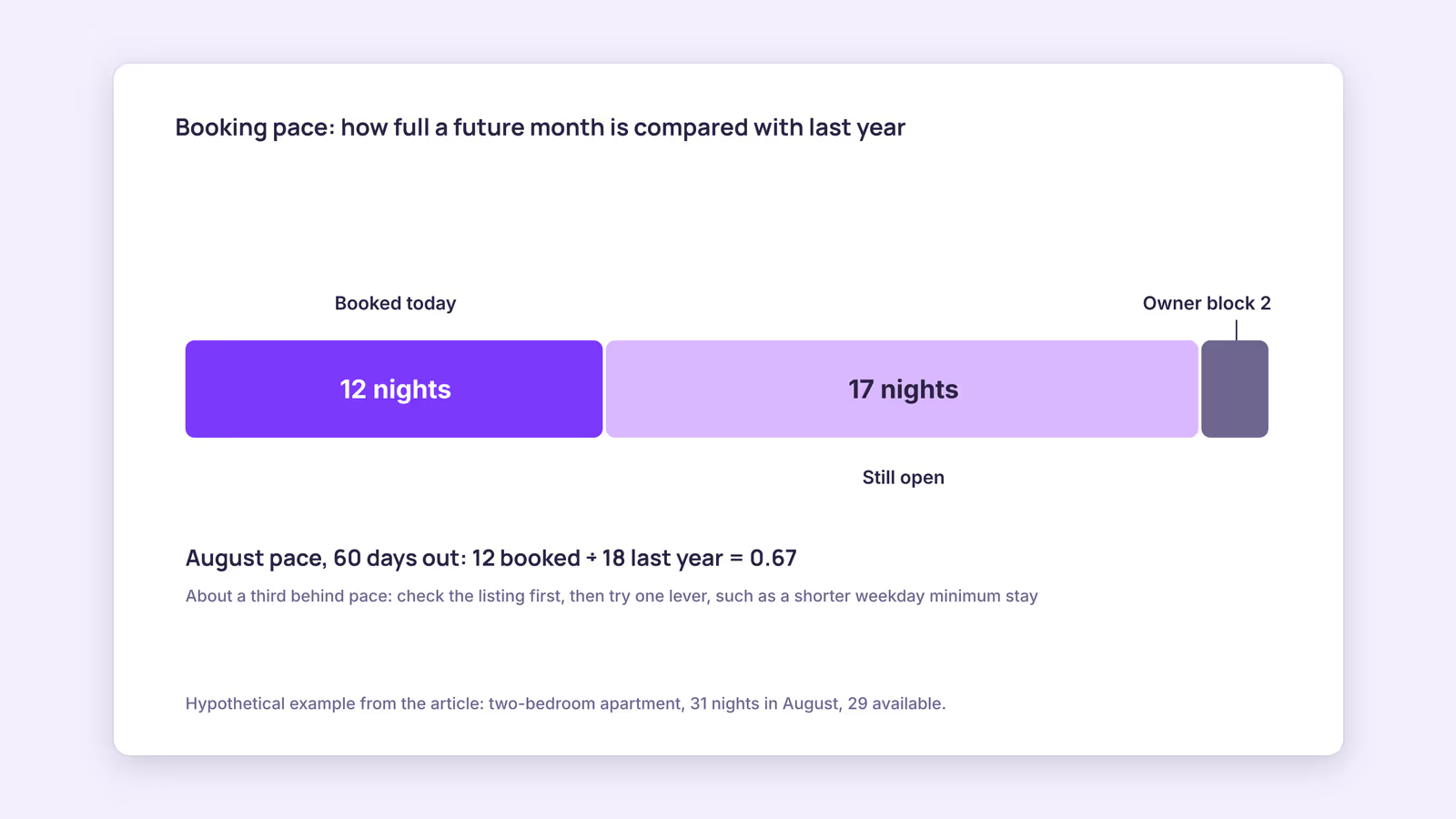
Here's a worked example. Consider a hypothetical two-bedroom apartment looking at August, 60 days out:
- August has 31 nights. Two are blocked for the owner, so 29 are available.
- Today, 12 nights are booked.
- On the same date last year, 18 nights were booked.
- 12 ÷ 18 = 0.67, so August is about a third behind last year's pace.
That doesn't mean you should cut August prices tomorrow. It means August is the period to look at first. The table below turns what you see into one first move.
| What you see | What it suggests | First lever to try |
|---|---|---|
| A period is well ahead of last year or your target, 60+ days out | Your rate may be below what guests will pay | Raise the rate for remaining nights in small steps, then recheck next week |
| A period is behind pace, 60+ days out | Too early to judge demand; your listing may also be the issue | Check photos, reviews and similar listings before changing price |
| Nights are unbooked under 14 days out | Demand for those dates may not arrive at the current price | Add a last-minute discount or shorten the minimum stay on those nights |
| One- or two-night gaps sit between bookings | Your minimum stay is blocking the only stays that fit | Lower the minimum stay for the gap only |
| Long stays fill peak weeks months ahead | Long-stay discounts may be too generous for peak dates | Review weekly and monthly discounts and the maximum nights setting |
| The calendar is full but take-home per night is dropping | More bookings may be arriving through higher-fee channels | Compare net per night by channel |
If you have no history, use a target instead of last year. Say, "half of next month booked by the first of this month." Adjust the target after a season, when you know more.
Which Airbnb revenue management settings do the work?
On Airbnb, the main revenue management tools are Smart Pricing, rule-sets for discounts and trip length, and minimum and maximum night settings. On Booking.com, dynamic restriction rules handle gap nights and unsold nights automatically.
Smart Pricing. Airbnb says Smart Pricing "uses hundreds of factors about your listing and your area to adjust your nightly price based on demand." You set the price range, and you can override single nights with custom prices. Two details matter here: weekly, monthly and trip length discounts override Smart Pricing, and you have to turn it off to use weekend pricing or rule-sets.
Rule-sets. Airbnb's rule-sets are saved sets of custom pricing and availability rules you apply to listing calendars. They can include stay-length discounts, early-bird discounts for booking further ahead, last-minute discounts that reduce your price as check-in approaches, and minimum and maximum trip lengths. Once applied, a rule-set overrides your existing settings for those dates. Those options map directly to the booking-window and stay-rule levers above.
Minimum and maximum nights. You can also set trip length rules by day of the week, for example a two-night minimum for Friday check-ins and one night for other days.
Booking.com gap and unsold nights. Booking.com's dynamic restriction rules can lower your minimum length of stay to fit a gap, but never below a limit you choose. Rules for unsold nights can also change minimum stay, minimum advance reservation or price for a window of the next 3 to 60 days. Manual calendar updates override any rule.
If you want a third-party tool to set rates across channels, our guide to pricing tools for vacation rentals covers what they do and how they connect. For minimum-stay choices in depth, see the Airbnb minimum stay guide.
How often should you review your pricing, and what should you record?
Our recommendation: review once a week for the next 90 days, change one lever per period, and write down what you changed. A short, regular review beats an occasional overhaul because you can see which change did what.
Use this weekly checklist:
- Pace. Count booked nights in each of the next three 30-day blocks and compare with last year or your target.
- Gaps. Find every gap of one to three nights and check whether your minimum stay blocks it.
- Last week's bookings. Note how far ahead each came in and what it paid per night. Very early bookings at peak dates suggest a low rate.
- Channels. Compare what you kept per night on each channel after commission. Booking.com's commission applies to the total booking amount, including fees like cleaning, and the rate depends on your country, property type and agreement. The OTA fee comparison lines up the main channels.
- Log. Record the date, the period, the lever and the change. Next week, check that period's pace before touching it again.
A revenue management strategies example, continuing the hypothetical apartment: August is a third behind pace, 60 days out. The host checks the listing first and finds nothing wrong, then lowers the minimum stay from four nights to two for August weekdays only, leaving prices alone. A week later the host compares August's pace again. If it has closed the gap, the rule stays. If not, the next lever is a modest price change on the weekdays that are still empty. This is a process, not a predicted result. Whether it works depends on your market.
What this suggests: most weeks, the right move is small or nothing. The value comes from catching the few dates that need attention while there's still time to sell them.
When this advice does not apply
- New listings: you have no last-year pace, so use a simple target and expect it to be rough for a season.
- Several identical units sold as one listing or room type: pace and gaps work differently when one booking takes any of several units, so count them per room type rather than per unit.
- Regulated markets: where local rules cap nights or require minimum stays, those limits come before any revenue decision.
- Full-time revenue managers or pricing tools: if software or a manager already sets your rates, use the weekly review to check its output rather than overriding it night by night.
What to do next
- Count booked nights in the next three 30-day blocks and compare each with last year or a target.
- Pick the one period furthest off pace and match it to a row in the table above.
- Check your Airbnb Smart Pricing and rule-set settings so you know which one controls each price.
- Set a gap-night rule on Booking.com, or a shorter minimum for gap dates on Airbnb.
- Start a one-line change log and review it every week for the next month.
FAQ
Do I need an Airbnb revenue manager?
Not for one to three units. A short weekly review of pace, gaps and channels covers the basics. A revenue manager or pricing tool starts to earn its cost when you have more units than you can review by hand each week.
What is Airbnb yield management?
It's the same idea as revenue management: adjusting price and stay rules per night to get the most revenue from a fixed number of nights. On Airbnb, the practical tools are Smart Pricing, rule-sets and trip length settings.
Why is revenue management important for a small rental?
Because every unsold night is lost for good, and every night sold too cheaply can't be repriced. A small host feels both mistakes directly in monthly income.
See every gap in one view: BookBed Pro's multi-channel timeline shows bookings across all your units in one calendar, including Airbnb and Booking.com reservations imported through iCal, so gap nights stand out during your weekly review. See BookBed Pro →
Sources
- Airbnb Help Center, "Use Smart Pricing to automatically adjust your prices based on demand" — Verified 2026-09-30
- Airbnb Help Center, "How rule-sets work" — Verified 2026-09-30
- Airbnb Help Center, "Set the minimum and maximum nights for your listing" — Verified 2026-09-30
- Booking.com for Partners, "Setting up dynamic restriction rules" — Verified 2026-09-30
- Booking.com for Partners, "Understanding your commission" — Verified 2026-09-30