You want to know whether your listing is actually doing well, and "I'm booked most weekends" isn't an answer. To calculate occupancy rate for your Airbnb, divide the nights guests booked by the nights you really made available, then multiply by 100. Your first action: pull last month's calendar from every platform you list on and count both numbers by hand. It takes ten minutes and it's the baseline for everything below.
The formula is simple. The mistakes are in what goes into it, and in what you conclude from the result.
How do you calculate occupancy rate for an Airbnb?
Occupancy rate is booked nights divided by available nights for the same period, times 100, where "available" excludes nights you blocked for yourself, repairs, or deliberate closures.
Occupancy rate = booked nights ÷ available nights × 100
- Booked nights: nights sold to paying guests on any channel, not just Airbnb. A Booking.com or direct booking counts too.
- Available nights: calendar nights in the period, minus owner stays, maintenance blocks, and seasonal closures.
Two details trip people up. First, count nights, not days: a guest arriving on the 10th and leaving on the 13th is three nights. Second, use one consistent rule for blocked nights. If you block a night only because a platform's calendar hasn't caught up, that night is still available in your math, because it's a sync buffer, not a choice to close.
That second point matters if you list on more than one site. Airbnb says its calendar updates imported calendars every 3 hours, and Booking.com says it imports connected calendars every two hours. A booking made elsewhere shows up as "blocked" on Airbnb, so if you count only Airbnb reservations you'll undercount occupancy and misread it as a slow month.
What does a worked occupancy calculation look like?
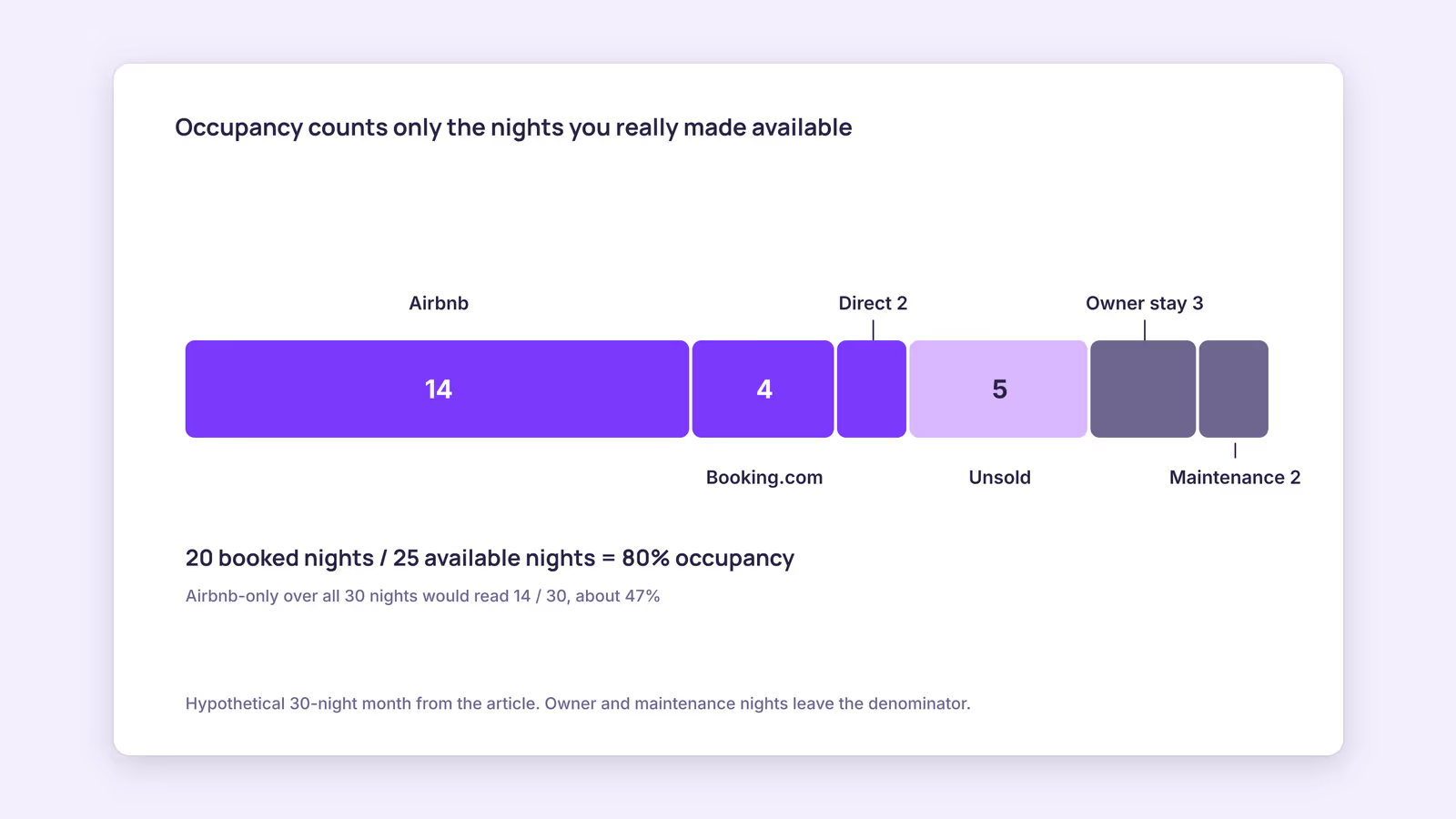
Take a hypothetical one-bedroom apartment for a 30-night month, counted night by night rather than estimated, and run each line of the formula so you can see where the denominator changes.
| Line | Nights | Note |
|---|---|---|
| Calendar nights in the month | 30 | Starting point |
| Owner stay | minus 3 | Your choice to close, so remove it |
| Maintenance (repainting) | minus 2 | Remove it |
| Available nights | 25 | The denominator |
| Airbnb bookings | 14 | Count all channels |
| Booking.com bookings | 4 | Shows as "blocked" on Airbnb |
| Direct booking | 2 | Counts the same |
| Booked nights | 20 | The numerator |
| Occupancy rate | 80% | 20 ÷ 25 × 100 |
If this host had counted Airbnb reservations only and left the full 30 nights in the denominator, they'd get 14 ÷ 30, about 47%. Same month, same calendar, very different story. That's why the method matters more than the number.
Run the same calculation for each of the last 12 months rather than once for the year. An airbnb occupancy rate by month shows you where the soft periods are, and an annual average can hide a strong summer and an empty shoulder season inside one respectable-looking figure.
What is a good occupancy rate for Airbnb?
There's no universal good occupancy rate; the useful benchmark is your own listing's rate by month, compared against your nightly price and revenue for the same months, plus what similar listings nearby charge.
This guide doesn't quote market-wide occupancy ranges, because we couldn't trace any to a primary source. Published benchmarks exist from data vendors, but their methods differ (some count blocked nights as booked, some don't), so compare only against figures that explain how they were built.
A better test is to read occupancy next to two other numbers:
- ADR (average daily rate): room revenue ÷ booked nights. See the ADR guide.
- RevPAR (revenue per available night): room revenue ÷ available nights, which equals occupancy × ADR. See RevPAR for vacation rentals.
Use this diagnosis grid for any single month:
| Occupancy vs last year | ADR vs last year | Likely reading | First thing to check |
|---|---|---|---|
| Up | Down | You may be buying bookings with discounts | Did RevPAR rise or fall? |
| Up | Up | Demand is strong | Are your peak dates selling out early? |
| Down | Up | Price may be ahead of demand | Compare nearby listings for the same dates |
| Down | Down | Visibility or demand problem | Photos, reviews, minimum stay, channel mix |
These readings are inferences, not proof. A local event, a new competitor, or a broken calendar link can move occupancy on its own.
Our recommendation: be suspicious of very high occupancy paired with bookings arriving months ahead. That pattern often suggests your price sits below what guests would pay for those dates. Airbnb notes that listings priced below comparable nearby listings tend to rank higher in search, so low prices can fill your calendar without maximizing revenue. Raise rates gradually on your busiest dates and watch whether RevPAR moves, not just occupancy.
How do you increase Airbnb occupancy rate when it's too low?
Start with the months where occupancy fell, then check calendar gaps, minimum stays, price against comparable listings, and channel reach, changing one thing at a time so you can tell what worked.
- Look for orphan gaps. One- and two-night gaps between stays often go unsold if your minimum stay is longer. Shortening the minimum for near-term dates can fill them. The minimum stay strategy guide walks through the trade-offs.
- Check price against comparable listings for the same dates. Airbnb says price, quality, popularity, and location all heavily influence search placement. Price is the one you can change today.
- Fix the listing basics. Photos, description accuracy, and reviews shape conversion. They won't show in the formula, but they drive the numerator.
- Add a second channel carefully. Listing on Booking.com reaches different guests, but it adds a calendar to keep in sync and its own commission. Read multi-channel distribution before you switch it on.
Remember that occupancy ignores cost. Every extra booking brings cleaning, laundry, and platform fees; Airbnb's service fee, for example, applies to your nightly price plus host fees like cleaning, per its service fee page. A booking that fills a gap at a steep discount can raise occupancy and lower profit.
When this advice does not apply
- Mid-term and monthly stays: a 30-night booking fills the calendar with one turnover, so occupancy runs high by design. Compare revenue per month instead.
- Owner-heavy second homes: if you use the property for much of the year, occupancy on a small denominator swings wildly. Look at total rental revenue against costs.
- Multi-unit portfolios: calculate per unit first, then combine by summing booked and available nights. Don't average percentages across units of different sizes.
- Newly listed properties: a few months of data isn't a trend. Give it a full season before drawing conclusions.
What to do next
- Export last month's bookings from every channel and calculate occupancy with the corrected denominator.
- Repeat for the past 12 months and put the results in one sheet next to ADR and RevPAR.
- Mark any month that matches a row in the diagnosis grid and note the first thing to check.
- Change one lever (price, minimum stay, or channel) for the weakest month and recalculate after it ends.
- Check your full return with the vacation rental ROI guide.
FAQ
What is the occupancy rate formula for a vacation rental?
Booked nights divided by available nights, times 100. Remove owner stays and maintenance blocks from available nights, and count bookings from every channel.
Should blocked nights count as booked?
No. Nights blocked for personal use or repairs come out of the denominator. Nights blocked because a booking came in on another platform are real bookings and belong in the numerator.
Is 100% occupancy a good sign?
Not on its own. It can mean strong demand, or it can mean you're priced low. Check whether ADR and RevPAR rose alongside it before celebrating.
About BookBed: Your occupancy count is only as accurate as your calendar. BookBed gives each unit one calendar with two-way iCal sync for Airbnb and Booking.com, so bookings from both channels sit in one place when you count booked nights. Try BookBed Pro
Sources
- Airbnb Help Center, "Sync your home host calendar to other websites" — Verified 2026-09-30
- Booking.com for Partners, "Updating your availability calendar in the extranet" — Verified 2026-09-30
- Airbnb Help Center, "How search results work" — Verified 2026-09-30
- Airbnb Help Center, "Airbnb service fees" — Verified 2026-09-30