You're setting nightly rates by hand, you know demand swings more than your prices do, and every list of tools you find ranks vendors without asking where you actually sell. That's the gap. The right vacation rental pricing tool depends less on its algorithm and more on which channels you list on and how many units you run.
Start with one action: write down every channel each unit sells on (Airbnb, Booking.com, Vrbo, your own site) and how those channels are connected today. That short list rules out half the options before you compare a single price.
What does a vacation rental pricing tool actually do?
A pricing tool sets or suggests nightly rates inside limits you choose, using signals like season, day of week and local demand. The key difference between tools is which channels they can change prices on.
In practice, you're choosing between three types:
- Built-in channel tools. Airbnb, Booking.com and Vrbo each offer some automation inside their own platform. They only change prices on that one channel.
- Standalone dynamic pricing tools. Services such as PriceLabs, Wheelhouse and Beyond calculate rates from market data and send them to connected accounts. Their reach depends on their integration list.
- Rules you set yourself. Seasonal rates, a weekend premium and a last-minute discount set by hand or in a spreadsheet. It's slower, but free and fully under your control.
All three work inside guardrails: a minimum you'd accept, a normal rate and a ceiling. If you haven't set those yet, our guide to dynamic pricing for vacation rentals walks through the math on a single night.
Which pricing tools do Airbnb, Booking.com and Vrbo build in?
Airbnb offers Smart Pricing, Booking.com offers dynamic restriction rules and demand data, and Vrbo offers rate automation. Each one changes prices only on its own platform, so none of them keeps a second channel in step.
Airbnb Smart Pricing. Airbnb says Smart Pricing "uses hundreds of factors about your listing and your area to adjust your nightly price based on demand," within a minimum and maximum you enter. A few interactions catch hosts out: early bird discounts can take the price below your Smart Pricing minimum, weekly and monthly discounts override it, and it overrides rule-sets, so you have to turn it off to use them. You can still set a custom price on specific nights.
Booking.com dynamic restriction rules. The Booking.com partner help pages we checked don't describe an automatic nightly rate setter like Smart Pricing. What they do describe is dynamic restriction rules: automations for gap nights and unsold nights that can relax your minimum stay or minimum advance reservation and apply a price change you choose, such as 10% up or down, over the next 3 to 60 days. Manual calendar updates override any rule. One catch: Booking.com's eligibility list says the property must not use a connectivity provider. If a channel manager manages your Booking.com rates, this tool isn't available to you. Booking.com also shows demand data in the extranet's Analytics tab, which is information to price from, not automation.
Vrbo dynamic pricing. Vrbo's rate automation "looks for opportunities every 24 hours and adjusts base rates as needed," inside minimum and maximum limits you set in its MarketMaker dashboard. You choose whether it adjusts rates 90, 180 or 365 days ahead, and Vrbo says it can take up to 48 hours for rates to move. Nights you override manually are excluded from further automation.
What this suggests: if you sell on one channel only, its built-in tool is a sensible place to start. Once you're on two or more, each built-in tool pulls its own channel in its own direction.
What do short term rental pricing tools cost?
The three best-known standalone tools price per listing, as a percentage of revenue, or both. Which model costs less depends on how much each unit grosses in a year, not on the headline rate.
Here's what each vendor published on its own site, checked on 2026-09-30:
| Tool | Flat option | Percentage option | Trial or free start |
|---|---|---|---|
| PriceLabs | $19.99 per listing/month in the US, UK, Canada, Europe, Australia, New Zealand and Israel; $9.99 in most other countries; discounted from the second listing | 1% of revenue on request | 30 days, no card |
| Wheelhouse | Pro Flat $19.99 per listing/month; $16.99 for 10–49 listings | Pro Flex 1% of revenue, $2.99 minimum monthly fee | Free plan to explore |
| Beyond | Not listed | Growth 1% of bookings; Pro 1.25% | Starts with a $50 credit |
Sources: PriceLabs plans, Wheelhouse plans, Beyond plans. Taxes can apply on top, and each vendor defines "revenue" its own way. Wheelhouse, for example, says Flex excludes taxes and fees. Read the definition before you compare.
Worked example: flat fee or percentage for three units?
Consider a hypothetical host with three apartments, each grossing $20,000 a year in rent.
| Plan type | How it's calculated | Yearly cost |
|---|---|---|
| Flat, $19.99 per listing | 3 × $19.99 × 12 | $719.64 before any volume discount |
| 1% of revenue | 1% × $60,000 | $600 |
| 1.25% of revenue | 1.25% × $60,000 | $750 |
The break-even rule is simple. A $19.99 flat fee costs $239.88 per listing per year, and 1% of revenue reaches that figure when a listing grosses $23,988. Below that, the percentage plan costs less; above it, the flat plan does. PriceLabs discounts from the second listing, so its real flat cost here would be lower. Get a quote for your exact count.
Our recommendation: run this sum for your own units before you look at features. Our roundup of Airbnb pricing software works through the same break-even for seasonal units with empty months.
Which pricing tool fits your channel setup?
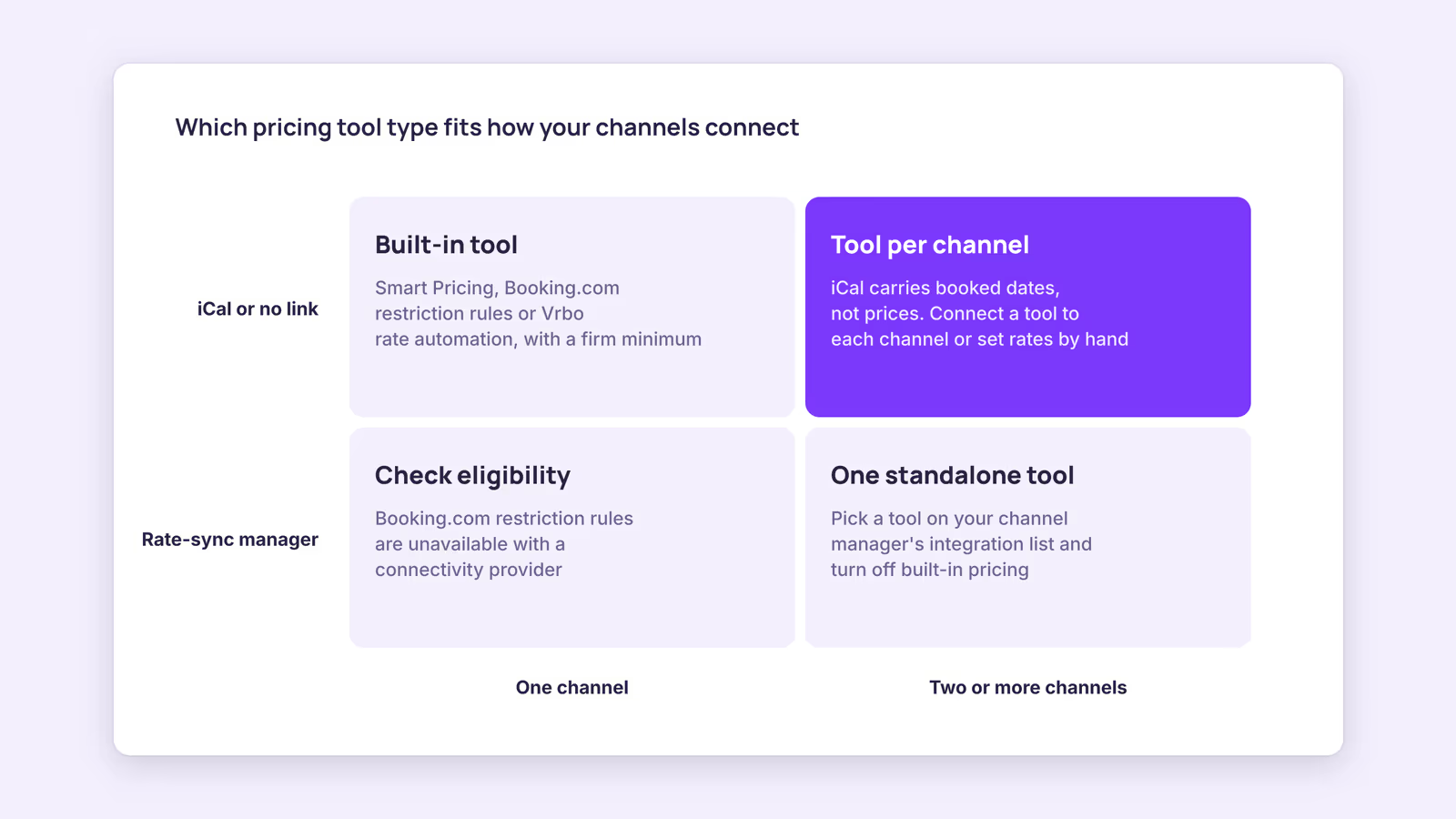
Match the tool to how your channels are connected. Built-in tools cover one channel each, standalone tools cover whatever they integrate with, and iCal links carry booked dates but never prices.
That last point decides more setups than any feature list. The iCalendar format behind iCal sync describes events, meaning booked or blocked dates, not nightly rates (RFC 5545). So if Airbnb and Booking.com are linked only by iCal, a price change on one never reaches the other.
Use this decision table:
| Your setup | Tool type to start with | Watch out for |
|---|---|---|
| Airbnb only, 1–3 units | Smart Pricing with a firm minimum | Discounts that go below your minimum |
| Booking.com only, no channel manager | Dynamic restriction rules plus manual seasonal rates | Rules only cover gap and unsold nights |
| Vrbo only | Rate automation with minimum and maximum limits | Up to 48 hours before rates move |
| Two or more OTAs linked by iCal | One standalone tool connected to each channel, or set rates on each channel yourself | Built-in tools pulling channels apart |
| Channel manager with rate sync | A standalone tool that integrates with that channel manager | Confirm it's on the vendor's integration list |
| Your own direct booking site | Seasonal rules in the booking engine | Keep direct rates deliberate, not accidental |
Before you sign up, ask any vendor three questions in writing. Which channels or software do you send rates to? How will I know if a price update fails? Can I set a different markup per channel? If you do run different prices per channel, set them on purpose. Our rate parity guide covers how.
When this advice does not apply
- Hotel-style inventory. If you sell several identical rooms as one room type, you'll likely need revenue management built for hotels.
- Mid-term and monthly stays. These usually price on weekly or monthly discounts, and Airbnb's length-of-stay discounts override Smart Pricing anyway.
- Rate caps. Some local rules or building agreements limit what you can charge. They take priority over any tool.
- Prices change. Every vendor figure here is what the vendor published on 2026-09-30. Recheck before you buy.
What to do next
- List every channel each unit sells on and how it's connected: iCal, channel manager, or nothing.
- Set a minimum, normal rate and ceiling per unit, with the minimum built from your real per-stay costs.
- If you're on one channel, test its built-in tool for a month with your minimum in place.
- If you're on several, run the flat-versus-percentage sum above and confirm each tool's integrations.
- Check what a rate really pays out after fees with the Airbnb fee calculator.
FAQ
Is there a free vacation rental pricing tool?
Airbnb's Smart Pricing and Booking.com's dynamic restriction rules sit inside platforms you already use, and Wheelhouse has a free plan for exploring its data. Pricing by hand with seasonal rates also costs nothing but your time.
Is there a dynamic pricing tool for Booking.com?
Booking.com offers dynamic restriction rules for gap and unsold nights, but only for properties that don't use a connectivity provider. For demand-based rates on Booking.com, you'd need a standalone tool that connects to it, directly or through your channel manager.
Can I use two pricing tools at the same time?
Not on the same channel. Two systems setting the same night's price will overwrite each other. Turn off the built-in tool on any channel where a standalone tool takes over.
About BookBed: BookBed lets you set a base price and seasonal pricing rules for each unit, which apply to your BookBed calendar and embeddable direct booking widget. See pricing
Sources
- Airbnb, "Use Smart Pricing to automatically adjust your prices based on demand" — Verified 2026-09-30
- Booking.com, "Setting up dynamic restriction rules" — Verified 2026-09-30
- Vrbo, "Set up rate automation" — Verified 2026-09-30
- PriceLabs, "Pricing Plans" — Verified 2026-09-30
- Wheelhouse, "Plans & Pricing" — Verified 2026-09-30