A guest who has never stayed with you arrives on your property site with a choice already open in another tab: the same place, or one like it, on Airbnb or Booking.com. On the OTA they know how dates, prices, payment and refunds work. On your page they have to work it out. If any of that takes effort, the OTA tab is one tap away.
Most booking pages fail on information, not design. A first-time guest needs four answers before they will pay a stranger: are my dates free, what will I pay in total, is paying you safe, and what happens if I cancel. Open your booking page on your phone now and see how quickly a stranger could answer each one.
What does a first-time direct guest need to see before booking?
They need answers to four questions, in roughly this order, before the payment step: availability for their dates, the full price, who is taking their money and how, and the cancellation terms.
Repeat guests already trust you, so they skip most of this. A first-time guest has no platform standing between you and them, which means your page has to supply what the OTA usually supplies. Use this table as the audit:
| Guest question | What the page must show | Where it belongs |
|---|---|---|
| Are my dates free? | Live calendar, minimum stay, check-in and checkout times | Before guest details |
| What will I pay? | Total for the selected stay, including mandatory fees | Beside the chosen dates |
| Is paying you safe? | Your name, contact details, payment method and payment page | Before the pay button |
| What if I cancel? | A short cancellation summary and a link to full terms | Beside the total |
If any row fails, the guest has to leave your page to find the answer. Often that means emailing you and waiting, and a guest who has to wait may book the OTA listing instead.
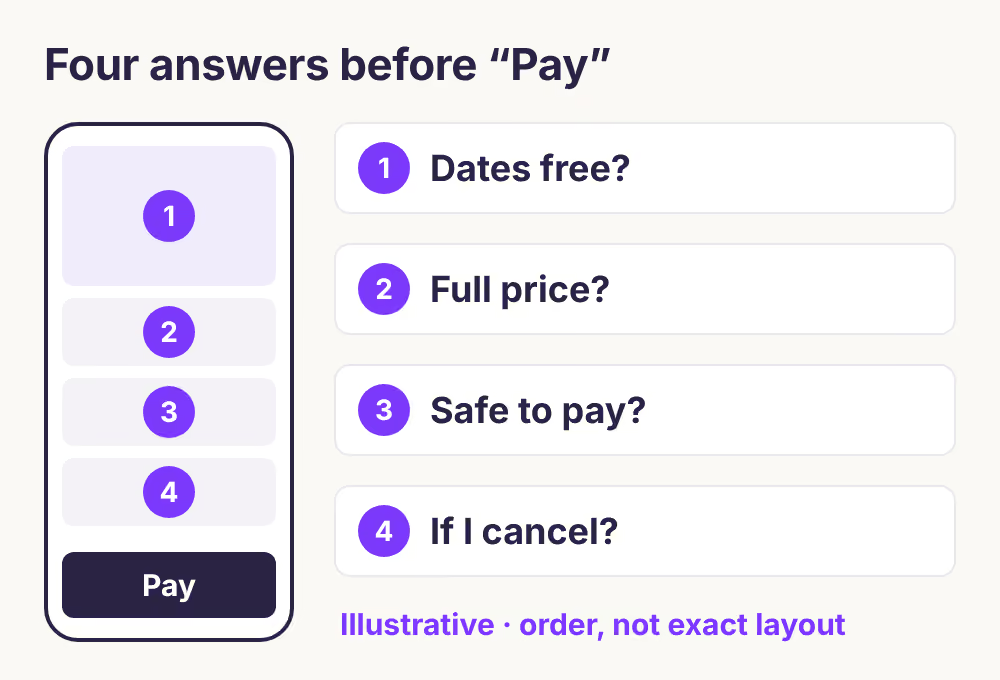
The diagram shows the order, not a required layout. A calendar-only page, a long single page or a separate checkout can all pass, as long as every answer appears before the guest is asked to pay.
How do you show dates a guest can trust?
Show availability on the page itself, apply your minimum stay before the guest picks dates, and state check-in and checkout times in plain view. A guest should never discover a minimum-stay rule after typing their details.
Three things go wrong most often:
- No calendar at all. A "check availability" form that sends an email asks the guest to wait. For a first-time guest, that is the weakest point on the page.
- Rules that appear late. If you require three nights in summer, the calendar should stop a two-night selection rather than reject it at checkout.
- A calendar that disagrees with the OTAs. If you also list on Airbnb or Booking.com, your page is only as current as the last calendar sync. Over iCal, each platform imports on its own schedule, so a date can look free on one channel shortly after it sold on another. The guide on why your booking widget shows unavailable dates covers the opposite problem, when free nights look blocked.
Test this from the guest's side: open the page on mobile data, pick a date that is sold on Airbnb, and confirm your page blocks it.
What price should the guest see first?
Show the total for the selected stay, including every fee the guest must pay, before the guest commits. In the US and the UK this is more than good practice. Consumer rules on mandatory fees cover how lodging prices are displayed.
In the US, the FTC's Rule on Unfair or Deceptive Fees took effect on 12 May 2025 and covers short-term lodging. The FTC's FAQ lists vacation rentals among the covered offers and uses a vacation rental cleaning fee as its example of a charge that must be included in the total price. It also says:
- The total price must be displayed more prominently than other pricing information, such as the nightly rate.
- Taxes and other government charges can be left out of that total, but they must be disclosed before the guest is asked to pay.
- The final amount, including taxes, must appear before payment and at least as prominently as the total.
The FAQ is FTC staff guidance, not a binding ruling, and state or city rules can add requirements.
In the UK, the CMA's price transparency guidance says the total price should normally include unavoidable charges, including taxes, and that hiding fees, taxes or charges until later is illegal. It specifically mentions mandatory local charges such as resort fees. Elsewhere in Europe, check your national consumer authority, because price display rules are applied country by country.
Here is a hypothetical four-night stay, to show what "total first" means in practice:
| Line | Hypothetical amount |
|---|---|
| 4 nights at €140 | €560 |
| Cleaning fee (mandatory) | €80 |
| Stay total shown first | €640 |
| Tourist tax, 2 adults at €2 per night | €16 |
| Amount charged at payment | €656 |
A page that leads with "€140 per night" and shows the cleaning fee only at checkout fails the US rule as the FTC describes it. Under the UK guidance, a mandatory local tax like this one would also belong in the price the guest sees first, so the headline figure would be €656. For the trade-off between this direct total and an OTA payout, the direct booking guide works through one stay end to end.
How do you show that paying you is safe?
Tell the guest who they are paying, how, and when, before the payment button. A named business, a payment page the guest recognizes and a clear charge on their statement give a stranger ways to check you.
Check each of these:
- A named host or business. Put your name or business name, a working email address and the property's area on the booking page, not only on an "about" page.
- The payment step. If checkout opens a Stripe-hosted payment page, say so near the button. Stripe's Checkout documentation describes this redirect option. A guest who expects the redirect is less likely to read it as a phishing page.
- Payment timing. State whether you charge the full amount, a deposit, or nothing until arrival, and when any balance is due.
- The statement name. Stripe's statement descriptor guidance says clear descriptors can reduce chargebacks and disputes, and the descriptor should reflect your trading name. If the guest booked "Olive Grove Villa" and their card shows something else, they may dispute a charge they made.
- No card details by email. If your fallback is "email us to book", never ask for a card number in a reply. Send a payment link instead.
Where should cancellation terms appear?
Put a one-line cancellation summary beside the total and link the full terms, all before payment. For accommodation booked for set dates, your written policy is usually the only cancellation right the guest has.
A guest may assume that an online booking comes with a 14-day cooling-off period. For dated accommodation, that usually isn't true. In the UK, the Consumer Contracts Regulations exclude the supply of accommodation for a specific date or period from the cancellation rules. The EU's Your Europe guidance on returns and the right of withdrawal lists hotel bookings for specific dates among the exceptions. It doesn't name holiday rentals, so confirm how your country applies the exception.
A useful summary answers three things in one line: until when the guest can cancel, how much they get back, and how the refund is paid. "Full refund to your card if you cancel up to 14 days before arrival; 50% after that" is clearer than a paragraph of policy text. Put the same terms in the confirmation email so the guest keeps a copy.
Your 10-minute phone audit
Run this on a phone, on mobile data, in a private browser window, as if you had never seen the property. Mark each check pass or fail.
- Within ten seconds, can you tell where the property is and how to start booking?
- Pick dates that include a sold night and a too-short stay. Does the page stop both before you type your details?
- Find the stay total for your dates. Does it include the cleaning fee and every other mandatory charge?
- Look for taxes. If they aren't in the total, are they shown before the payment step? In the UK, are they in the first price you see?
- Find out who is charging you, how to contact them, and whether the payment page is yours or a payment provider's.
- Read the cancellation summary without leaving the booking flow.
- Complete a test booking, then check the confirmation email shows dates, total paid and cancellation terms.
- Refund and remove the test booking, and confirm the dates reopen on every channel.
Fix failures in order. A guest who can't confirm dates never reaches the price, and a guest who doesn't trust the price never reaches the payment page. If the page passes and guests still don't book, the conversion rate guide explains how to find the step where they drop off.
When this advice does not apply
- Inquiry-only booking. If guests send a request and you reply with a quote, the four answers move into your reply. The same rules apply to the quote: total first, cancellation terms included.
- Guests who never reach the page. A clear page can't fix missing traffic. Start with where direct booking traffic comes from.
- Legal questions. This is a practical checklist, not legal advice. US state and city rules, EU national rules and tourist tax collection vary, so confirm your obligations locally.
- OTA listings. Airbnb and Booking.com control how their own pages show price and policy. This checklist is for the page you own.
What to do next
- Run the phone audit above and write down every failed check.
- Rewrite your price display so the stay total, including the cleaning fee, comes first.
- Add a one-line cancellation summary beside the total and in the confirmation email.
- Set your Stripe statement descriptor to the name guests see on your site.
- If your page has no live calendar, read how to add direct bookings to your existing website before rebuilding anything.
About BookBed: BookBed's embeddable booking widget shows a unit's availability on your own site and takes reservations through Stripe checkout into your own Stripe account, with 0% commission. It covers the calendar and the payment step. Your price wording, contact details and cancellation terms are still yours to write, and the widget doesn't bring traffic or guarantee bookings. Get the direct booking widget
Sources
- US Federal Trade Commission, "Rule on Unfair or Deceptive Fees: Frequently Asked Questions". Verified 2026-10-26
- UK Competition and Markets Authority, "Providing clear and accurate information about prices: summary" (CMA209). Verified 2026-10-26
- UK legislation, The Consumer Contracts (Information, Cancellation and Additional Charges) Regulations 2013, regulation 28. Verified 2026-10-26
- European Union, Your Europe, "Returns and the right of withdrawal". Verified 2026-10-26
- Stripe documentation, "Build a payments page" and "Statement descriptors". Verified 2026-10-26
- BookBed, public pricing.md and documentation (widget modes, Stripe checkout flow). Verified 2026-10-26