Your rental already has a website. Guests find it, scroll the photos, and then reach a contact form or a "Book on Airbnb" button. The first turns every booking into an email thread about dates and payment. The second sends a guest who came to you straight back to an OTA, where the platform's fees apply to a booking you could have taken yourself.
You don't need a new website to fix that. Add one booking page per unit with an embedded booking flow, point your existing buttons at those pages, and leave the design, domain and content as they are. Below: what changes, where it goes, what blocks it on an existing site, and how to test it.
Do you need to rebuild your website to take direct bookings?
No. A booking widget is typically embedded into an existing page, often as an iframe, a box loaded from the booking provider, so your site keeps its design while the calendar, pricing and checkout run inside the box.
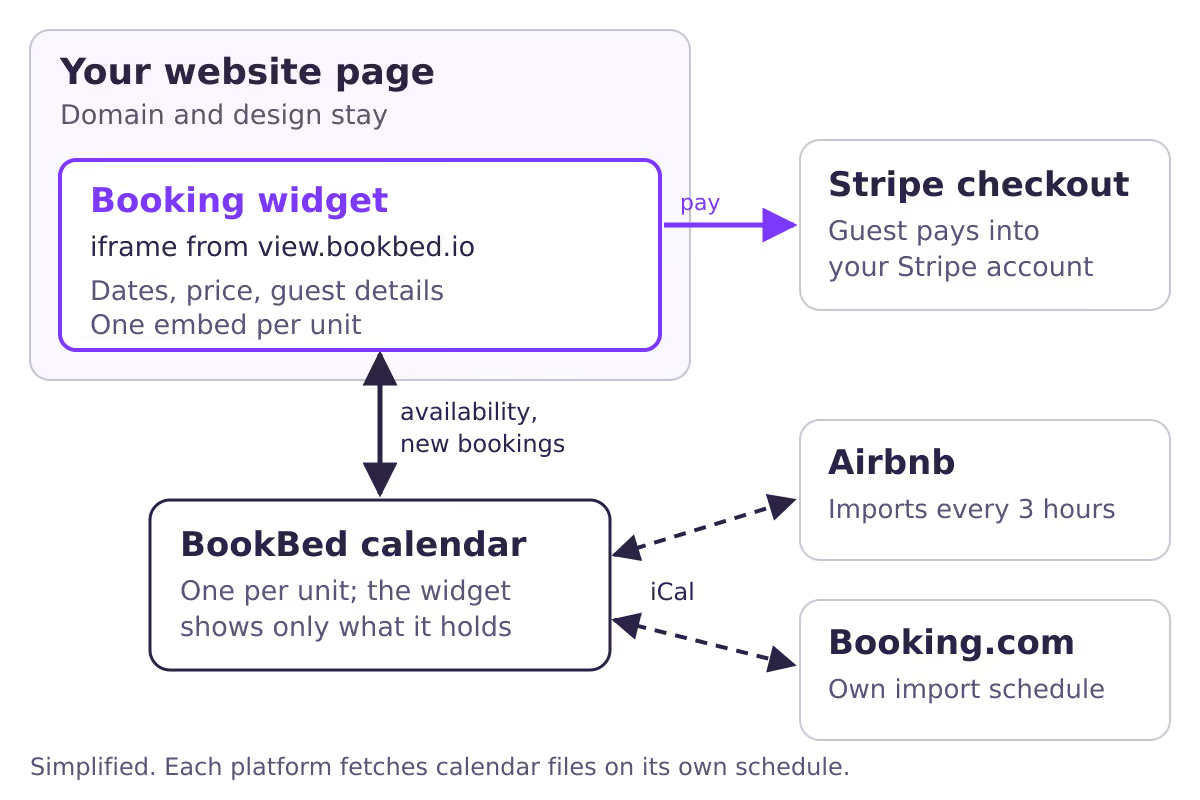
Here's what that looks like in practice. Your page stays on your domain. Inside it, the booking box reads availability and prices from the booking system and collects the guest's dates and details. Card payment may happen on a separate page. In BookBed's case, the docs describe the guest moving to Stripe's checkout page to pay, after which the booking is confirmed and you get an email notification.
Which booking path should replace your current contact form?
Pick the lightest path that removes the manual step you actually hate. A calendar-only view stops "is it free?" emails, a request mode keeps your approval, and instant checkout removes the payment back-and-forth.
| Path | Guest does on your site | You still do by hand | Move on when |
|---|---|---|---|
| Inquiry form | Sends a message | Dates, quote, payment, blocking | Always, if volume grows |
| Availability only | Checks free nights | Quote, payment, blocking | Guests ask mostly about price |
| Booking request | Picks dates, requests | Approve, collect payment | Rules and sync are reliable |
| Instant checkout | Picks dates and pays | Guest questions only | Already the end state |
Whichever row you choose, keep your old contact route visible on the page as a fallback for questions, groups and long stays. If you're unsure which mode fits, the direct booking widget guide compares the modes and payment timing in more detail.
Where on your existing site should the booking widget go?
Put one booking flow on each unit's own page, then repoint every existing "Book", "Check availability" and "Book on Airbnb" button on your site to that page, rather than embedding a single widget on the home page.
Start with a short audit: open your site on your phone and list every place a guest could try to book, from header buttons to footer links. Each becomes a link to a unit's booking page, or goes.
Then map units to pages. Booking tools that keep one calendar per unit, as BookBed does, give each unit its own embed code. In BookBed's documented embed, the code carries a property ID and a unit ID, so a page showing two apartments needs two embeds or, more cleanly, two pages.
| Unit | Booking page | Embed IDs | Old button to repoint |
|---|---|---|---|
| Sea-view apartment | /apartments/sea-view | property + unit A | "Book on Airbnb" on unit page |
| Garden studio | /apartments/garden | property + unit B | "Enquire" in header |
The rows are a template, not a real property. Fill one per unit before you paste any code.
Keep the facts around the widget consistent with the booking system. If your page says "minimum three nights" but the booking settings allow two, a guest will book two. BookBed's public docs don't describe a cancellation-terms field inside the widget, so state your cancellation terms on the page beside it, and in whatever you send the guest after booking.
For brand continuity, check what the widget lets you match. BookBed's widget has light, dark and automatic themes and a language setting that can follow the guest's browser or stay fixed. Custom branding on the widget is a Pro feature in BookBed's pricing.
Will the widget show dates already booked on Airbnb and Booking.com?
Only if the booking system's calendar imports those bookings. The widget shows whatever its own calendar holds, so connect each OTA's calendar to it before launch, and expect a delay before the OTAs see your direct bookings.
That delay runs both ways and isn't set by the widget. With iCal, each platform fetches the other's calendar file on its own schedule. Airbnb's calendar sync article says imported calendars update automatically every three hours, with a manual refresh that has a limit. Booking.com also imports on its own schedule. Airbnb's article adds that preparation time or advance-notice settings you set elsewhere may not carry over as blocked nights.
This suggests two practical rules. First, enter prices, minimum stays and blocked dates in the booking system the widget reads, because rules you set inside an OTA don't travel through a calendar file. Second, decide what you'll do when a direct booking lands while an OTA still shows those nights as open. The steps for that situation are in what to do when Airbnb hasn't picked up a direct booking yet.
What can block the embed on a site you already have?
Most failures on an existing site come from the site, not the widget: an editor account that strips iframes, a builder plan that doesn't allow them, a security header, or a frame too short for a phone.
BookBed's documented embed is a standard iframe loaded from view.bookbed.io, with your property and unit IDs in its address. Per the embed docs, you copy it from the unit's Widget tab in Unit Hub once the unit is published, then paste it into your builder's HTML or code block.
If the box doesn't appear, work through this table from the top:
| Symptom | Likely cause | Check |
|---|---|---|
| Iframe gone after saving | WordPress role lacks unfiltered_html | Paste from an account that has it |
| Blank box on Squarespace | Plan doesn't allow iframes | Check plan is on Squarespace's list |
| Visible to visitors, not to you | Logged-in Squarespace view | Use Preview in Safe Mode |
| Code shows as text | Squarespace Display Source is on | Turn Display Source off |
| Nothing renders on Wix | Non-HTTPS code or URL | Use the https address |
| Blocked in browser console | Site's CSP frame-src rule | Add the widget's domain |
| Widget not loading | Unit unpublished or wrong IDs | Publish unit, recheck IDs |
| Booking button does nothing | No payment option set up | Connect Stripe or enable bank transfer |
| Checkout cut off on phone | Fixed or short frame height | Raise the minimum height |
The WordPress row comes from WordPress's Custom HTML block documentation, which says content saved by users without unfiltered_html is sanitized and loses iframe tags. The Squarespace rows come from its code block help page, which lists the plans, starting with Core, that allow iframes in code blocks. Wix's embed guide adds that only HTTPS code is displayed and that its HTML element is itself an iframe, so the content inside won't resize like the rest of your page. Set width to 100% and test the height on a phone.
On custom-built sites, check the security header. If your site sends a Content-Security-Policy, MDN's frame-src reference explains that frame-src decides which addresses may load in an iframe, falling back to child-src and then default-src. A strict policy without the widget's domain blocks it for visitors, usually with nothing more than a console error, so ask whoever maintains the site to add it.
How do you measure bookings that happen inside the widget?
Count bookings in the booking system and visits on your own pages. Your site's analytics tag runs on your page, not inside the booking box, so it generally can't see each step a guest takes in there.
Browsers isolate documents from different origins: MDN's same-origin policy page describes very limited access between them, with postMessage for deliberate communication. BookBed's public docs don't describe widget events for analytics tools, so track two numbers: views of each booking page, and confirmed direct bookings in BookBed. The monthly ratio is a rough trend, not a precise conversion rate.
Your pre-launch checklist
Work through this list on the live site, logged out, on a phone and a laptop:
- Mapping: each unit has its own page and embed; every old button points to the right one.
- Availability: each OTA calendar is imported, and your export link is added on each OTA.
- Rules: prices, fees, minimum stays and blocks are entered where the widget reads them.
- Terms: cancellation terms, house rules and payment timing are on the booking page.
- Mobile: the full flow fits without a scroll bar inside a scroll bar.
- Test booking: book a far-future date with a real card and reach the payment page.
- Confirmation: you get the notification and have seen what the guest receives.
- Other channels: note when the test nights close on Airbnb and Booking.com.
- Clean-up: refund and remove the test booking; confirm the nights reopen everywhere.
- Rollback: keep the old contact route until a few real bookings have gone through.
When this advice does not apply
- You can't edit the site. If an agency or theme locks your pages, the embed needs their help or a link to a separate booking page instead.
- Guests who found you on Airbnb. Airbnb's Off-Platform and Fee Transparency Policy prohibits off-platform links in listings or messages and pressuring guests to move reservations elsewhere. The widget is for people who reach your site on their own.
- Hotel-style inventory. Several identical rooms sold as one room type need room-type inventory, not one calendar per unit.
- Almost no site traffic. An embed converts visitors you already have. If you have very few, building and promoting the direct booking site comes first.
What to do next
- Fill in the unit-to-page mapping table for every unit.
- Choose one booking path from the comparison table.
- Confirm your builder plan, editor role and any security header allow an iframe.
- Connect each OTA calendar to the booking system before you embed.
- Run the checklist above, then switch your old buttons over.
About BookBed: BookBed's embeddable booking widget runs in Full Booking, Calendar Only or Inquiry mode on the site you already have, with Stripe checkout into your own Stripe account. Try the widget playground to pick a mode before you embed it.
Sources
- Airbnb Help Center, "Sync your home host calendar to other websites" — Verified 2026-10-08
- WordPress.org Documentation, "Custom HTML" — Verified 2026-10-08
- Squarespace Help Center, "Code blocks" — Verified 2026-10-08
- Wix Help Center, "Wix Editor: Embedding a Site or a Widget" — Verified 2026-10-08
- MDN Web Docs, "Content-Security-Policy: frame-src directive" and "Same-origin policy" — Verified 2026-10-08