You've set a nightly rate, bookings are arriving at some pace, and you can't tell whether that pace means your price is right, too low, or too high. A workable Airbnb pricing strategy answers that with rules you can check, not a single number you set once. Your first action: open your calendar and write down, for the next 90 days, which nights are booked, which are open, and what each open night costs. Everything below works from that list.
How do you set a base price for your Airbnb?
Set your base price from what comparable nearby listings charge on ordinary nights, then adjust it for the differences between your place and theirs, so every other rule starts from a defensible number.
A practical method:
- Pick five to eight listings near you with the same guest capacity, bedroom count and a similar standard of finish.
- Search a normal weeknight in a quiet month, four to eight weeks out, so events and last-minute discounts don't distort what you see.
- Compare the total price guests see, not only the nightly rate. Airbnb says its search considers total price and how it compares to other listings in the area for the given dates, and that listings priced below comparable ones tend to rank higher.
- Take the middle of that range as a starting point, then move it up or down for real differences: parking, a view, a worse location, fewer reviews.
Your cleaning fee is part of that total. A low nightly rate paired with a high cleaning fee can still look expensive on short stays, which is why the Airbnb host fees guide is worth reading alongside this one. If your listing is brand new, the new-listing pricing guide covers the extra step of pricing before you have reviews.
Should you use Airbnb Smart Pricing?
Use Airbnb Smart Pricing if you want demand-based adjustments with little effort and you set a sensible minimum; skip it if you need weekend pricing, rule-sets, or tighter control than a min–max range gives you.
Here's what Airbnb says the tool does, per its Smart Pricing help article:
- It uses "hundreds of factors" about your listing and area to adjust nightly prices based on demand.
- You set a minimum and maximum price, and you can override single nights with custom prices without turning it off.
- Weekly, monthly and trip-length discounts override Smart Pricing, and discounts such as early bird can push the guest price below your minimum.
- You have to turn Smart Pricing off to use weekend pricing or to apply a rule-set, because Smart Pricing overrides rule-sets.
The common complaint that Airbnb Smart Pricing is too low usually traces back to the minimum. Our recommendation: set the minimum at the lowest nightly price you'd accept on your quietest night after cleaning, fees and running costs, not at a round number that feels competitive. If the tool keeps pricing at that floor, that's information about demand for your listing, not proof the tool is broken.
Third-party dynamic pricing tools are the other route. They typically offer more rule types and market data, but they add a subscription and another system to monitor. Airbnb doesn't publish how Smart Pricing compares with them, so treat any claim that one "always" beats the other as unverified.
How should an Airbnb dynamic pricing strategy handle seasons, weekends and gaps?
A dynamic pricing strategy should change price and minimum stay by season, day of week and how close the date is, and it should open short gaps that your normal rules would leave unbookable.
Use this table as a diagnostic against the 90-day list you made at the start.
| What you see in your calendar | Likely cause | What to try |
|---|---|---|
| Peak dates fully booked months ahead | Price too low for that period | Raise those dates in steps and watch pickup |
| Weekends book, weeknights stay empty | One rate for every night | Lower weeknights or raise Friday and Saturday |
| One- or two-night gaps between stays | Minimum stay longer than the gap | Allow a shorter stay for that gap only |
| Open nights inside the next two weeks | Price or minimum stay too strict for late bookers | Reduce minimum stay first, then price |
| Off-season weeks with no bookings | Few short-stay travelers | Add weekly or monthly discounts |
Seasons. Airbnb seasonal pricing is simply your base price moved up or down for known demand periods. Mark your high, shoulder and low months, and set a clear rate or range for each. For the months in between, the shoulder-season pricing guide goes deeper.
Weekends. Airbnb offers a weekend adjustment for Friday and Saturday nights, but its Smart Pricing article says you need Smart Pricing off to add weekend pricing. Decide which of the two you're using.
Minimum stays by lead time. Longer minimums far out protect you from one-night bookings splitting a busy week. As a date gets closer and stays open, a shorter minimum usually beats an empty night. There's no universally right cut-off; pick one, such as two weeks out, and review it.
Gaps. A gap is only a problem if nobody can book it. If you require three nights and a two-night gap appears, either allow two nights for those dates or accept it as a turnover buffer.
Longer stays. Airbnb says many guests book stays of 28 nights and longer and lets you set weekly and monthly discounts. How large the discount should be depends on your costs: fewer turnovers means fewer cleans, but longer stays also mean more utilities and wear per booking.
What does a worked Airbnb pricing strategy review look like?
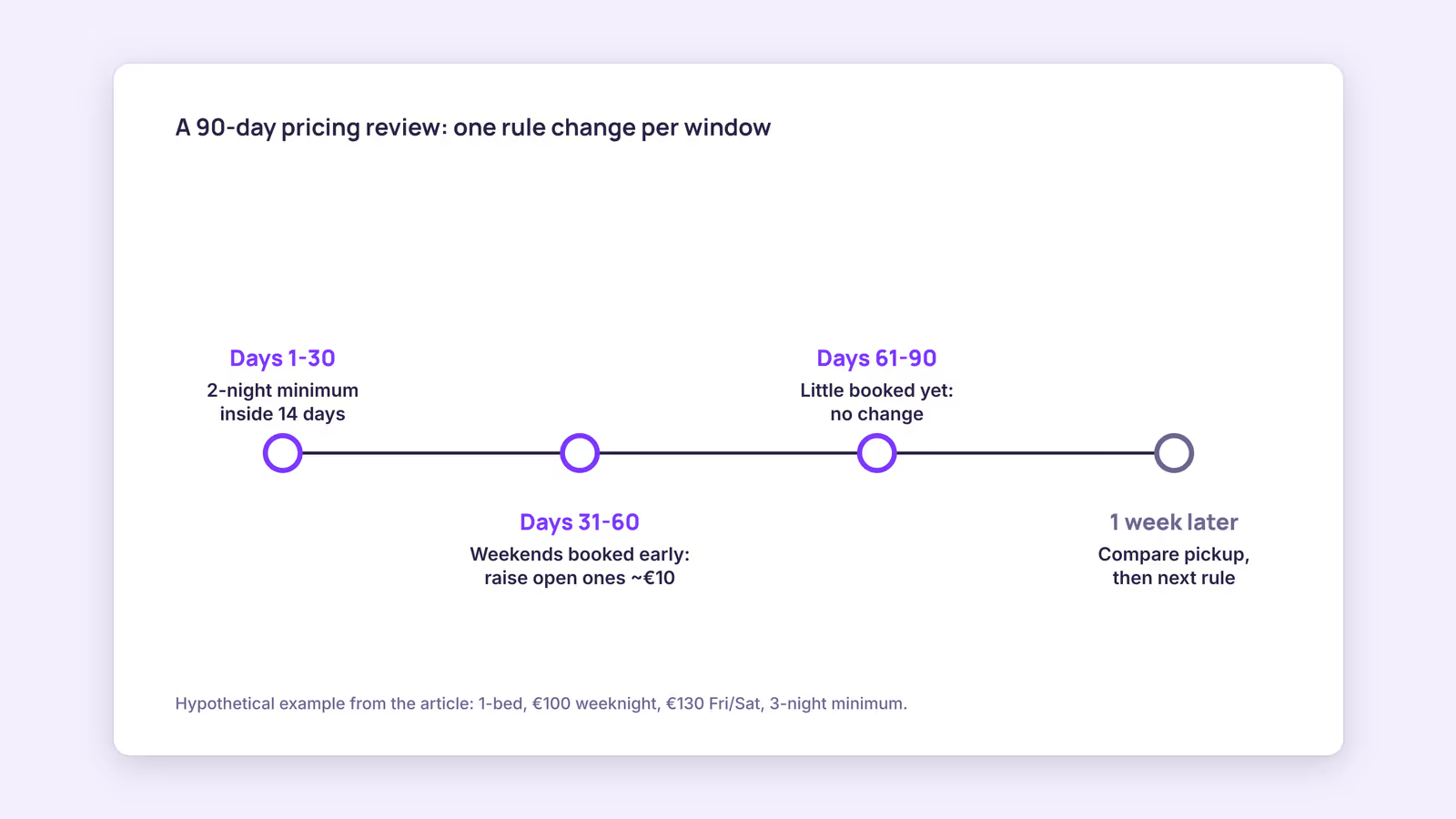
A pricing review compares what's booked with what's still open for the next 90 days, then changes one or two rules at a time so you can see which change moved bookings.
Consider a hypothetical one-bedroom apartment with a €100 weeknight base price, a €130 Friday and Saturday price and a three-night minimum.
- Next 30 days: every weekend is booked, but six weeknights are open. Action: lower the minimum stay to two nights for dates inside 14 days, and keep the price.
- Days 31–60: two weekends are already booked well ahead. Action: raise open weekends in that window by a modest step, such as €10, and check again next week.
- Days 61–90: almost nothing booked, which is normal this far out. Action: no change yet.
The figures are illustrative only. The method is the point: change a rule, write down the date, and compare pickup a week later before you change the next one.
When this advice does not apply
- If your area has rules that cap nightly rates or limit rental nights, those rules come before any pricing logic.
- If you're on a co-hosting or management contract, the owner may set price floors you can't go below.
- If most of your bookings come from repeat or corporate guests on agreed rates, public-market comparisons matter less.
- Very small or remote markets may not have five comparable listings; use a wider radius and weight your own booking history more.
What to do next
- Write down your booked and open nights for the next 90 days.
- Pull five to eight comparables and set a base price from their weeknight totals.
- Decide between Smart Pricing with a floor you can live with, or manual rules with weekend and seasonal rates.
- Set a shorter minimum stay for dates close in and for gaps between bookings.
- Put a weekly 15-minute pricing review in your calendar and change one rule at a time.
FAQ
How does Airbnb Smart Pricing work?
Airbnb says it adjusts your nightly price based on demand using many factors about your listing and area, within the minimum and maximum you set. You can override individual nights.
How do I price my Airbnb if I also list on other sites?
Keep rates on each platform consistent with the fees each one charges you, so a guest doesn't find a much cheaper total elsewhere. The OTA fee comparison helps you see how channel costs differ.
Can I change prices after a guest books?
Airbnb says pricing changes don't affect pending or confirmed reservations. New prices apply to future bookings only.
About BookBed: BookBed lets you set seasonal pricing rules for your own BookBed calendar and direct booking widget, so the rates guests see when booking with you follow your seasons. These rules apply to BookBed, not to your Airbnb or Booking.com listings. Try BookBed Pro
Sources
- Airbnb Help Center, "Use Smart Pricing to automatically adjust your prices based on demand" — Verified 2026-09-30
- Airbnb Help Center, "How search results work" (article 39) — Verified 2026-09-30
- Airbnb Help Center, "Host monthly stays" — Verified 2026-09-30
- BookBed, "Documentation" (data/docs.en.json, seasonal pricing and minimum stay rules) — Verified 2026-09-30