Your cleaner just sent you a photo of a cracked glass table, or a guest messaged that the air conditioning died mid-stay. Either way, money now needs to move after the booking was paid, and on Airbnb that happens in the Airbnb Resolution Center. Your first action: before anyone cleans or repairs anything, photograph the problem and write down the date and time you found it. The deadlines below start at checkout, not when you notice the damage.
What is the Airbnb Resolution Center used for?
The Airbnb Resolution Center is the tool hosts and guests use to send or request money after a reservation, such as refunds for a broken amenity, optional extras, or reimbursement for guest damage.
Airbnb's Resolution Center help article lists these uses:
- Refunds you and the guest agree on, for example a missing or broken amenity, and guest requests for refunds, such as a place that wasn't clean at check-in.
- Optional fees, such as a paid transfer you offered or an upgrade the guest chose.
- Damage reimbursement, which is also the required first step before AirCover will look at your claim.
It also lists what it can't be used for. You can't use it to charge for extra nights, extra guests, or extra pets; those go through "Change reservation." You can't use it to collect mandatory fees you didn't disclose in the listing's fee fields. And security deposits can only be charged there by "select software-connected hosts" who disclosed them properly, so an Airbnb Resolution Center security deposit isn't something most individual hosts can collect. If deposits are on your mind, read our Airbnb security deposit guide.
Keep all money inside Airbnb. Airbnb's off-platform policy bars moving payments or future bookings off the platform, and a cash or bank-transfer settlement leaves you without Airbnb's help if the guest later disputes it.
What is the Airbnb damage claim time limit?
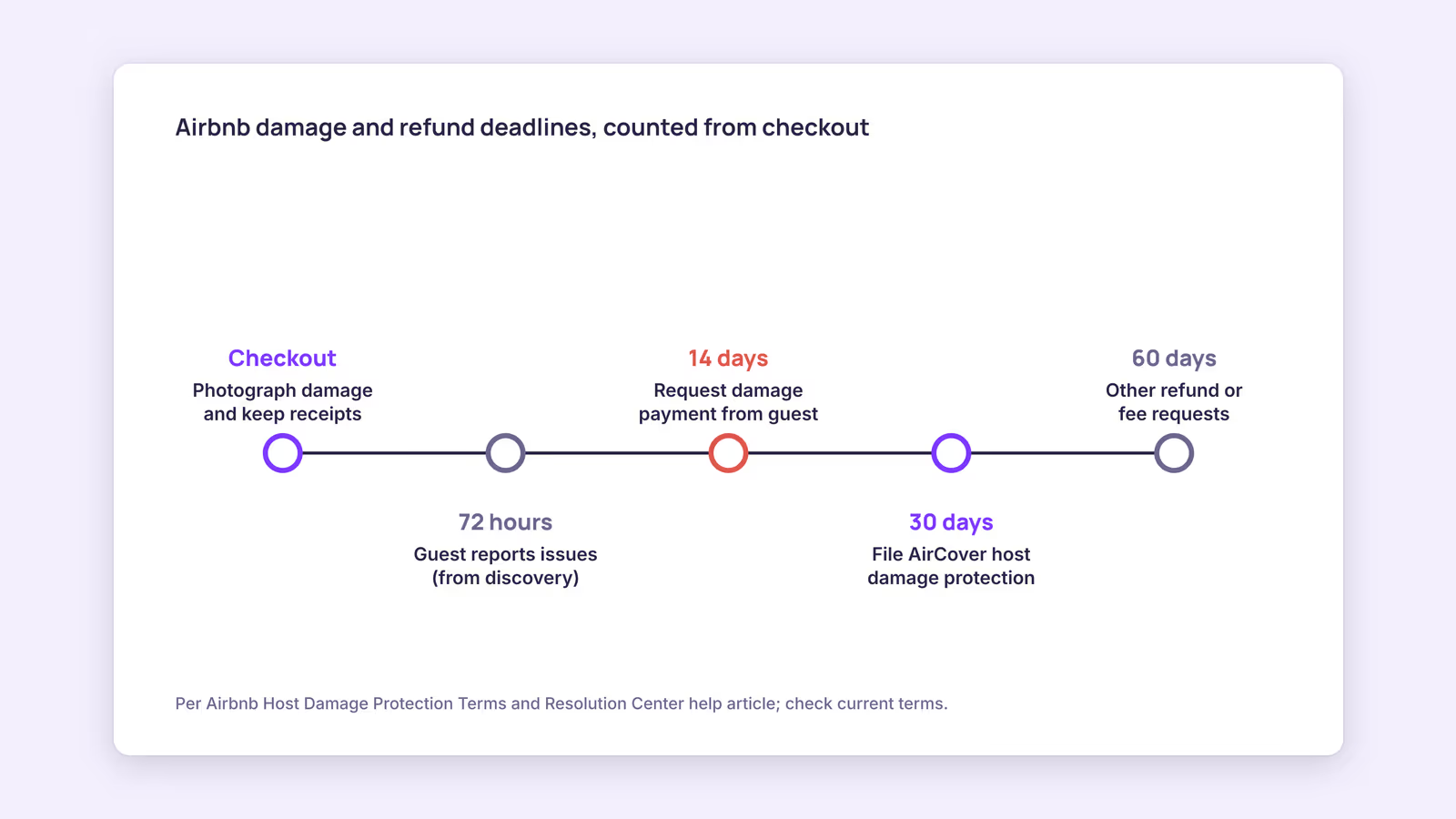
For damage, you need to request payment from the guest within 14 days of checkout and file with AirCover within 30 days; other Resolution Center requests have up to 60 days.
These deadlines come from two different Airbnb documents, which is why hosts often mix them up:
| Deadline | What it covers | Source |
|---|---|---|
| 14 days after checkout | Ask the guest to pay for damage (a Resolution Center request counts) | Host Damage Protection Terms, 3.1.2–3.1.3 |
| 30 days after checkout | File the Host damage protection request with evidence if the guest didn't pay | Host Damage Protection Terms, 3.3 |
| 60 days after checkout | Any Resolution Center request, such as refunds or optional fees | Resolution Center help article |
| 72 hours after discovery | Issues a guest must report to be eligible under the rebooking and refund policy | Resolution Center help article |
The table reflects the Host Damage Protection Terms (last updated August 1, 2026) and the Resolution Center article. Our recommendation: treat 14 days as your real deadline for any damage. If you miss it, the 30-day AirCover window may not help, because the terms say you must first have tried to recover the money from the guest.
How do you file a damage claim with Airbnb?
To file a damage claim with Airbnb, request the money from the guest in the Resolution Center with evidence, wait for their answer, and then submit an AirCover request if they don't pay.
Here's the sequence as the terms describe it:
- Collect evidence the day you find it. The terms ask for "the time, cause and origin" of the loss plus receipts, photos, videos, or documents. For each damaged item they want make and model, purchase date, condition before the damage, and cost to repair or replace.
- Open a request to the guest. Go to the Resolution Center, choose the reservation, and use the Airbnb Resolution Center request money option. Explain why the guest is responsible and state the amount. Keep the message short and factual.
- Give the guest a chance to pay. If they pay, you're done. If they decline or don't respond, move on; the terms say you can make the AirCover request once the guest fails to pay.
- File for Host damage protection. Within 30 days of checkout, complete the Host Damage Protection Payment Request Form through the Resolution Center and attach your evidence.
- Answer Airbnb's questions fast. The Resolution Center article notes that for mediation requests you only have one hour to respond, so watch your notifications while a case is open.
Airbnb's AirCover for Hosts page says Host damage protection covers up to $3M and can also cover specialized cleaning, such as stains, pet accidents, or smoke odor. The Resolution Center article adds an important limit: Host damage protection "isn't an insurance policy," and it doesn't apply to hosts in Japan or stays through Airbnb Travel, LLC. It's also not a substitute for your own insurance.
A worked example of a claim package
Consider a hypothetical host whose cleaner finds a broken dining chair and a red-wine stain on a rug the morning after checkout. A package that matches what the terms ask for would contain:
- Timestamped photos of both items, plus a check-in photo showing them undamaged
- The chair's order confirmation (model, purchase date, price)
- A written quote from a rug cleaner for stain removal
- A two-line message to the guest: what was found, when, and the total requested with the attached documents
What's missing is just as useful to spot. A price guess with no receipt or quote, or photos with no date, weakens the claim. The terms define evidence as "legitimate and verifiable" and say it must not be doctored, "including by the use of artificial intelligence."
When should you use Airbnb Resolution Center send money instead?
Use Airbnb Resolution Center send money when you and the guest agree that part of the stay fell short, such as a broken appliance, and a partial refund settles it.
Sending money proactively is often faster than waiting for a guest to escalate, and it keeps the payment on record. This suggests a simple rule: if the fix is cheap and the fault is clearly yours, offer the refund yourself. If the guest's complaint is disputed, answer it in writing first; our guide to handling Airbnb guest complaints covers how. For a broader view of disputes across channels, see vacation rental dispute resolution.
When this advice does not apply
- Hosts in Japan fall under Japan Host Insurance instead of Host damage protection.
- Software-connected hosts may be able to collect disclosed mandatory fees and security deposits through the Resolution Center; check your own account.
- Bodily injury or guest property claims go through Host liability insurance, a separate program with its own process.
- Booking.com stays follow different rules; see our Booking.com damage policy guide.
Airbnb updates these terms regularly, so check the current version before filing.
What to do next
- Add a before-and-after photo step to your turnover checklist so you always have condition evidence.
- Save receipts for furniture and appliances in one folder, by property.
- Put a 14-day reminder on your calendar whenever a cleaner reports damage.
- Open the Resolution Center request before the next guest checks in, while the evidence is fresh.
- Review your personal insurance to see how it overlaps with AirCover for Hosts.
FAQ
How long does the Airbnb Resolution Center take?
Airbnb doesn't publish a fixed processing time. The deadlines that matter are yours: 14 days to ask the guest, 30 days to file for damage protection.
Where is the Airbnb Resolution Center in the app?
Airbnb links to it from its help articles and Help Center "send or request money" option. Menu placement can change between app versions.
Can I charge a guest for extra guests or pets there?
No. Airbnb says changes to nights, guest count, or pet count must go through "Change reservation," not the Resolution Center.
Using BookBed Pro: automated post-stay messages can remind guests on your direct bookings about checkout steps, so fewer issues turn into claims. See BookBed Pro
Sources
- Airbnb, "How the Resolution Center helps you" — Verified 2026-09-30
- Airbnb, "Host Damage Protection Terms" — Verified 2026-09-30
- Airbnb, "Getting protected through AirCover for Hosts" — Verified 2026-09-30
- Airbnb, "Off-Platform Policy" — Verified 2026-09-30