You've been hosting for a few months, your reviews are mostly good, and the badge still hasn't shown up. If you're wondering how to become a Superhost on Airbnb, there's no application: Airbnb checks your numbers on fixed dates and awards the badge automatically when all four criteria are met. Your first action is simple. Open the Superhost section of your host dashboard, find the criterion you're furthest from, and plan the next quarter around that one number.
This guide is the practical plan. If you only want the criteria list, our Superhost requirements breakdown covers it in detail.
How do you become a Superhost on Airbnb, step by step?
You become a Superhost by meeting four criteria over the past 12 months as the listing owner of a home listing, then waiting for the next quarterly assessment, when Airbnb grants the status automatically.
According to Airbnb's Superhost help article, the criteria are:
- Stays: at least 10 reservations, or 3 reservations totaling at least 100 nights.
- Response rate: respond to 90% of new messages, and accept or decline new reservation requests, within 24 hours.
- Cancellations: a cancellation rate under 1%, with exceptions for Major Disruptive Events.
- Rating: a 4.8 or higher overall rating.
Two conditions catch people out. First, only listing owners are evaluated. Airbnb says co-hosts, experience hosts and service hosts aren't assessed on those roles, so a co-host managing someone else's listing can't earn the badge from it. Second, your account has to be in good standing, and Airbnb says it may suspend or withhold the status for hosts with high review removal rates or high host-initiated cancellation rates.
How long does it take to become a Superhost on Airbnb?
It takes at least as long as reaching 10 reservations (or 3 totaling 100 nights) with clean metrics, plus waiting for the next assessment, because Airbnb only awards the status four times a year.
Airbnb evaluates every three months, in a 7-day assessment period starting January 1, April 1, July 1 and October 1. You don't need a full year of hosting to qualify. If you meet the criteria between assessments, the badge comes at the next assessment date as long as you still qualify then, and Airbnb says it can take up to a week to appear on your listing.
Reviews add a timing wrinkle. Airbnb counts a review toward Superhost once both sides have reviewed or the 14-day review window closes, whichever comes first. A stay that ends just before an assessment may land in the following period instead. Practically, a host who books steadily from launch can qualify within a few months, while a slow-season start can push the first badge back a quarter or two.
What rating do you need to be a Superhost on Airbnb, and how fast can one bad review hurt?
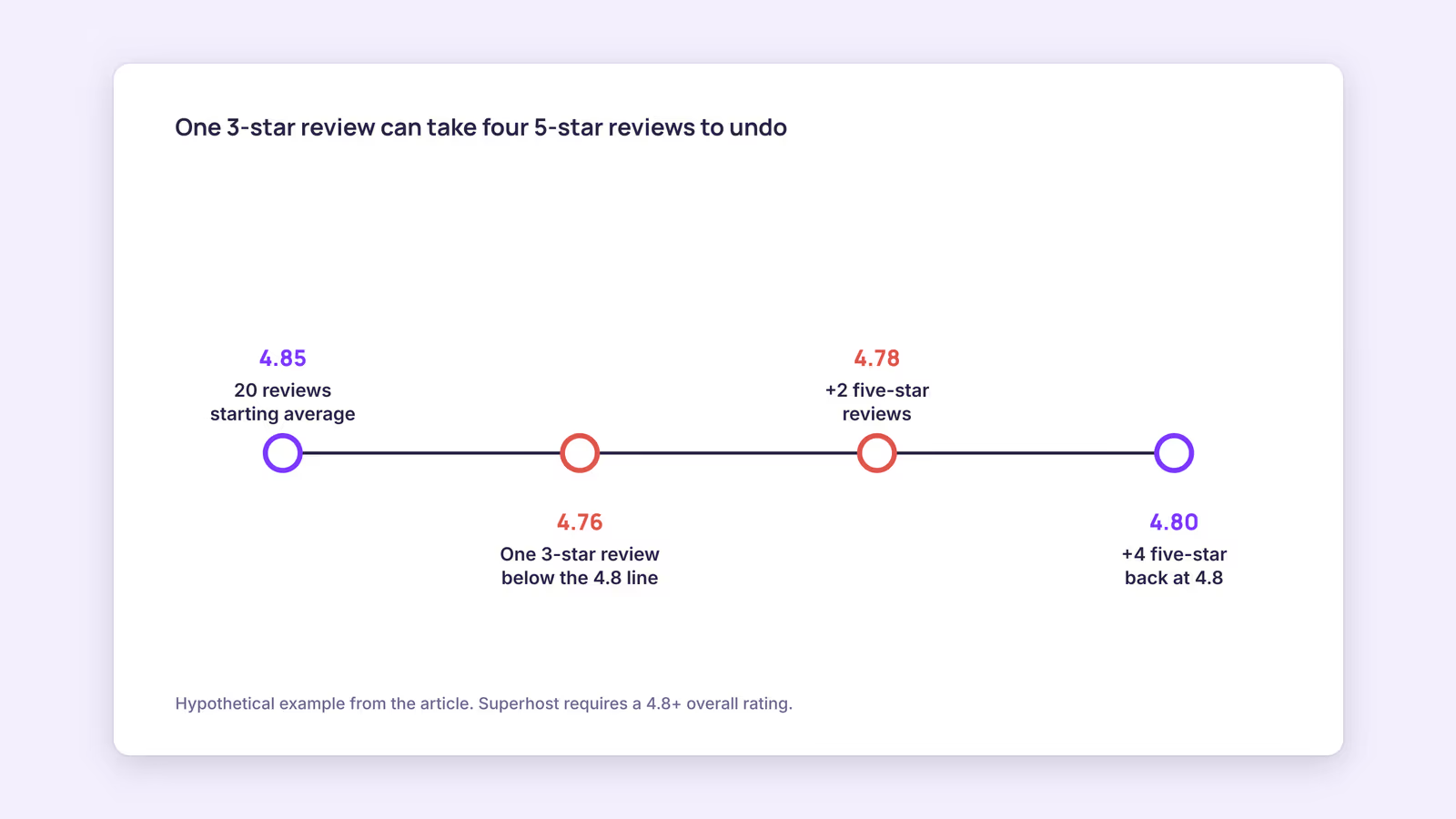
You need an overall rating of 4.8 or higher, and because it's an average, one low review on a small review count can drop you below the line and take several five-star reviews to recover.
Here's a worked example with a hypothetical host, not real data. Use it with your own totals: add up your ratings, divide by the number of reviews, then test what a new review does.
| Step | Reviews | Sum of ratings | Average |
|---|---|---|---|
| Starting point | 20 | 97 | 4.85 |
| One 3-star review arrives | 21 | 100 | 4.76 |
| After 2 more five-star reviews | 23 | 110 | 4.78 |
| After 4 more five-star reviews | 25 | 120 | 4.80 |
The formula: new average = (sum of ratings + new ratings) ÷ (reviews + new reviews). In this example the host needs four straight five-star reviews to get back to 4.8. With 100 reviews instead of 20, the same 3-star review would barely move the average. This suggests new hosts should be most careful in their first 20 or 30 stays, when each review carries the most weight.
What actually protects the rating is mostly unglamorous:
- Describe the listing honestly. Mention noise, stairs, parking limits or a shared entrance up front, so guests book with accurate expectations.
- Treat cleanliness as a checklist, not a feeling. Use the same turnover list every time and photograph the finished rooms.
- Make check-in boring. Clear instructions sent before arrival remove the most common first-hour stress.
- Fix problems during the stay. A guest who reports an issue and sees it handled quickly has a reason not to mention it in the review.
Don't try to shortcut this by pressuring guests. Airbnb's Reviews Policy sets rules on how reviews can be requested and what can be removed, and a high review removal rate is one of the reasons Airbnb gives for withholding the status.
How do you maintain Superhost status once you have it?
You maintain Superhost status by keeping all four criteria true at every quarterly check, because Airbnb re-evaluates Superhosts every three months against the same rolling 12-month window.
Use this quarterly check as your routine. Run it in the month before each assessment:
| Criterion | Where to look | Warning sign | What to do this month |
|---|---|---|---|
| Rating 4.8+ | Superhost section of your dashboard | Average under 4.85 with few reviews | Tighten the cleaning checklist and pre-arrival instructions |
| Response rate 90% | Dashboard and listing page | Requests left to expire | Turn on notifications and answer or decline within 24 hours |
| Cancellation rate under 1% | Dashboard | Any host cancellation in the window | Audit calendar links so the same dates can't sell twice |
| 10 stays or 100 nights | Dashboard | Low booking count in a slow season | Review pricing and minimum stays for the gap months |
On response rate, note the difference in how Airbnb measures it. Airbnb's response rate article says the listing response rate covers new inquiries and requests over the past 30 days, while the Superhost version is based on your first reply to each new message thread over the past 12 months. Letting a request expire counts as a non-response, and declining counts as a response. Follow-up messages don't affect it. If you're often away from your phone, automating routine guest messages can cover confirmations and check-in details, but you still need to answer new Airbnb inquiries in time.
Cancellations are the criterion hosts least control once something goes wrong. Our inference: with fewer than 100 reservations in the 12-month window, a single non-exempt host cancellation can put you over 1%. Airbnb's host cancellation policy also applies fees of 10%, 25% or 50% depending on timing, with a $50 minimum, and your calendar may be blocked for those dates. The most preventable cause is a double booking when you list the same unit on several platforms. If you do, a channel manager or at least a working calendar sync is part of protecting the badge, and you can test each feed with the iCal checker.
Is Airbnb Superhost worth it?
For most hosts, yes, mostly because the four criteria overlap with running a good rental anyway. Airbnb's help article mentions added visibility, access to exclusive rewards and a badge on your listing and profile. Airbnb's search ranking article says the algorithm considers Superhost criteria (host cancellations, responsiveness, and ratings and reviews) when ordering results. That's a statement about the underlying behavior, not a promise that the badge itself moves you up, and we haven't found Airbnb data that quantifies a booking uplift. Our recommendation: treat the badge as a byproduct of good operations, not a goal worth cancelling-risk or review-pressure tactics.
When this advice does not apply
If you're a co-host, experience host or service host, Superhost evaluation doesn't cover those roles, so the plan above only helps if you own a home listing yourself. If your account isn't in good standing, fix that first. Airbnb can change the program criteria, assessment dates and benefits, so check the help article before planning around a specific quarter.
What to do next
- Open the Superhost section of your host dashboard and write down all four numbers.
- Put the next assessment date (January 1, April 1, July 1 or October 1) in your calendar, with a check a month before.
- Run the rating math for your own review count to see how much room you have.
- Turn on notifications so no inquiry or reservation request passes 24 hours unanswered.
- If you list on more than one platform, test every calendar link before your busy season.
FAQ
How many reviews do you need to become a Superhost on Airbnb?
Airbnb doesn't set a review count. It requires 10 reservations (or 3 totaling 100 nights) and a 4.8+ overall rating. Fewer reviews make that average more fragile.
How do you lose Superhost status on Airbnb?
You lose it if you fall short of any criterion at a quarterly assessment. You can earn it back by meeting the criteria at a later assessment.
Can you pay to become a Superhost on Airbnb?
No. Airbnb awards the status automatically based on your hosting performance, and there's no application or fee.
About BookBed: If you list one unit on both Airbnb and Booking.com, BookBed's two-way iCal sync keeps booked dates in one calendar and publishes them to each platform, which helps you avoid the double bookings that lead to host cancellations. Airbnb and Booking.com still fetch calendars on their own schedules, so block peak dates by hand when a booking lands. Try BookBed Pro
Sources
- Airbnb Help Center, "What's required to be a Superhost" — Verified 2026-09-30
- Airbnb Help Center, "Improve your response rate and response time" — Verified 2026-09-30
- Airbnb Help Center, "Host cancellation policy" — Verified 2026-09-30
- Airbnb Help Center, "How search results work" — Verified 2026-09-30
- Airbnb Help Center, "Reviews Policy" — Verified 2026-09-30