You've got the same apartment live on Airbnb and Booking.com, and right now each platform only knows about its own bookings. This guide shows how to sync Airbnb calendar with Booking.com using the free iCal links both platforms provide: four steps, two links, one test.
Your first action takes two minutes. Sign in to the Booking.com extranet, open Rates & Availability, then Sync calendars, and check whether your property is eligible. If it isn't, the steps below won't be available to you, and you'll know before you start copying links.
If you want the background on how calendar files move between platforms, read what iCal sync is first. This post is the setup.
How to sync Airbnb calendar with Booking.com: which steps, in what order?
You copy Airbnb's calendar link into Booking.com's import, then copy Booking.com's export link into Airbnb's import. That gives you two one-way links, one in each direction, and each platform then fetches the other's booked dates on its own schedule.
Before you start, check Booking.com eligibility. Booking.com's calendar sync article says calendar sync isn't enabled for every property. Your property needs to be open and bookable, you need Rates and Availability permission in the extranet, and the property can have no more than 20 room types, each with only one unit. It also must not use a connectivity provider. A "Standard double room" with five identical units under one room type doesn't qualify.
Then set it up per unit:
- Copy Airbnb's export link. In Airbnb, go to Calendar, pick the listing, click Availability, and under Connect calendars click Connect to another website. Copy the Airbnb calendar link shown there, per Airbnb's calendar sync article.
- Import it into Booking.com. In the extranet, go to Rates & Availability, then Sync calendars. Find the matching room or unit, click Add calendar connection, paste the Airbnb link, name it "Airbnb", click Next step, then Done.
- Copy Booking.com's export link. On the same page, click Add calendar connection, choose Skip to export, name the connection, and click Copy link. A correct Booking.com link contains "/ical/" in the URL.
- Import it into Airbnb. Back in Airbnb's Connect to another website screen, paste the Booking.com link into the calendar address field, name it "Booking.com", and click Add calendar. Airbnb says imported links must end in .ics, and other URLs won't work.
Repeat for every unit. The most common mistake with several similar apartments is pasting unit A's link into unit B, so name each connection with the unit, not just the platform.
How long does a booking take to cross between Airbnb and Booking.com?
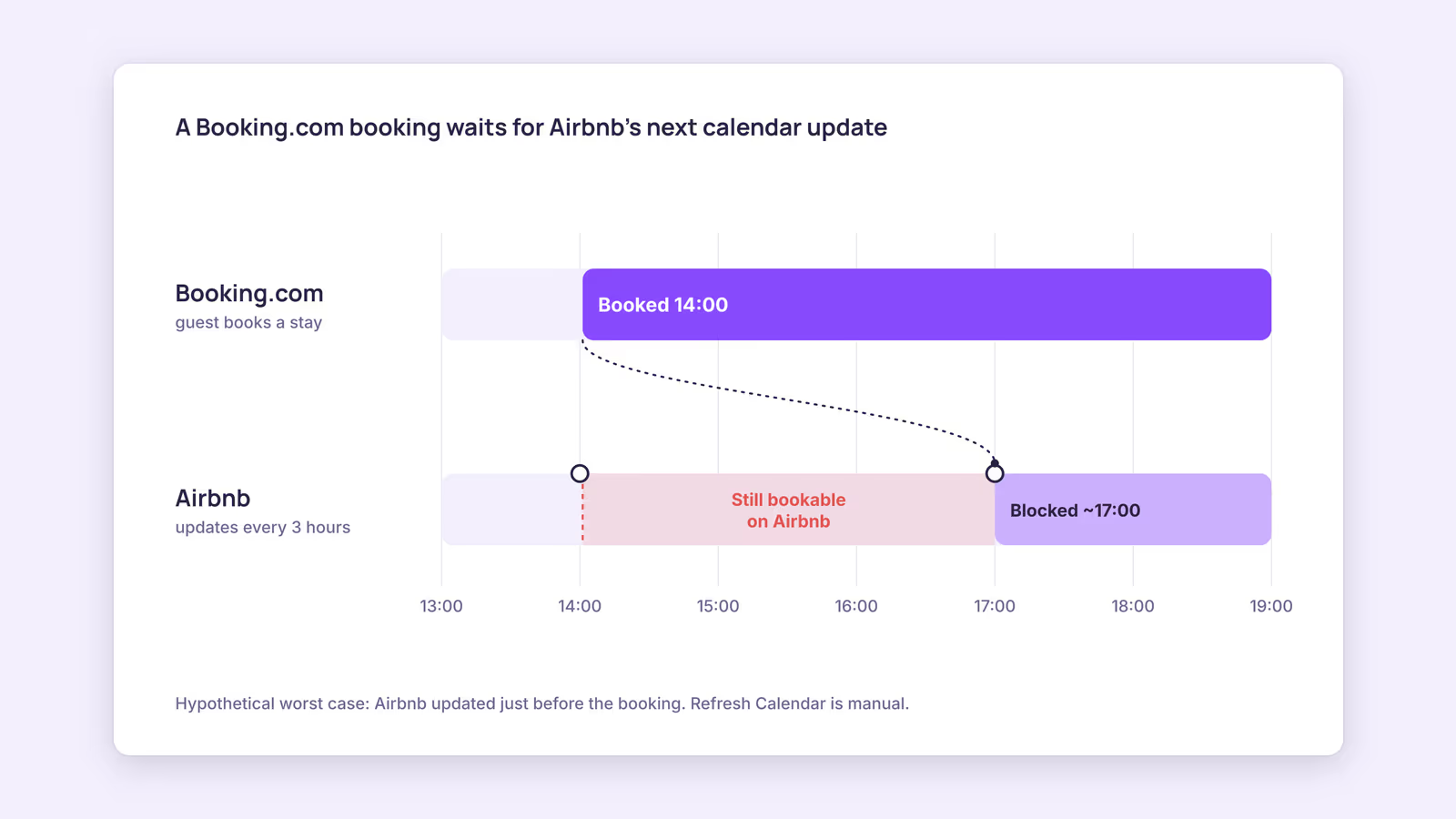
Up to about two hours in one direction and three in the other. Booking.com imports connected calendars every two hours, while Airbnb updates from connected calendars every 3 hours, so a Booking.com booking reaches Airbnb more slowly.
Booking.com's article says it "automatically imports any connected calendar every two hours" and that calendar sync "is not in real time." Airbnb's article says "Your Airbnb calendar automatically updates every 3 hours." Both platforms offer a manual refresh: Import now in the extranet, Refresh Calendar on Airbnb. Neither schedule is something you, or any tool publishing the feed, can change.
Here's a worked example using those published numbers. Consider a hypothetical studio listed on both platforms:
| Booking made | Where | Worst case before the other side blocks it |
|---|---|---|
| 14:00 | Booking.com | Airbnb's next automatic update, up to about 17:00 |
| 14:00 | Airbnb | Booking.com's next automatic import, up to about 16:00 |
Those windows are a floor, not a ceiling: neither platform publishes how quickly its own export link reflects a new booking. This suggests the riskier direction is Booking.com to Airbnb. When a Booking.com reservation lands in peak season, press Refresh Calendar on Airbnb or block the nights by hand. The full prevention plan, including buffer nights and what to do when two guests collide, is in how to avoid double bookings.
Why is your Booking.com calendar not syncing with Airbnb?
Usually one direction is missing, a link went into the wrong unit, or the wrong URL was pasted. Booking.com shows a status for each connection, and that status plus the symptom tells you which side to fix.
Start with the status on the extranet's Sync calendars page:
| Status or symptom | What it means | What to do |
|---|---|---|
| Activating | Booking.com is still setting up the connection | Wait, then run the test below |
| Import only | Airbnb dates come in, but Booking.com changes aren't sent to Airbnb | Copy Booking.com's export link and add it in Airbnb |
| Export only | Booking.com's link is exported, but no Airbnb link is imported | Add Airbnb's link under Add calendar connection |
| Service error | Booking.com can't reach or read a link | Recheck both links for typos, then reconnect |
| Airbnb rejects the Booking.com link | Wrong URL copied | Use the Copy link export URL that contains "/ical/" |
| Nights closed on Booking.com that nobody booked | Airbnb's export includes nights blocked for preparation time, advance notice and minimum stays | Check those Airbnb settings before deleting anything |
| A block on Booking.com never reaches Airbnb | Airbnb says nights you block on another calendar "may or may not" be blocked on Airbnb | Block the same nights on Airbnb by hand |
| Bookings arrive, but hours late | Normal import schedule | Use the manual refresh, or block by hand in peak weeks |
If the status looks fine and dates still don't match, paste each link into the free iCal feed checker. It shows whether the feed resolves and flags duplicate IDs, overlapping events and missing fields, so you can rule out a broken feed before blaming the schedule.
Then prove the connection works in both directions:
- Block one night on Airbnb at least a year out, where no guest will want it.
- In the extranet, click Import now or wait up to two hours, and confirm the night is closed.
- Block a different far-future night on Booking.com.
- On Airbnb, click Refresh Calendar or wait up to 3 hours, and confirm it's blocked.
- Remove both test blocks on the platform where you created them.
Should you link the platforms to each other or to one calendar tool?
With one or two units on only these two platforms, direct links are simple and free. Once a third calendar joins, linking each platform to one central calendar keeps the number of links manageable and gives you one place to audit them.
Direct links grow fast. Two platforms need two links per unit. Add a direct booking calendar and every platform needs to import every other, which is six links per unit. With a central calendar, each platform exports to it and imports from it, which is two links per platform.
The trade-off is timing. A booking now makes two hops: the tool fetches it from the first platform, then the second platform fetches it from the tool on that platform's own schedule. The Airbnb and Booking.com import clocks above still apply to the second hop. Test the full chain the same way you'd test a direct link.
Our recommendation: pick one pattern per unit. If you move to a central calendar, remove the old direct links, or you'll end up with the same booking imported twice and stale links you can't explain later. Tools that connect to platforms through an API instead of iCal work differently; see iCal vs API sync before you choose.
When this advice does not apply
- Properties that fail Booking.com's eligibility rules: more than 20 room types, several units under one room type, or an existing connectivity provider. Booking.com points these properties toward a connectivity provider instead of calendar sync.
- Properties already on a channel manager: Booking.com's calendar sync isn't available if you use a connectivity provider, so your Booking.com availability runs through that provider rather than through extranet links.
- Linked Airbnb listings: an entire home and a room inside it share availability through Airbnb's own linked calendars, which is a separate setting from external sync.
What to do next
- Check Booking.com eligibility on the Sync calendars page.
- Add both links for each unit, named by unit and platform.
- Run the far-future block test in both directions.
- Validate both links with the iCal feed checker.
- In peak weeks, refresh the other platform or block nights by hand whenever a booking lands.
FAQ
Can you sync Airbnb and Booking.com calendars for free?
Yes. Both platforms include iCal import and export in their host tools at no charge. You pay only if you add separate software.
Does iCal sync copy prices or minimum stays to Booking.com?
No. The link carries booked and closed dates only. Rates, stay rules and policies are set on each platform, although Airbnb's export does include nights its own availability settings block.
What if a double booking happens anyway?
Booking.com's overbooking guidance says to contact its team and move the guest to a unit of the same or better standard, at your cost if none is free. On Airbnb, a host cancellation can bring fees and a blocked calendar. Keep each platform's support contact handy before peak season.
About BookBed: BookBed gives each unit one calendar with two-way iCal sync for Airbnb and Booking.com, so both import and export links sit in one place you can audit. Airbnb and Booking.com still fetch on their own schedules. See plans and start a free trial
Sources
- Airbnb Help Center, "Sync your home host calendar to other websites" — Verified 2026-09-30
- Booking.com for Partners, "How to synchronise your calendars across channels" — Verified 2026-09-30
- Booking.com for Partners, "Handling overbookings" — Verified 2026-09-30
- Airbnb Help Center, "Host Cancellation Policy for homes" — Verified 2026-09-30