Your Vrbo listing is live, but it sits low in search or doesn't appear at all for dates you know are open. Most advice about the Vrbo ranking algorithm is guesswork. Vrbo doesn't publish its full formula, but its help center does say which metrics feed search position and which settings affect it.
Your first action: log in to your Vrbo Owner Dashboard, open Performance, and write down your acceptance rate, cancellation rate, review count and review average. Those four numbers tell you more than any outside guide can, and every fix below maps to one of them.
What does the Vrbo ranking algorithm actually look at?
Vrbo names a set of ranking metrics, mostly measured over the past 365 days, plus Instant Booking and Premier Host status as factors that raise search position. It also says you can't directly change your position.
Vrbo's ranking metrics article defines what it tracks:
- Acceptance rate: the share of booking requests you accepted over the past 365 days.
- Cancellation rate: the share of host-initiated cancellations over the past 365 days, and your rank within your market.
- Review count and review average: reviews received, and their average rating, over the past 365 days.
- Bookings, property views and search results: activity over the last 30 days. Vrbo notes that search results count appearances, not where you appeared.
- Market and competitive set: your market is based on the location terms guests search (Vrbo's example is guests searching "Orlando" for a Kissimmee rental), and your competitive set is comparable properties by beds, baths, amenities and location.
Two settings are called out as direct ranking factors. Vrbo's Instant Booking article says Instant Booking "is one of the factors that determines your rank and search position": if two properties are equal except for Instant Booking, the one with it ranks higher. And the Premier Host program lists an "automatic increase in search position" among its benefits.
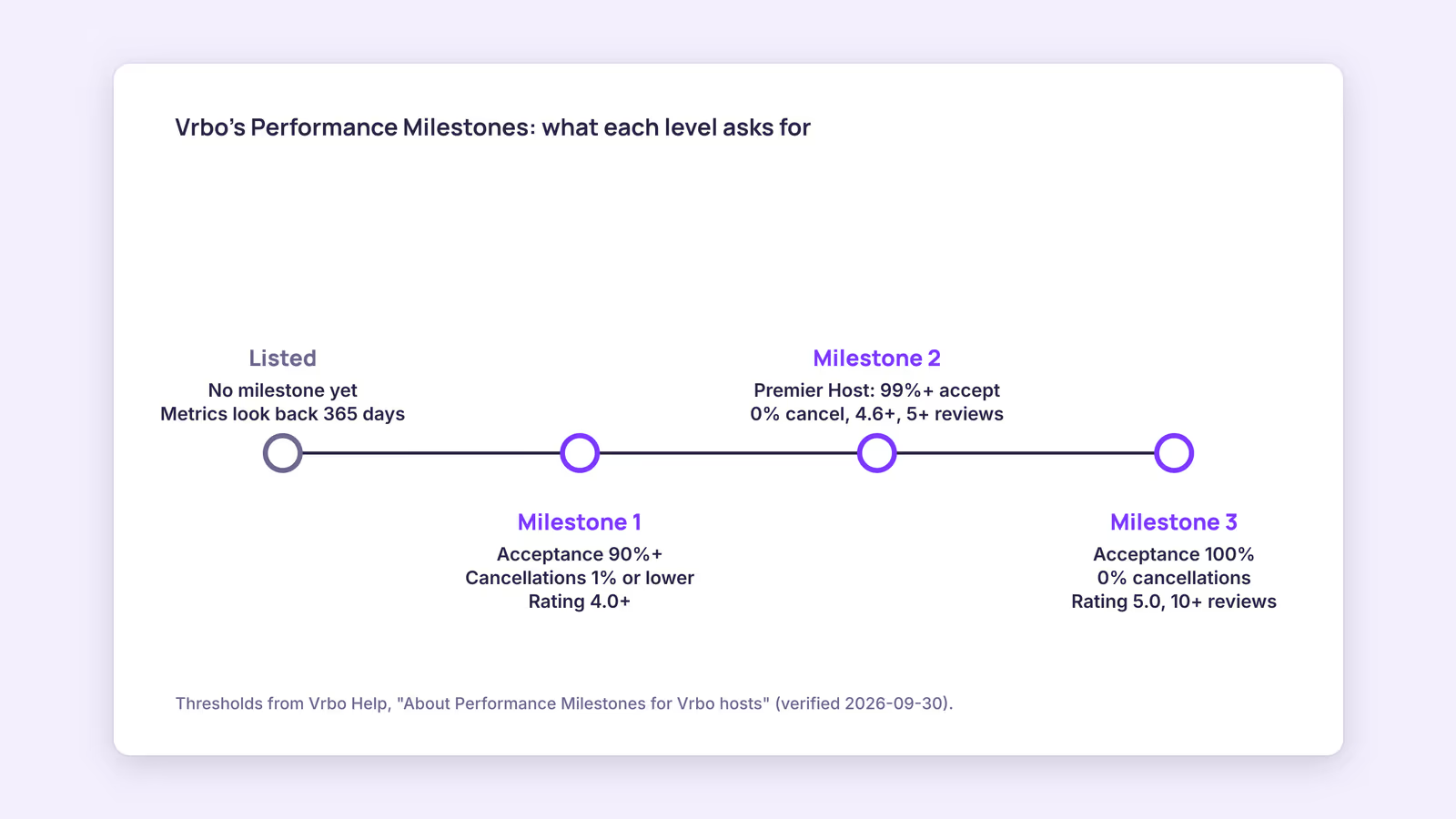
Since 2026, Vrbo groups these thresholds into three Performance Milestones:
| Milestone | Acceptance rate | Cancellation rate | Review rating | Reviews | Rewards named by Vrbo |
|---|---|---|---|---|---|
| 1: Good | 90% or higher | 1% or lower | 4.0 or higher | No minimum | Increased search visibility, Loved by Guests eligibility |
| 2: Great | 99% or higher | 0% | 4.6 or higher | 5 or more, plus 5 bookings or 60 booked nights | Premier Host status and badge, priority support |
| 3: Excellent | 100% | 0% | 5.0 | 10 or more, plus 5 bookings or 60 booked nights | Eligibility for a Top 1% callout |
This suggests the practical target for most hosts is Milestone 1 first. It's the first step Vrbo ties to increased search visibility.
Why is my Vrbo listing not showing in search?
Usually it's a setting, not the algorithm: a recent status change, a misplaced map pin, stay rules that don't match the searched dates, occupancy limits, or a suspension. Check those before worrying about rank.
Vrbo's troubleshooting article lists the causes, and two other help pages add suspension triggers. Work through this table in order:
| What you see | Likely cause per Vrbo | Check first |
|---|---|---|
| Listing went live or was unpaused today | Changes can take up to 24 hours to reach all searches | Listing status under Property details, then wait a day |
| Missing for a resort or neighborhood search | Map pin outside the searched area's boundary | Pin position on the dashboard map |
| Missing for specific dates only | Dates don't meet your minimum stay, check-in day or booking window rules, or have no rates | Stay rules and rates for those exact dates |
| Missing when guests filter by size | Maximum adults or bedroom/bathroom settings | Occupancy settings, and Toilet selected in Bathroom type |
| Missing everywhere, no requests arriving | Suspension after two booking requests in a row expired | Listing status page and reactivation steps |
| Photos flagged or listing suspended | Fewer than 6 photos for over 30 days, or photos that break the guidelines | Rejected photos under Edit Property |
Two of those rows are easy to trip over. Vrbo's booking request article says that if two requests in a row expire because you didn't answer within 24 hours, the listing may be suspended and hidden from search. Its photo guidelines require at least 6 unique photos, at least 1024 x 683 pixels, with 3840 x 2160 or higher recommended. For shot lists and lighting, see vacation rental photography tips.
How do you rank higher on Vrbo?
Turn on Instant Booking if your house rules allow it, avoid every host-initiated cancellation, answer requests within 24 hours, ask each guest for a review, and fill in amenities guests filter by.
In order of what Vrbo states most directly:
- Instant Booking. It's a named ranking factor, and Vrbo says Instant Booking properties "also appear to travelers who visit Expedia Group sites." Guests must accept your house rules before booking, and you can still cancel if they don't meet them. Vrbo recommends asking the guest to cancel from their own account so it doesn't affect your metrics.
- Cancellations. Only host-initiated cancellations count toward the rate. If a guest asks to cancel, have them do it from their account. If you use property management software, Vrbo's integration ranking article warns that canceling incorrectly through the software can hurt this metric.
- Acceptance and response. Review each request within 24 hours. Blocking dates you can't host prevents requests you'd have to decline.
- Reviews. Vrbo's own advice is to request a review after each stay. Review count and average both look back 365 days.
- Content. Vrbo suggests featuring the amenities guests are likely to search for. Its integration article adds that incomplete content can keep a listing out of results when guests use amenity or bed/bath filters.
Here's a worked example of why cancellations matter most. Consider a hypothetical listing with 40 bookings in the past 365 days. Vrbo doesn't publish its exact formula, so assume the rate is host cancellations divided by bookings:
| Host-initiated cancellations | Rate (40 bookings) | Milestone 1 (1% or lower) | Premier Host (0%) |
|---|---|---|---|
| 0 | 0% | Meets | Meets |
| 1 | 2.5% | Misses | Misses |
| 2 | 5% | Misses | Misses |
On those assumptions, a single cancellation drops this listing below both thresholds. Because the window is 365 days, that cancellation stays in the calculation until it ages out, even if everything else is perfect.
The most common avoidable cause is a double booking you then have to cancel. Vrbo's calendar import article says imported iCal calendars sync every 30 minutes, with a manual refresh, and that newly imported events may take up to 20 minutes to appear. It also says calendar import isn't available if the property is managed through third-party property management software. The setup is covered in how to sync Airbnb and Vrbo calendars, and the free iCal checker tells you whether a feed actually resolves.
How do you become a Vrbo Premier Host?
You don't apply: a listing joins automatically once it reaches 99% acceptance, 0% owner-initiated cancellations, 5 or more Vrbo reviews averaging 4.6 or higher, and 5 bookings or 60 booked nights.
Status is per listing, not per account. Vrbo's Premier Host article says it reviews listings quarterly, on February 1, May 1, August 1 and November 1, looking at the past 12 months, and removes listings that no longer qualify. You're added back automatically once you meet the criteria again. If a listing qualifies for both badges, the Loved by Guests badge displays instead of the Premier Host badge.
Our recommendation for a new listing: don't chase the badge directly. Five reviews and five bookings take time. Aim for Milestone 1's thresholds, which carry the increased search visibility Vrbo mentions and need no minimum review count, and treat Premier Host as a result of keeping cancellations at zero for a full year.
When this advice does not apply
- Integrated property managers: if your listings are managed through connected software, calendar import isn't available in the Vrbo dashboard, and Vrbo says new listings created during integration start without ranking metric history.
- Request-to-book by necessity: if your property genuinely needs screening before every stay, weigh Instant Booking's ranking benefit against canceling bookings that break your rules.
- Brand-new listings: most metrics look back 365 days, so there's little data to act on yet. Focus on the setup checks in the troubleshooting table.
What to do next
- Record your four ranking metrics from the Performance page and compare them with the Milestone 1 thresholds.
- Run through the troubleshooting table for any dates where the listing doesn't appear.
- Decide on Instant Booking, and write house rules clear enough that you won't need to cancel.
- Test your calendar sync by blocking a date elsewhere and timing when it reaches Vrbo.
- Check fees before adding Vrbo to more units: Vrbo fees explained breaks down the 12% commission and 3% payment processing fee, and Vrbo vs Airbnb for hosts compares the platforms.
FAQ
What are Vrbo ranking metrics?
They're the performance numbers on your Vrbo Performance page: acceptance rate, host-initiated cancellation rate, review count and review average over 365 days, plus bookings, property views and search appearances over 30 days. Vrbo says they help determine search position.
Does a guest cancellation hurt my Vrbo ranking?
Vrbo's cancellation rate counts host-initiated cancellations. That's why it asks you to have guests cancel from their own account, so the two are recorded separately.
How long does it take to improve a Vrbo ranking?
Vrbo doesn't give a timeline. Most ranking metrics use a 365-day window and Premier Host is assessed quarterly, so a past cancellation or low review keeps counting until it falls out of that window.
Calendar sync: BookBed's iCal calendar import and export lists Vrbo among its supported platforms, so bookings you take directly or on Airbnb can appear on a feed Vrbo imports. It's iCal, not a direct connection: Vrbo fetches the feed on its own schedule, and sync doesn't change your ranking. It lowers the odds of a double booking you'd have to cancel. See plans and start a free trial
Sources
- Vrbo Help, "Understand Ranking Metrics" — Verified 2026-09-30
- Vrbo Help, "About Instant Booking" — Verified 2026-09-30
- Vrbo Help, "About the Premier Host program" — Verified 2026-09-30
- Vrbo Help, "About Performance Milestones for Vrbo hosts" — Verified 2026-09-30
- Vrbo Help, "Troubleshoot your property's search results" — Verified 2026-09-30