You have a rental that does fine on Airbnb, and you're wondering whether to list your vacation rental on multiple sites. More listings can mean more people see your place. They also mean several calendars selling the same nights, and a gap between them where two guests can book the same dates.
Your first action today: write down, per unit, which sites you're on now, how each one learns about bookings from the others, and how quickly your peak dates usually sell. That list tells you whether you're ready for another channel, and what you'd need to change first.
Should I list my vacation rental on multiple sites?
Usually yes, if you can keep every calendar accurate and you've checked that each channel's fees and rules fit your pricing. Adding a site without a reliable way to block dates everywhere trades more visibility for double-booking risk.
Each platform reaches a partly different set of travelers, so a second or third channel can fill nights one platform leaves empty. That's the upside. We can't give you a reliable percentage for how many extra bookings to expect: it depends on your market, your listing quality and the season, and we're not aware of a trustworthy public figure.
The downside is operational. Every new site adds another calendar, another inbox, another cancellation policy and another fee structure to keep straight. Use this readiness check before adding a channel:
| Question | If yes | If no |
|---|---|---|
| Can a booking on one site block the same dates on every other site without you? | Ready to add a channel | Fix sync first |
| Do you know each site's fee on your typical stay? | Price with those fees in mind | Run the numbers before listing |
| Can you answer messages from every site within your usual response time? | Fine | Add one channel at a time |
| Are your cancellation policies roughly aligned across sites? | Fine | Align them so guests get similar terms |
| Do your peak dates sell within hours of opening? | Plan manual blocks for peak weeks | Scheduled sync gaps matter less |
Our recommendation: add one channel at a time, run it for a full booking cycle, then decide on the next.
Which vacation rental listing sites should you start with?
For most hosts, Airbnb and Booking.com are the practical starting pair, with a direct booking option for returning guests. Beyond that, pick sites by where your guests actually come from, not by the length of a list.
What each channel costs you depends on the platform and your setup, so check current help pages rather than old tables:
- Airbnb: most hosts pay either a 3% split fee (with the guest paying a separate fee) or a single host-only fee of around 15.5%, according to Airbnb's service fee article. The single fee is mandatory for hosts using property management software, and Airbnb says the split fee is being phased out.
- Booking.com: commission is a percentage of the total booking amount, including fees such as cleaning. The rate depends on your country, property type and agreement, per Booking.com's commission explainer. Programs like Preferred Partner add to it.
- Vrbo: on pay-per-booking, Vrbo lists a 12% commission on rent and host fees plus 3% payment processing on the total, per its booking fee article.
- Direct bookings: no platform commission, but you pay card processing and you have to bring the traffic yourself. See the direct booking guide for what that involves.
To compare what you'd keep on a specific stay, plug your own numbers into the OTA fee comparison. Smaller or regional sites can be worth it in some markets. Check each one's current terms before listing.
How does Airbnb and Booking.com calendar sync work?
Most small hosts connect Airbnb and Booking.com with iCal links: each platform publishes a calendar file of busy dates, and the other platform fetches that file on its own schedule. Nothing is pushed instantly.
The schedules are published. Airbnb says your calendar "automatically updates every 3 hours" from connected calendars, per its calendar sync article. Booking.com says it "automatically imports any connected calendar every two hours" and that calendar sync "is not in real time," per its extranet calendar article. Both offer a manual refresh.
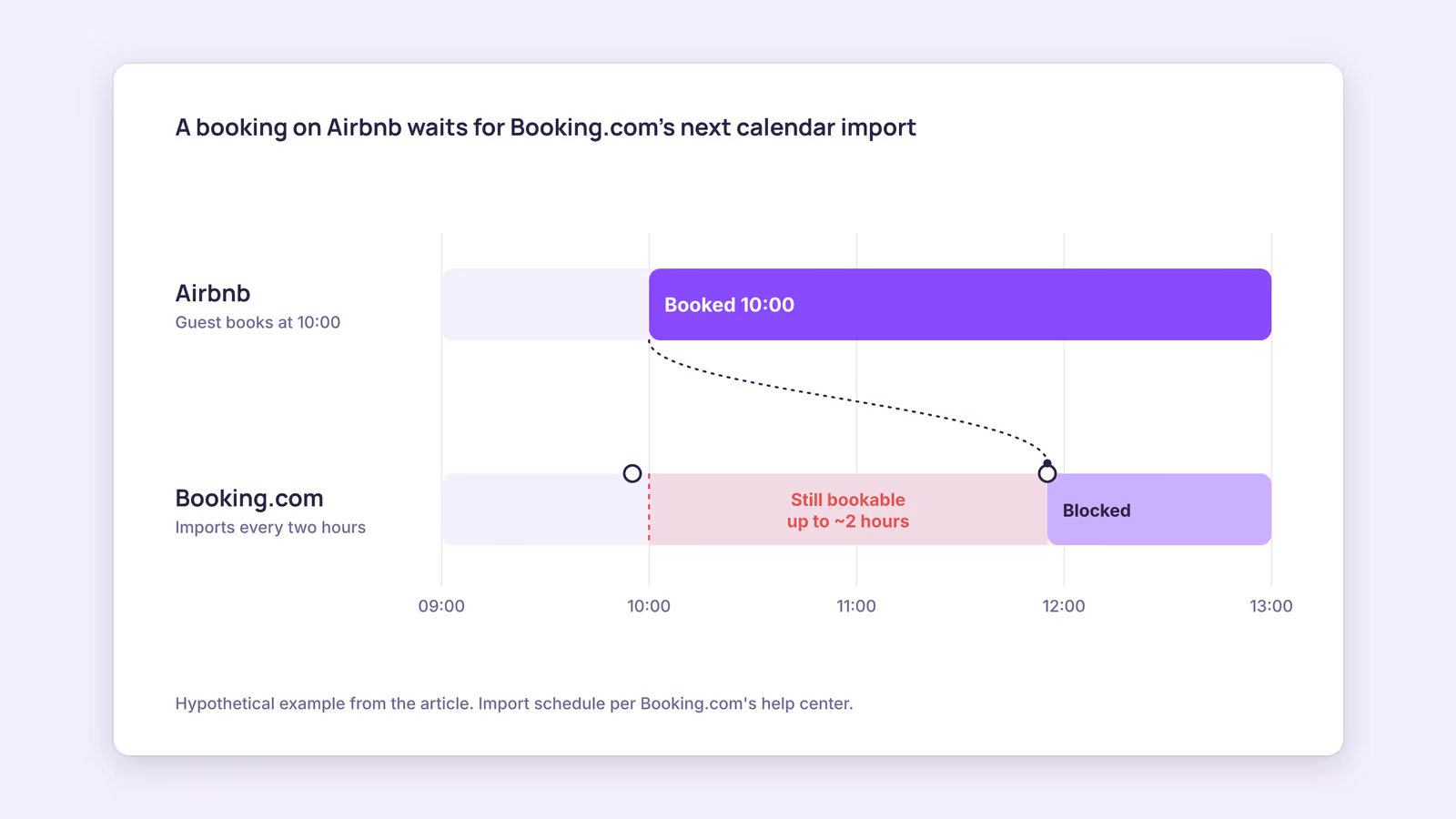
Here's a worked example. Consider a hypothetical apartment listed on both sites:
| Time | What happens | Booking.com status for those nights |
|---|---|---|
| 09:55 | Booking.com imports the Airbnb calendar | Available |
| 10:00 | A guest books on Airbnb | Available |
| up to about 11:55 | Booking.com's next scheduled import | Blocked |
For up to about two hours, the same nights stay bookable on Booking.com. In the other direction, Airbnb's three-hour schedule applies. This suggests the risk is highest when your dates sell fast on both sites at once, such as peak weeks.
A tool in the middle, such as a channel manager, gives you one place to manage the links. If it uses iCal, the platforms still fetch on their own schedules. Some channel managers connect through APIs instead, which is a separate setup with its own requirements. iCal also carries dates only, not prices or minimum stays, so you still set those per site.
How do you avoid double bookings across channels?
Close the sync gap where it matters most: block peak dates by hand as soon as a booking lands, test your links regularly, and remove any import you can't explain.
A double booking is expensive on both big platforms. Airbnb can charge host cancellation fees and may block your calendar for the dates, per its host cancellation policy. Booking.com says that when you overbook, you have to relocate the guest to accommodation of the same or better standard and cover the costs, per its overbooking article.
Use this routine:
- Map every link. For each unit, list every calendar you import and export on every site. Remove duplicates and links from tools you no longer use.
- Test the delay. Block one night more than a year out on one site, note the time, and check the others every 15 minutes without refreshing. The slowest one is your real exposure window.
- Block manually in peak weeks. When a booking arrives for high-demand dates, block the same nights on every other site right away.
- Validate feeds. Paste export links into a free iCal validator if an import shows an error.
- Keep a fallback plan. Know which nearby rentals could take a guest if a collision happens anyway.
For a longer prevention plan, see how to avoid double bookings.
When this advice does not apply
- API-connected listings: if your channel manager connects to a platform through an API, the iCal fetch schedules above don't describe that link. Check the provider's documentation.
- Hotel-style inventory: Booking.com room types with several identical units behave differently from one-listing-per-unit setups.
- Very low demand: if your dates rarely sell within a day, the sync gap matters less than getting found at all.
- Local rules: some cities limit short-term rentals or require registration numbers on every listing. Check your local rules before adding sites.
What to do next
- Write down every site, link and cancellation policy per unit.
- Run the far-future block test and note the slowest delay.
- Compare what you'd keep per stay on each site, fees included.
- Add one new channel, and set manual blocks for its peak weeks.
- Review after a full booking cycle before adding another.
FAQ
Will listing on other sites hurt my Airbnb ranking?
Airbnb's search ranking article lists factors such as quality, popularity and price, and doesn't mention other sites. Host cancellations from double bookings, however, carry their own penalties.
Can you link Airbnb and Booking.com calendars directly?
Yes. Export the iCal link from each and import it into the other for the matching unit. Each platform then fetches on its own schedule.
Does calendar sync copy prices between sites?
No. iCal shares busy dates only. Prices, minimum stays and policies are set on each site or through a tool that manages them.
About BookBed: BookBed gives each unit one calendar with two-way iCal sync for Airbnb and Booking.com, so every import and export link sits in one place you can audit. Try BookBed free
Sources
- Airbnb Help Center, "Sync your home host calendar to other websites" — Verified 2026-09-30
- Airbnb Help Center, "Airbnb service fees" — Verified 2026-09-30
- Booking.com for Partners, "Updating your availability calendar in the extranet" — Verified 2026-09-30
- Booking.com for Partners, "Understanding your commission" — Verified 2026-09-30
- Vrbo Help, "How is the booking fee calculated?" — Verified 2026-09-30