You've got the same unit on Airbnb and Booking.com, maybe a third site too, and linking every calendar to every other calendar is getting messy. An iCal channel manager offers a different wiring: each platform talks to one central calendar, and that calendar relays busy dates back out. It tidies the setup, but it doesn't make iCal faster than the platforms allow.
Your first action today: for one unit, list every calendar link you currently import and export, and note which tool each link points to. You'll need that list to rewire anything below.
Is iCal a channel manager, or just the pipe one uses?
iCal isn't a channel manager; it's a calendar file format that channel managers and booking platforms use to exchange busy dates, while the channel manager is the software that collects those dates and republishes them.
The format is iCalendar, defined in RFC 5545. A feed is a plain-text file at a private URL, with one event per booked or blocked stay: a start date, an end date and a unique ID. It doesn't carry prices, guest contact details or stay rules. If you want the full walkthrough of the file itself, see what iCal sync is.
Without a channel manager, you connect platforms point to point. Airbnb imports Booking.com's feed, Booking.com imports Airbnb's feed, and a third platform needs links to and from both. With an iCal channel manager, the pattern becomes a hub:
- Each platform's export link is pasted into the channel manager.
- The channel manager builds its own calendar from all of them, plus any bookings it takes directly.
- The channel manager's export link is pasted into each platform's import field.
The practical difference shows up in the link count. For a hypothetical unit on three platforms, point to point means six import links, because each platform imports the other two. The hub setup also uses six links, three in and three out, but every link touches the same central calendar. The gap widens as you add platforms: point to point grows with every pair, the hub grows by two links per platform. More importantly, there's one place to check when something looks wrong.
Where does the delay in an iCal channel manager come from?
The delay has two parts: how long the channel manager takes to fetch the source platform's feed, plus how long the destination platform takes to fetch the channel manager's feed, and you control neither fully.
iCal doesn't push anything. Each side downloads the other's file on its own schedule. The platforms publish their own import timing:
- Airbnb says its calendar automatically updates every 3 hours from connected calendars, with a manual refresh option.
- Booking.com says it automatically imports any connected calendar every two hours, notes that this isn't real time, and offers a manual refresh.
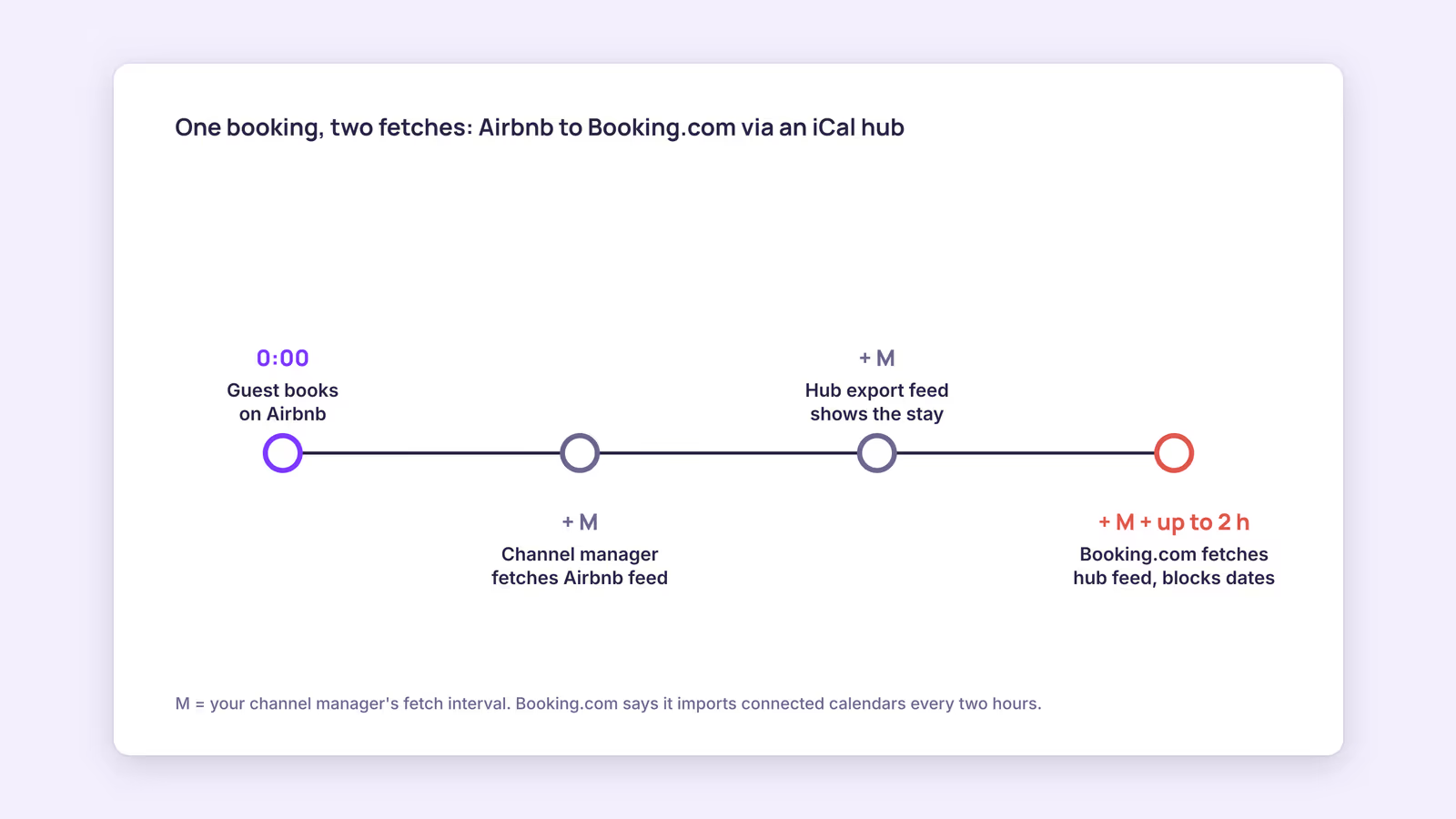
So a booking travels in two hops. Here's a worked example with labelled assumptions:
| Step | What happens | Worst-case wait |
|---|---|---|
| 1 | Guest books on Airbnb; Airbnb's export feed updates | Not published by Airbnb |
| 2 | Channel manager fetches Airbnb's feed | Your tool's fetch interval (call it M) |
| 3 | Channel manager's export feed now shows the stay | Usually immediate after step 2 |
| 4 | Booking.com fetches the channel manager's feed | Up to 2 hours, per Booking.com |
Worst case from Airbnb to Booking.com is roughly M plus two hours. In the other direction, Booking.com to Airbnb, it's roughly M plus three hours. If M were 15 minutes, a hypothetical host would face a gap of up to about 2 hours 15 minutes one way and 3 hours 15 minutes the other.
This suggests something vendors rarely spell out: once a channel manager fetches reasonably often, the platform's import schedule dominates. Shaving M from 15 minutes to 1 minute only trims a small slice of a multi-hour worst case. Bookings the channel manager takes directly skip hop one, but they still wait for each platform's own fetch.
Our recommendation: judge an iCal channel manager on clarity and error reporting, not on its advertised fetch speed alone. The comparison of iCal vs API sync covers when that platform-side gap is big enough to justify an API connection instead.
How do you wire an iCal channel manager without creating loops?
Replace your old point-to-point links with hub links one unit at a time, and delete every direct platform-to-platform import so each busy date has exactly one path.
The most common mistake is leaving the old links in place. Then Airbnb imports Booking.com's feed directly and the channel manager's feed, and a single booking can appear twice or linger after a cancellation. Use this checklist per unit:
| Check | Pass looks like | If it fails |
|---|---|---|
| Imports on each platform | Exactly one: the channel manager's feed | Delete direct links to other platforms |
| Imports in the channel manager | One per platform, mapped to the right unit | Fix mapping before going live |
| Test block | A far-future night shows on every platform | Refresh manually, then recheck mapping |
| Cancellation | Removing the test block frees the night everywhere | Look for a leftover direct link |
| Feed health | No duplicate UIDs or overlapping events | Run the feed through a validator |
Run the test with a night well outside any demand period, and record when each platform shows it. That gives you your real delay rather than a vendor number. The free iCal feed checker flags duplicate UIDs, overlaps and missing fields in any feed you paste in. If a booking has vanished from a calendar after rewiring, this troubleshooting guide walks through the causes.
When this advice does not apply
If your channel manager connects to Airbnb or Booking.com through an API rather than iCal, the two-hop timing above doesn't describe that connection; check the vendor's documentation for how it works. Hotels on connectivity-provider setups follow Booking.com's own integration rules. And if you list on a single platform, you don't need a channel manager for sync at all.
What to do next
- List every import and export link for one unit, per platform.
- Rewire that unit to the hub pattern and delete direct platform-to-platform imports.
- Place a far-future test block and time how long each platform takes to show it.
- Validate each feed for duplicates and overlaps before moving the next unit over.
- For last-minute dates, check your calendars before accepting a same-day request, since the gap is widest then.
FAQ
What are some channel manager examples that use APIs instead of iCal?
Some vendors describe official connections. Smoobu, for example, describes itself as an Airbnb Preferred Partner using an API and a Booking.com Premier Connectivity Partner. Check each vendor's own pages for which channels use which method.
Does an iCal channel manager sync prices and minimum stays?
No. iCal carries busy dates only. You'll still set rates, minimum stays and cancellation policies on each platform, or through a tool that uses an API connection.
Can I just use Airbnb's and Booking.com's built-in iCal import?
Yes. That's point-to-point sync, and it works for two platforms. The trade-off is more links to manage as you add platforms and no single calendar showing everything.
BookBed works as an iCal hub: it gives two-way iCal sync with Airbnb and Booking.com, using iCal rather than direct API connections, so each platform still fetches on its own schedule. Before connecting anything, test your iCal feed.
Sources
- IETF, "RFC 5545: Internet Calendaring and Scheduling Core Object Specification (iCalendar)" — Verified 2026-09-30
- Airbnb, "Sync your home host calendar to other websites" — Verified 2026-09-30
- Booking.com, "Updating your availability calendar in the extranet" — Verified 2026-09-30
- Smoobu, "Airbnb channel manager" — Verified 2026-09-30
- Smoobu, "Booking.com channel manager" — Verified 2026-09-30