A guest booked and paid online, and instead of a bank transfer you got a card number from Booking.com. That's a Booking.com VCC, and the money on it isn't yours until you charge it through a card terminal or payment provider that accepts it. Miss the window and the funds go back.
Your first action: open the extranet, go to your reservations, and find every booking where the payout method is a virtual card. Note each one's activation date and check-out date. That short list is what the rest of this guide helps you work through.
What is a Booking.com VCC and when do you get one?
A Booking.com VCC is a temporary digital Mastercard, one per reservation, that Booking.com loads with the guest's online payment when you receive payouts through Payments by Booking.com with the virtual card option.
Booking.com's guide to virtual credit cards says you can only use a VCC if you're on Payments by Booking.com, and you need a point-of-sale (POS) system that accepts VCCs. The Payments by Booking.com page adds that you're paid by bank transfer or VCC depending on your country and property settings, and that with VCC payouts you pay a transaction fee directly to your bank or payment provider rather than Booking.com's payment service fee.
So the VCC is a payout method, not a guest's personal card. The cardholder name on the reservation shows as "Bookingcom Agent," which is one way to tell them apart.
When does a Booking.com virtual credit card activate?
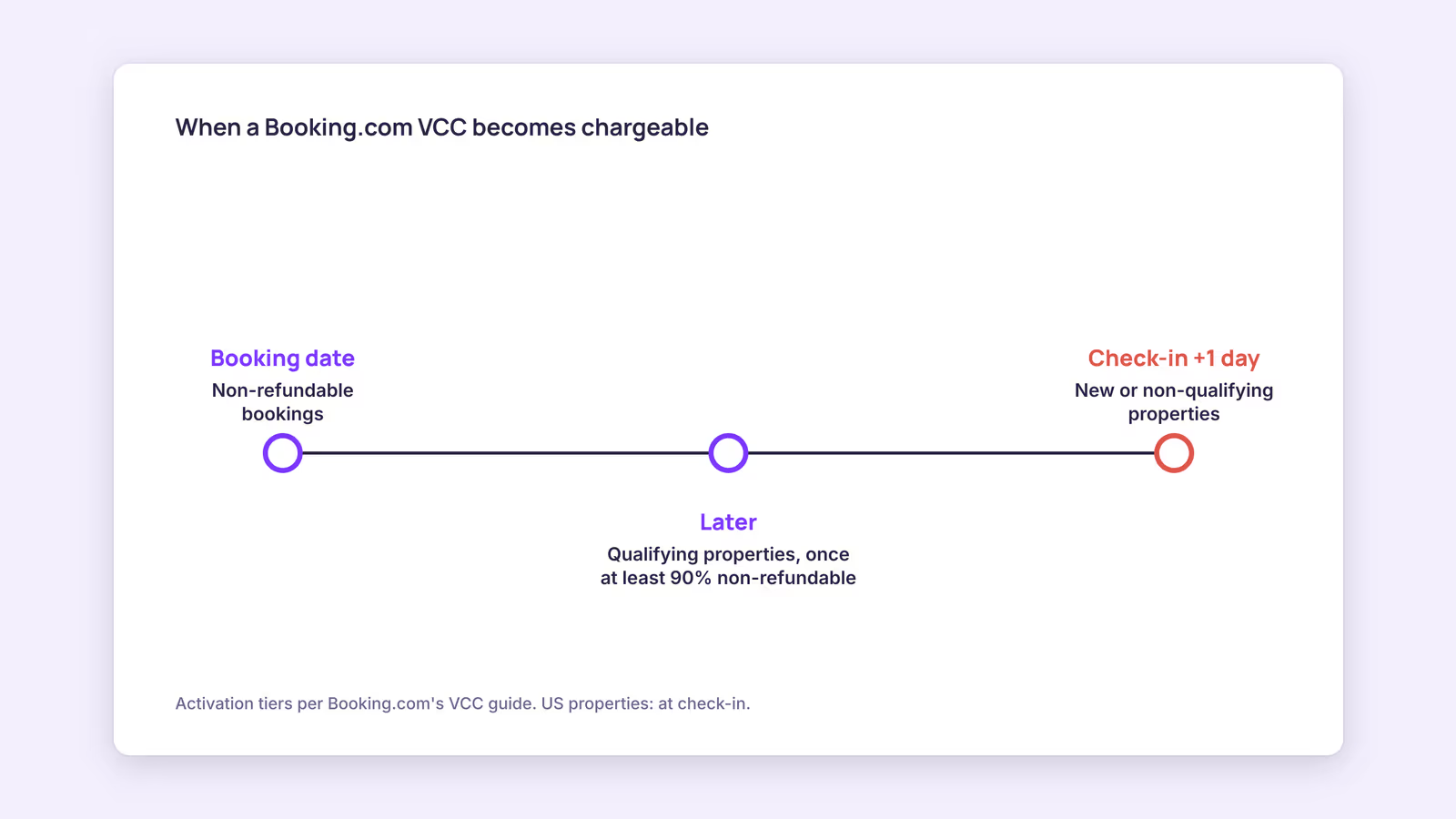
A VCC activates according to the reservation's policy: on the booking date for non-refundable bookings, and otherwise once the reservation is at least 90% non-refundable, with newer properties waiting until after check-in.
Booking.com's guide spells out the tiers:
- Non-refundable bookings: chargeable from the booking date.
- Other bookings, if you qualify: chargeable once the reservation becomes non-refundable. Qualifying means paying all invoices on time for the last 12 months, having no overdue VCC refunds, having paid at least one commission invoice with validated stays and reviews, and not having been closed for fraud. Booking.com reviews this every four months.
- New properties, or those that don't qualify: chargeable one day after check-in (at check-in for US properties).
This means the activation date on each reservation, not a rule of thumb, is what you work from. If your channel manager or PMS has Booking.com's VCC Payments Clarity Package integrated, you'll see the activation date and the balance to charge there. Without it, the reservation still shows the activation date, but not the balance or expiry, so check those in the extranet's virtual cards view.
How to charge a VCC on Booking.com without errors
To charge a VCC, wait for the activation date, enter the card details in your POS or payment provider, and charge the full available balance in the card's currency without pre-authorizing it first.
Most declines trace back to one of a handful of causes. Booking.com shows the reason on the reservation details page roughly 30 minutes after a failed attempt. Use this table to match the symptom to the fix.
| What you see | Likely cause | What to do |
|---|---|---|
| "Do not honour" or can't be authorized before activation date | Charged too early | Check the activation date in the extranet and retry on or after it |
| Insufficient funds | Charged more than the balance, often after a currency conversion or an added surcharge | Charge exactly the available balance shown in the VCC details |
| Money left on the card | Partial charge, often from a currency mismatch | Charge the remaining balance; a VCC can be charged several times until it reaches zero |
| Charge stuck as an authorization | You pre-authorized the card | Settle it with the authorization code, or cancel the authorization and charge again |
| Terminal refuses the card type | Your provider doesn't accept VCCs | Ask your bank or payment provider; switch if needed |
Our recommendation: charge in the currency the VCC shows and don't add card surcharges on top. If you'd like a check before a busy week, use this list:
- Filter reservations by VCC payout and sort by activation date.
- Charge every card whose activation date has passed.
- Confirm each balance reads zero afterward.
- Flag anything declined and read the reason on the reservation page half an hour later.
What happens if a VCC expires or needs a refund?
You can charge a VCC for up to 12 months after check-out; after that it expires, the funds return to Booking.com, and Booking.com won't reissue a card for that reservation.
Booking.com says it sends reminder emails after check-out if a card hasn't been charged, so don't treat those emails as spam. A monthly sweep of uncharged cards is cheaper than an expired one.
Refunds run the other way. If a reservation is canceled in a way that entitles the guest to money back, for example a Force Majeure cancellation, Booking.com reimburses the guest directly and you're responsible for refunding the VCC you already charged. You get weekly reminders, and you have 45 days from the first refund reminder. Miss that and Booking.com raises a chargeback to recover the amount, and your bank or provider may charge a chargeback fee. Keep enough in your account to cover pending refunds, and if your terminal blocks refunds to VCCs, sort that out with your provider before you need it.
Commission is a separate matter from the VCC. Booking.com's commission explainer says the rate depends on your country, property type and agreement, and applies to the total booking amount including fees such as cleaning. Read your own contract or invoice rather than assuming a standard percentage. For how VCC payouts sit alongside bank transfers and invoices, see how Booking.com payments work, and for where each screen lives, the Booking.com extranet guide.
When this advice does not apply
If you're not on Payments by Booking.com, or you're paid by bank transfer, you won't receive VCCs at all; guests pay you directly or funds arrive in your account. Activation rules for US properties differ slightly, as noted above. Booking.com updates these rules, so treat the extranet and the partner help page as the final word on your reservations.
What to do next
- List every VCC reservation with its activation and check-out dates.
- Confirm your POS or payment provider accepts VCCs and can process refunds to them.
- Charge all activated cards for the exact available balance, then confirm each reads zero.
- Set a monthly reminder to sweep for uncharged cards and pending refunds.
- If you use a channel manager, ask whether it has the VCC Payments Clarity Package integrated; if you're comparing tools, the Booking.com channel manager guide covers what to ask.
FAQ
Why is my Booking.com virtual credit card declined?
The usual reasons are charging before the activation date, charging more than the balance, a currency mismatch, a prior pre-authorization, or a terminal that doesn't accept VCCs. Check the reason on the reservation page about 30 minutes after the attempt.
Can I charge a VCC more than once?
Yes. Booking.com says you can charge a VCC multiple times until the balance reaches zero, which helps if a first charge was partial.
How do I refund a VCC on Booking.com?
Refund it through the same POS or payment provider you charged it with. You have 45 days from the first reminder email before Booking.com starts a chargeback.
VCCs only cover what comes through Booking.com. For guests who book you directly, BookBed's embeddable booking widget takes payment through Stripe checkout straight into your own Stripe account, with 0% BookBed commission. See BookBed plans
Sources
- Booking.com for Partners, "Getting paid by virtual credit cards (VCCs) when using Payments by Booking.com" — Verified 2026-09-30
- Booking.com for Partners, "Payments by Booking.com" — Verified 2026-09-30
- Booking.com for Partners, "Understanding your commission" — Verified 2026-09-30