If you're figuring out how to connect Booking.com to a channel manager, start by checking one thing: whether your property is even eligible for Booking.com's calendar sync. Most small hosts connect through iCal links in the extranet, which exchange booked and closed dates in both directions. If you aren't eligible, the iCal route won't work and you'll need a connectivity provider instead.
This guide covers the eligibility check, the two links you need, how to read the connection status, and a test that tells you how long a booking actually takes to reach the other side.
How to connect Booking.com to a channel manager: is your property eligible?
Yes, if your property meets Booking.com's calendar sync eligibility rules: open and bookable, 20 room types or fewer, one unit per room type, and no connectivity provider already connected. Otherwise you'll need an API-based provider.
Booking.com lists these calendar sync eligibility requirements:
- The property is open and bookable.
- Your extranet user has Rates and Availability permission.
- The property has 20 room types or fewer.
- Each room type has a maximum of one unit.
- You don't use a connectivity provider.
The "one unit per room type" rule catches a lot of apartment owners. If you've set up a single room type with three identical apartments, calendar sync isn't available for it. You'd need to restructure the listing so each apartment is its own room type, or use a connectivity provider.
Also know what iCal carries. According to the same Booking.com article, calendar sync imports and exports booked or closed dates, and it is "not in real time." Rates, minimum stays and guest details don't travel through the link. For the underlying format, see what iCal sync is.
Which Booking.com iCal link goes where?
You need two links per unit: the Booking.com iCal export link goes into your channel manager's import field, and your channel manager's export link goes into Booking.com's import field. One link alone gives one-way sync.
Mixing these up is the most common setup mistake, so map them before you paste anything:
| Link | Where you get it | Where you paste it | What it prevents |
|---|---|---|---|
| Booking.com export link | Extranet, Sync calendars, Copy link | Channel manager, import field for that unit | Your channel manager selling nights Booking.com already sold |
| Channel manager export link | Channel manager, export or iCal link for that unit | Extranet, Sync calendars, Add calendar connection | Booking.com selling nights booked on Airbnb or direct |
Booking.com notes that its own links contain "/ical/" in the URL, and that calendars imported from other platforms usually contain ".ics". That's a quick sanity check: if the link you're about to paste into Booking.com contains Booking.com's own "/ical/" path, you've grabbed the wrong one.
Treat every link like a password. Anyone with it can read your booked dates.
How do you set up Booking.com iCal import and export?
Sign in to the extranet, open Rates & Availability, then Sync calendars, and add a calendar connection for the unit. Paste your channel manager's link to import, then copy Booking.com's link to export.
Booking.com's step-by-step instructions run like this:
- Sign in to the extranet and click Rates & Availability, then Sync calendars.
- Find the room or unit and click Add calendar connection.
- Paste your channel manager's export link for that unit, name the connection (for example, "Channel manager"), and click Next step.
- Click Done, or continue to the export step.
- For export, click Copy link and paste the Booking.com link into the import field for the matching unit in your channel manager.
If you want to export first, Booking.com offers Skip to export, and you can return later through Complete setup. Repeat the whole process for every room or unit. Each one has its own pair of links.
Before you paste the Booking.com link anywhere, you can validate it with the iCal feed checker. It flags missing fields, duplicate event IDs and overlapping events.
Reading the connection status
After setup, the Sync calendars page shows a status for each connection. Here's what each one means and what to do about it:
| Status | What Booking.com says it means | What to check |
|---|---|---|
| Activating | The connection is being set up | Wait, then reload the page |
| Okay | Calendars are synchronized and working | Run the test below anyway |
| Import only | External dates come in, but Booking.com changes aren't sent out | Paste the Booking.com export link into your channel manager |
| Export only | Only the Booking.com calendar is being exported | Add your channel manager's link as an import |
| Service error | There's an issue connecting | Recheck both links and settings; regenerate if needed |
"Import only" is the status to watch. It looks like it's working because outside bookings appear on Booking.com, but Booking.com reservations never reach your other calendars.
How long does Booking.com iCal sync take?
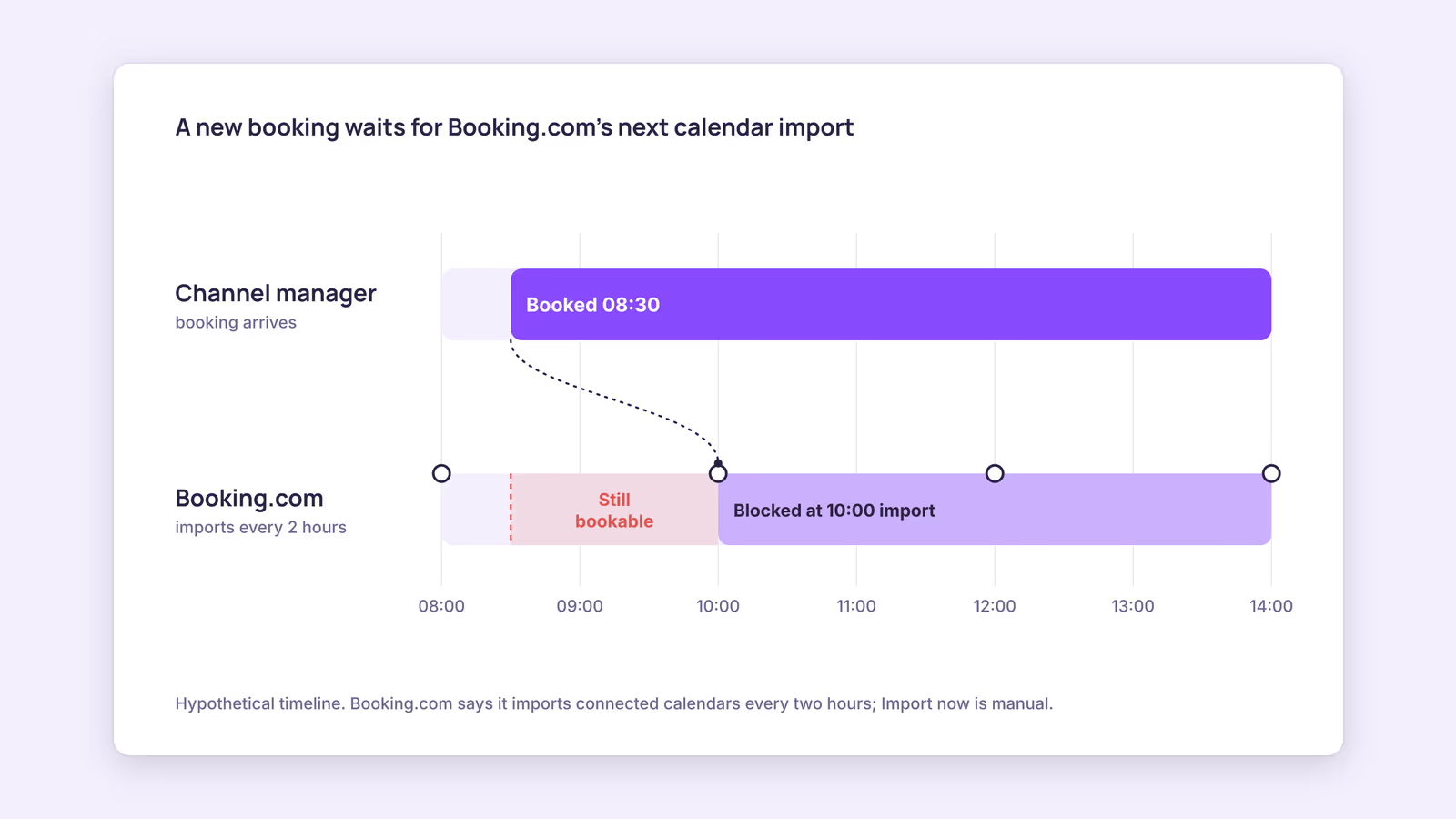
Booking.com says it automatically imports connected calendars every two hours, with a manual Import now button. Your channel manager and other platforms fetch on their own schedules, so the full delay can be longer.
Booking.com's own calendar sync page gives the two-hour figure. On the other side, Airbnb's help center says its calendar "automatically updates every 3 hours" from connected calendars. Those are separate clocks. A booking that lands just after one fetch waits for the next, and a channel manager in the middle adds its own fetch interval.
This suggests you should measure the chain rather than trust the status label. Use this test:
- Pick a night several months out that nobody will book.
- Block it in your channel manager and note the time.
- Check Booking.com every 15 minutes without pressing Import now. Record when it shows closed.
- Block a different far-future night on Booking.com and record when your channel manager shows it.
- Remove both test blocks and confirm they clear.
The slower of the two times is your real exposure window. If it's measured in hours, a same-day booking on another platform can still overlap with a Booking.com booking.
Consider a hypothetical host with one apartment on Booking.com and Airbnb. If your test shows a two-and-a-half-hour gap and you often get last-minute bookings, our recommendation is to close tonight and tomorrow by hand on each platform as soon as a booking arrives. The cost of a mistake is real: Booking.com's overbooking guidance says you must relocate the guest to accommodation of the same or better standard and cover the costs, including transport.
For a wider prevention plan, see how to avoid double bookings and the guide to syncing Airbnb and Booking.com calendars.
Disconnecting Booking.com from a channel manager
To disconnect Booking.com from a channel manager, go to Rates & Availability, then Sync calendars, click Remove next to the connection, and confirm. Booking.com says this stops all syncing with that calendar. Remove the matching import in your channel manager too, or it will keep reading a link you no longer manage.
When this advice does not apply
- Properties with several identical units in one room type: calendar sync isn't available. A connectivity provider is the route Booking.com points to.
- Properties already on a connectivity provider: iCal sync is excluded while a provider is connected. Follow your provider's setup instead.
- API-based channel managers: if your tool connects to Booking.com through an approved API, the iCal steps and two-hour schedule above don't describe that link.
- Rates and restrictions: iCal only moves booked and closed dates. Prices and minimum stays still need to be set on Booking.com.
What to do next
- Check each property against the five eligibility requirements before you start.
- Map the two links per unit using the table above, then validate the Booking.com link with the iCal checker.
- Set up import and export, and confirm every connection reads "Okay," not "Import only."
- Run the far-future block test in both directions and write down the slowest time.
- During peak weeks, close nights by hand on every platform the moment a booking arrives.
FAQ
Where do I find the Booking.com iCal link?
In the extranet, go to Rates & Availability, then Sync calendars, click Add calendar connection, choose Skip to export, name it, and click Copy link. It's a per-unit link.
Can I make Booking.com import my calendar faster?
You can press Import now on the Sync calendars page to pull the latest data. Otherwise Booking.com sets the schedule, not you or your channel manager.
Does iCal sync send prices or minimum stays to Booking.com?
No. Booking.com describes calendar sync as importing and exporting booked or closed dates. Rates, restrictions and guest details are managed separately.
About BookBed: BookBed gives each unit one calendar with two-way iCal sync for Airbnb and Booking.com, so every import and export link for a unit sits in one place you can check. Booking.com and Airbnb still fetch on their own schedules. Try BookBed free
Sources
- Booking.com for Partners, "How to synchronise your calendars across channels" — Verified 2026-09-30
- Booking.com for Partners, "Handling overbookings" — Verified 2026-09-30
- Airbnb Help Center, "Sync your home host calendar to other websites" — Verified 2026-09-30
- IETF, RFC 5545 "Internet Calendaring and Scheduling Core Object Specification (iCalendar)" — Verified 2026-09-30