You've set one nightly rate, and now you're wondering whether you're leaving money on the table on busy weekends while quiet Tuesdays sit empty. That's the problem dynamic pricing for vacation rentals tries to solve: a rate that moves with demand instead of staying fixed all year.
Your first action is simple. Before you switch anything on, write down three numbers for each unit: the lowest nightly price you'd accept, the price you'd normally charge, and a ceiling you'd feel comfortable defending to a guest. Every pricing tool, free or paid, works inside those guardrails, and most bad outcomes come from setting them carelessly.
How does dynamic pricing for vacation rentals work?
Dynamic pricing starts from a base price you choose, then adjusts each night up or down based on signals such as season, day of week, local demand and how far away the date is, within a minimum and maximum you set.
The exact models are proprietary, so no one outside a vendor can tell you precisely how it weighs each signal. What you can control is the structure. Most tools, and most hosts who price by hand, apply some version of these adjustments:
- Season: higher in peak months, lower in shoulder and off-season.
- Day of week: leisure markets usually see stronger demand on Friday and Saturday nights; business-travel markets can be the reverse.
- Local demand: events, holidays and school breaks push rates up for specific dates.
- Lead time: how far away the date is. Many strategies hold price on far-out dates and discount unsold nights as arrival gets close, because an unsold night earns nothing.
Airbnb describes its own tool, Smart Pricing, as using "hundreds of factors about your listing and your area" to adjust your nightly price based on demand, within a minimum and maximum price you enter (Airbnb Help Center). Third-party tools describe similar inputs; how well any of them fit your market is something you have to test.
What does the math look like on a single night?
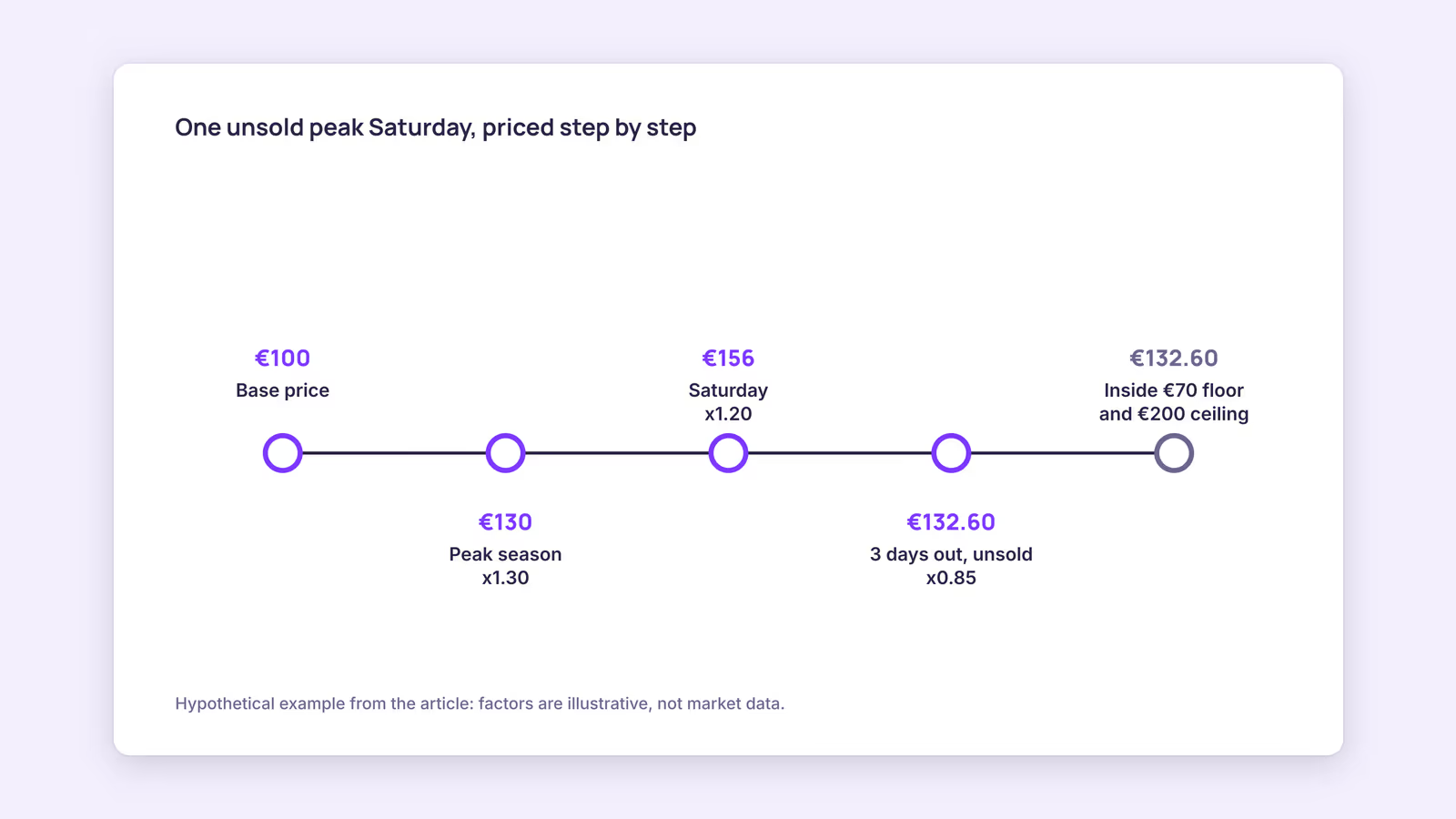
One useful way to see it is as a base price multiplied by a few adjustment factors, then clamped to your floor and ceiling. The factors below are a hypothetical example, not market data.
Consider a hypothetical two-bedroom apartment with a base price of €100, a floor of €70 and a ceiling of €200. Here's how one unsold Saturday in peak season, three days out, might be priced:
| Step | Adjustment | Running price |
|---|---|---|
| Base price | Starting point | €100 |
| Season | Peak month, x1.30 | €130 |
| Day of week | Saturday, x1.20 | €156 |
| Lead time | 3 days out, unsold, x0.85 | €132.60 |
| Guardrails | Between €70 and €200, no change | €132.60 |
Now run the same apartment on a quiet Tuesday in the off-season, three days out: €100 x 0.80 x 0.90 x 0.85 comes to €61.20. That's under the €70 floor, so the rate stays at €70. This is why the floor matters so much. It's the number that stops an eager discount from selling a night below what it costs you to clean and host it.
Our recommendation: set your floor from your real per-stay costs (cleaning, laundry, utilities, platform fees) plus the smallest margin you'd accept, not from what competitors charge. Use the Airbnb fee calculator to see what a given nightly price actually pays out after fees.
Static pricing vs dynamic pricing: which should you use?
Static pricing is fine when your demand is steady and your calendar fills without much effort; dynamic pricing earns its keep when demand swings a lot by season, weekday or event and you can't watch the calendar every day.
Use this quick diagnostic. The more rows that match your situation, the more a dynamic approach is likely to help:
| Question | Leans static | Leans dynamic |
|---|---|---|
| How much does demand swing across the year? | Little | A lot (clear peak and off-season) |
| Do local events or holidays sell out hotels? | Rarely | Several times a year |
| How often do you review your calendar? | Weekly or more | Less than monthly |
| How many units do you run? | One or two | Several |
| Do last-minute gaps stay empty? | Rarely | Often |
If you land mostly on the left, a handful of seasonal rates and a weekend premium set by hand may be all you need. Our guide to Airbnb pricing strategies covers how to build those manually.
Does Airbnb use dynamic pricing, and is it good enough?
Yes. Airbnb offers Smart Pricing, a free setting that adjusts your nightly price based on demand within the minimum and maximum you set, and you can override it for individual nights in your calendar.
According to Airbnb, you turn it on under Price settings, then Base price, then Smart Pricing, and enter a minimum and maximum. Turning it off doesn't change pending or confirmed reservations, and nights you've overridden are marked in the calendar (Airbnb Help Center).
Whether it's good for you depends mostly on your minimum. A floor set too low lets any demand-based tool sell cheap nights; a sensible floor limits that risk. There's no public evidence we can point to that Smart Pricing systematically underprices or overprices, so treat claims either way as opinion. Our recommendation: run it for a few weeks with a floor you're happy with, compare the booked rates against the same dates last year, and adjust.
The bigger limitation is scope. Smart Pricing prices your Airbnb listing only. If you also sell on Booking.com or through your own site, those rates don't move with it.
Do you need dynamic pricing software for vacation rentals?
You need paid dynamic pricing software when you sell on several channels or run several units and want one set of rules applied everywhere; a single-channel host can often start with the platform's free tool.
Paid tools price differently. Wheelhouse, for example, lists a Pro Flex plan at 1% of revenue with a $2.99 minimum monthly fee, and a Pro Flat plan at $19.99 per listing per month, and says prices sync to connected accounts daily when enabled (Wheelhouse). Check each vendor's current pricing page and supported channels before you commit. For a wider look, see our roundup of pricing tools for vacation rentals.
One point that trips up multi-channel hosts: calendar sync and rate sync are different things. The iCalendar format that powers iCal sync carries events, meaning booked or blocked dates, not nightly rates (IETF RFC 5545). Airbnb's calendar sync article likewise describes importing and exporting availability, not prices (Airbnb Help Center). So if your channels are only linked by iCal, a price change on one channel won't reach the others. You'll need a pricing tool connected to each channel, or you set rates on each one yourself.
A setup checklist before you switch on any tool
- Floor per unit, based on per-stay costs plus a minimum margin
- Ceiling per unit, so a demand spike doesn't produce a rate you'd be embarrassed to defend
- Minimum-stay rules that match your pricing (short gaps priced to sell, not blocked by long minimums)
- A list of dates you'll always price by hand, such as a local festival you know well
- A monthly review date to compare booked rates with last year
When this advice does not apply
- Long stays and monthly rentals: multi-week bookings are usually priced with weekly or monthly discounts, and nightly demand signals matter less.
- Hotel-style inventory: if you sell several identical rooms as one room type, you'll likely need revenue-management tools built for that setup.
- Regulated or capped rates: some markets or building rules limit what you can charge. Local rules win over any algorithm.
- Brand-new listings: with no booking history, both you and the tool have less to go on. Watch results more closely for the first season.
What to do next
- Write down a floor, base and ceiling for each unit, with the floor built from real per-stay costs.
- Run the static vs dynamic diagnostic above and decide whether hand-set seasonal rates are enough.
- If you sell only on Airbnb, test Smart Pricing for a few weeks with your floor in place.
- If you sell on several channels, confirm how any paid tool connects to each one before you rely on it.
- Review your minimum-stay rules so they don't block the short gaps your pricing is trying to fill.
FAQ
How does dynamic pricing work on Airbnb?
Airbnb's Smart Pricing adjusts your nightly price based on demand, within a minimum and maximum you set in Price settings. You can override it on specific nights without turning it off.
Is Airbnb dynamic pricing good?
It depends on your settings. The minimum price you enter matters most. Test it against your own past bookings rather than relying on general opinions.
Can I use dynamic pricing without a paid tool?
Yes. Setting seasonal rates, a weekend premium and a last-minute rule by hand is a basic form of dynamic pricing. It takes more of your time but costs nothing.
About BookBed: BookBed lets you set a base price and seasonal pricing rules for each unit, which apply to your BookBed calendar and direct booking widget. Those rates stay on your BookBed channels, since iCal sync with Airbnb and Booking.com carries availability, not prices. See BookBed plans
Sources
- Airbnb Help Center, "Use Smart Pricing to automatically adjust your prices based on demand" — Verified 2026-09-30
- Airbnb Help Center, "Sync your home host calendar to other websites" — Verified 2026-09-30
- IETF, RFC 5545 "Internet Calendaring and Scheduling Core Object Specification (iCalendar)" — Verified 2026-09-30
- Wheelhouse, "Plans & Pricing" — Verified 2026-09-30