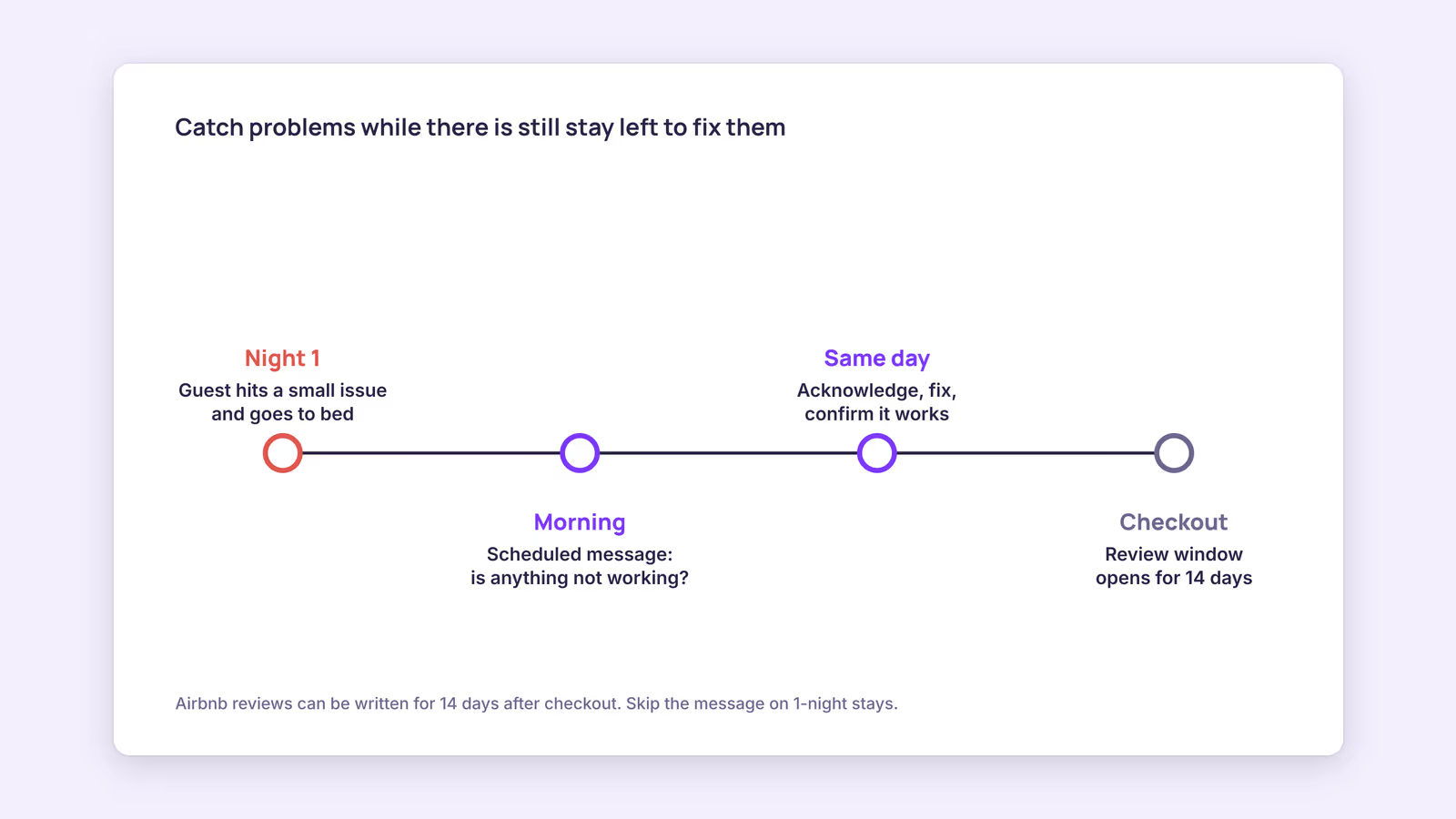
Guests who hit a small problem on arrival night, like a dead remote, a confusing shower or a weak Wi-Fi signal, often don't message you at 10 PM. They go to bed annoyed, and you only hear about it in the review. A short Airbnb message to guest after check in, sent the next morning, gives them an easy opening to tell you while you can still fix it.
Your first action: pick one listing, write the message below, and schedule it for the morning after check-in before your next arrival. The rest of this guide covers timing, wording, which stays to skip, and how to handle replies.
What should an Airbnb message to guest after check in say?
It should ask one open question about whether anything is missing or not working, give a single way to reply, and stay short enough to read in under half a minute on a phone.
The goal isn't to sound warm for its own sake. It's to lower the effort it takes a guest to report a problem. A guest who has to compose a complaint from scratch may not bother; a guest who only has to reply "the hot water takes ages" usually will.
Here's a template you can adapt:
Good morning [guest first name],
I hope you slept well. I'm checking in to see whether everything in the apartment is working and whether anything is missing.
If something isn't right, even something small, just reply here and I'll sort it out today.
Enjoy your day, [your name]
What to leave out:
- Review requests. Asking for a rating mid-stay reads as pressure and wastes the message's one job. Airbnb's Reviews Policy also bars hosts from pressuring or incentivizing guests to influence a review, so keep review talk for after checkout, and never tie it to a discount or refund.
- Repeat instructions. If your pre-arrival message already covered Wi-Fi and parking, don't paste it again. Link to the house manual instead.
- Upsells. Late checkout or extra-night offers belong in a separate message, if at all.
Our recommendation: name one or two things guests most often struggle with in your unit ("the boiler switch is behind the kitchen door") only if you already know from past stays that it's a common question. Otherwise keep the question open.
When should you send the after check-in message?
Send it the morning after the first night, in the listing's local time, early enough that you or a cleaner can still fix something that day but late enough that most guests are awake.
Airbnb's own guidance on scheduling quick replies lists "after the first night" as one of the moments to reach out and ask whether guests need anything. It doesn't give a clock time, so pick one that matches your fix capacity. If your handyman starts at 9, a message at 9 gives you the whole working day.
Stay length changes the value of the message. Use this diagnostic before you switch it on for every booking:
| Stay length | Send the morning-after message? | Why |
|---|---|---|
| 1 night | Usually skip | By the next morning they're packing; a checkout message is more useful |
| 2 nights | Optional | One remaining night; only worth it if you can fix issues same day |
| 3 to 6 nights | Yes | Most of the stay is still ahead, so a fix still improves it |
| 7 nights or more | Yes, plus a mid-stay check | A second short check around the midpoint catches issues that appear later |
This table is a recommendation, not a rule from Airbnb. The logic behind it: the message only pays off if there's time left in the stay to act on what you hear.
Also consider the review timing. On Airbnb, guests can write a review for 14 days after checkout, and reviews are published once both sides submit or the window closes. A problem you fix on day one is still part of the stay, and the guest may mention it. What you can influence is whether the review says "it broke and nobody helped" or "it broke and the host fixed it the same morning." We can't show that one version earns higher ratings than the other; it's a reasonable inference, not a measured outcome.
How do you send automatic messages on Airbnb?
Airbnb lets you schedule quick replies, which are message templates that send automatically before or after events like check-in or checkout, in the listing's time zone.
According to Airbnb's help article on scheduled quick replies, the setup on desktop is:
- Go to Messages, then Settings, then Quick replies, and click Create.
- Name the template, write the message, and choose which listings it applies to.
- Set the scheduling action (for example, a set time after check-in) and save.
A few details from that page matter for this message specifically:
- Scheduled quick replies apply to current and upcoming reservations for the listing, not only new ones.
- Placeholders such as guest first name pull from the reservation and listing. If the matching listing field is empty, the detail shows as unavailable, so fill in your listing info before relying on them.
- For last-minute bookings and short stays, some scheduled messages are skipped by default. A toggle called "Send for last minute bookings and short stays" changes that. For a morning-after message, leaving it off fits the table above, since you probably don't want it firing on one-night stays.
- You can skip, edit or send early from the timeline view for each reservation, which helps when a guest has already told you something is wrong.
If you also take bookings on Booking.com or directly, remember that an Airbnb scheduled reply only covers Airbnb reservations. Each other channel needs its own setup, or a tool that handles messaging for the bookings it holds. Our guide to automating guest messaging covers the full sequence from booking confirmation to checkout.
What do you do when a guest replies with a problem?
Acknowledge the reply quickly, give a specific time you'll act, fix it or offer a workaround, and then confirm with the guest that it's actually resolved.
A simple reply-handling checklist:
- Acknowledge within the hour if you can, even if the fix will take longer: "Thanks for telling me. Someone will be there by 2 PM."
- Fix or work around. No replacement part today? Bring a portable heater or a spare router and say when the permanent fix happens.
- Close the loop. A one-line follow-up ("Is the hot water working now?") confirms the fix and shows you followed through.
- Log it. Note the issue per unit. If the same problem shows up across several stays, it belongs on your turnover checklist, not in a guest message.
If a reply turns into a bigger complaint, our guide to handling Airbnb guest complaints goes further. Keep the conversation in the platform's messaging thread so there's a record if you ever need to open a claim or dispute.
When this advice does not apply
- Hosts who meet every guest in person may get the same feedback face to face; a message can still help guests who'd rather not say it directly.
- Listings with an on-site manager or front desk often already have a check-in routine. Don't duplicate it.
- Very short stays (one night) get little from a morning-after check, as the table shows.
- Units you can't service same day (remote cabins, no local help) still benefit, but set expectations honestly about when a fix can happen.
What to do next
- Write your morning-after message using the template above, in under 60 words.
- Schedule it on Airbnb as a quick reply for the morning after check-in, with short stays left to skip.
- Set up the equivalent on every other channel you take bookings from.
- Decide who fixes problems on weekday and weekend mornings, and put their number in your notes.
- After a month, review what guests reported and move repeat issues onto your cleaning or maintenance checklist.
FAQ
Is an Airbnb mid-stay message the same as a morning-after message?
Not quite. The morning-after message goes out after the first night. A mid-stay message is a second check for longer stays, usually around the midpoint, and should be even shorter.
Should I use Airbnb's welcome message example instead?
Airbnb's templates are a fine starting point, but a welcome message usually goes out at booking or before arrival. Keep the after check-in message separate and focused on one question.
Can I ask for a 5-star review in this message?
We don't recommend it. It dilutes the message's purpose, and Airbnb's Reviews Policy prohibits pressuring or incentivizing guests to influence reviews. Keep any review request for after checkout.
About BookBed: BookBed Pro includes automated guest messaging with pre-arrival, mid-stay and post-stay messages, so a check-in follow-up can go out for the bookings you manage in BookBed without setting it up per booking. Try BookBed Pro
Sources
- Airbnb Help Center, "Create scheduled quick replies and send them to guests automatically" — Verified 2026-09-30
- Airbnb Resource Center, "Using quick replies to save time" — Verified 2026-09-30
- Airbnb Help Center, "Reviews for homes" — Verified 2026-09-30
- Airbnb Help Center, "Airbnb's Reviews Policy" — Verified 2026-09-30