
Switching booking software rarely loses an Airbnb or Booking.com reservation. Those live on the OTA, and they're still there tomorrow. What goes missing is a night: a direct booking typed into the old tool, a manual block for a family stay, or a cancellation that one system freed and the other didn't. Any of those can reopen a sold date or keep a free one closed.
So don't migrate bookings and hope. Migrate a list of nights, count it, and prove the new tool blocks every one of them before the old tool stops. Your first action today: pick a freeze date, after which nobody edits availability in the old tool except to record new bookings.
What can go missing when you switch booking software?
Anything that exists only inside the old tool, plus anything whose status changed recently. OTA reservations reappear when you connect the new tool; direct bookings, manual blocks and fresh cancellations need you to carry them across.
Here's where each record type lives and how it usually fails:
| Record | Authoritative copy | Typical migration failure |
|---|---|---|
| Airbnb reservation | Airbnb | Shows only as blocked dates over iCal |
| Booking.com reservation | Booking.com extranet | Late to appear until the next import |
| Direct booking | Old tool only | Not re-entered, so the night reopens |
| Manual block or owner stay | Old tool only | Forgotten because it has no guest |
| Recent cancellation | The channel that cancelled | Still blocked in one system |
| Block from a smaller channel | That channel's feed | Feed link never re-added |
Connection order is a separate job. Airbnb and Booking.com document different ways to switch providers, and how to switch vacation rental PMS walks through each one. This guide covers the data control around that switch: what to list, how to compare it and when to let go of the old system.
How do you build a migration manifest?
A migration manifest is one spreadsheet row per stay or block, for every unit, from today to your furthest future booking. It's your control total: if a night isn't on it, nobody will check it.
Use these columns: unit, source (Airbnb, Booking.com, direct, owner, other), check-in date, checkout date, nights, reference or UID, status and a "checked in new tool" box.
Fill it from the authoritative copy, not from the old tool's calendar view:
- Airbnb. Airbnb's guide to finding your reservations puts upcoming stays under Today, Upcoming, with a filter by listing. Cancelled home reservations sit in Messages: select All, then filter the trip stage to cancelled. Airbnb doesn't document a reservations export there, so copy the rows by hand or from the old tool and check them against this list.
- Booking.com. Copy each property's upcoming and cancelled reservations from the extranet's reservation list.
- Direct bookings and blocks. Export them from the old tool. If it can't export, copy them from its calendar unit by unit and record the reason for each block.
- Other channels. List every iCal feed each unit imports, even ones that rarely book.
Record checkout dates exactly as the channel shows them. You'll convert to nights in the next step, and checkout matters more than it looks.
Why reconcile nights instead of bookings?
Because a booking can arrive intact with the wrong dates. Comparing nights catches shifted, shortened and duplicated stays that a booking-by-booking tick list would pass.
The calendar format behind most syncs treats checkout as free. RFC 5545, the iCalendar standard, defines an event's end date as non-inclusive. A stay from 12 to 15 June blocks the nights of the 12th, 13th and 14th; the 15th stays open for the next arrival. If one system counts checkout as a booked night and the other doesn't, every stay will look one night off.
Turn each manifest row into nights, then compare two numbers per unit: the count of stays and the count of nights. Both must match the new tool before you trust it.
Consider a hypothetical two-unit host. Unit A shows 14 stays and 52 nights in the manifest, and 14 stays but 49 nights in the new tool. The stay count passes; the night count says three nights are missing. Scanning that unit's rows date by date finds one direct booking entered with the wrong checkout. Without the night count, it would've passed.
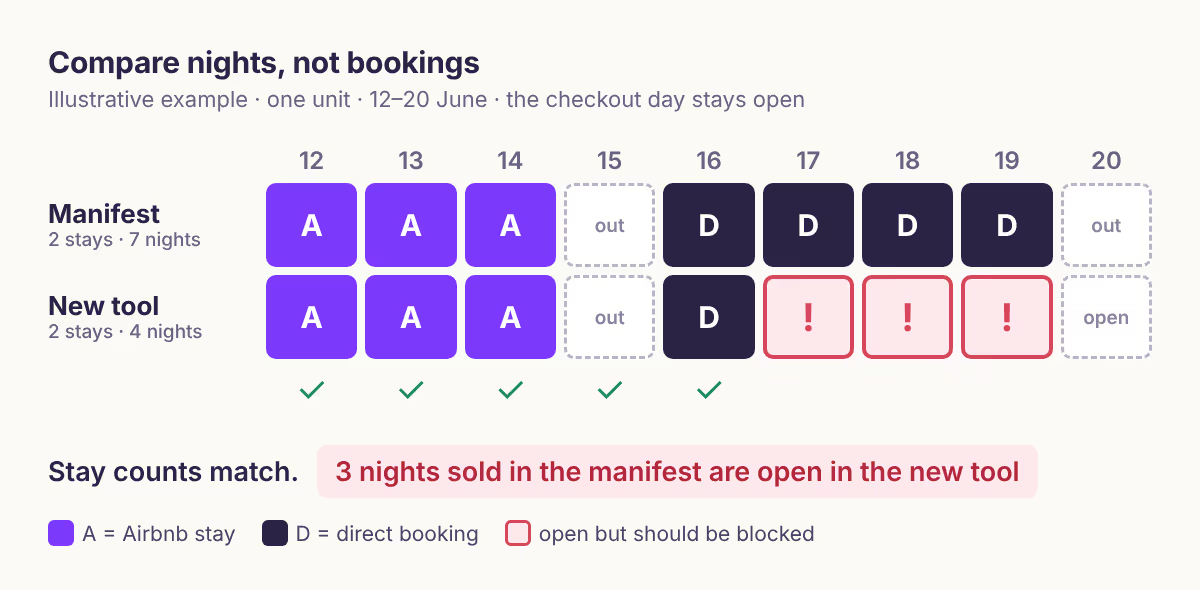
When the counts disagree, use this table to find the cause before cutover:
| What you see | Likely cause | Fix |
|---|---|---|
| New tool has one extra night per stay | Checkout counted as booked | Compare end dates as exclusive |
| Stays shifted by one day | Time zone or date-time export | Convert to the property's local date |
| Cancelled stay still blocked | Status not carried across | Free the dates, recheck both channels |
| Same stay appears twice | Same feed imported twice | Remove the duplicate import |
| Nights open that were blocked | Manual block not re-entered | Re-enter with its reason |
| Stay missing entirely | Feed or direct booking not added | Add it, then recount the unit |
The time zone row is an inference, not a platform rule. RFC 5545 separates date values from date-time values, so a tool that exports stays as UTC timestamps can land on a different calendar date than one that stores plain dates. If your old export has times in it, convert before comparing.
How long should the old and new tools run side by side?
Until each unit has passed a clean count and a test block has crossed every channel in both directions. That takes at least one full import cycle on each OTA, so plan for hours, not minutes.
OTAs import calendars on their own schedules. Airbnb's calendar sync article says it updates connected calendars every 3 hours and offers a Refresh button. Booking.com's calendar sync guide says it imports every two hours, offers Import now, and warns that calendar sync isn't real time or enabled for every property.
Run the parallel period like this:
- Pilot one unit. Choose a unit with few near-term arrivals. Connect its feeds to the new tool, reconcile it, and only then move the rest.
- Keep the old tool's direct booking path closed. Two widgets taking bookings for the same unit can sell the same night twice.
- Test a block in each direction. Block a far-future night in the new tool and confirm it appears on each OTA after their next import. Airbnb says nights blocked elsewhere "may or may not be blocked on Airbnb", so check rather than assume.
- Cover the swap window. For the hours between disconnecting an old feed and the first confirmed import of the new one, block any open nights in the next 48 hours by hand on each channel. Our recommendation is to block rather than pause a listing, because blocks are easy to lift date by date.
- Recount after the swap. Repeat the stay and night counts for the unit once both OTAs have imported.
What do you need for a rollback?
A rollback pack: the old tool still active for a short period, its last full export, and a copy of every old feed link. If the new tool shows a gap you can't explain, you can reconnect the old feeds and lose nothing but time.
Keep these until you've had a week of clean syncs:
- The completed manifest with the freeze date in its name.
- The old tool's final export of direct bookings, blocks and guest contacts you're allowed to keep.
- Every old import and export feed URL, per unit and channel.
- A screenshot of each OTA calendar on cutover day.
Cancel the old subscription last. Before you do, check whether it holds payments or invoices you'll need for refunds or tax records.
No-booking-lost sign-off checklist
Sign off a unit only when every line is true:
- Stay count and night count match the manifest for that unit.
- Every direct booking and manual block in the manifest is blocked in the new tool.
- No cancelled stay still blocks a night in either system.
- Each OTA shows the new tool's feed and has completed at least one import.
- A test block crossed to each channel and was removed again.
- The old tool's booking widget and scheduled messages are off.
- The rollback pack is saved.
When this advice does not apply
- Properties without Booking.com calendar sync. Booking.com says calendar sync isn't enabled for every property. If yours connects through a connectivity provider instead, follow that provider's switching steps and still reconcile against the manifest.
- API-connected migrations run by a vendor. If the new provider imports reservations through an API, still build the manifest. Use it to verify their import rather than to re-enter data.
- Channels not covered here. Other OTAs have their own sync schedules and switching rules. Check their help pages before assuming Airbnb's or Booking.com's timing.
- Very short booking windows. If most stays are booked same-day, run the swap overnight and keep every open near-term night blocked until both imports are confirmed.
What to do next
- Set your freeze date and tell anyone who edits the calendar.
- Build the manifest from Airbnb, Booking.com and the old tool's direct bookings and blocks.
- Validate each new feed link with the iCal checker before you paste it into an OTA.
- Pilot one unit, reconcile its nights, then move the rest.
- If a cancelled stay won't free up afterwards, work through why cancelled dates stay blocked.
About BookBed: Every BookBed plan includes free migration of historical reservations, and you can export your data as CSV at any time, so you can check the move against your manifest and leave with your data if it doesn't fit. Airbnb and Booking.com stays reach BookBed over iCal as blocked dates, and each OTA still imports on its own schedule. See BookBed pricing
Sources
- Airbnb Help Center, "Find all your reservations as a host" — Verified 2026-10-10
- Airbnb Help Center, calendar sync with other websites (article 99) — Verified 2026-10-10
- Booking.com for Partners, "How to synchronise your calendars across channels" — Verified 2026-10-10
- IETF, RFC 5545 "Internet Calendaring and Scheduling Core Object Specification (iCalendar)" — Verified 2026-10-10
- BookBed, pricing.md (plans, migration and data export) — Verified 2026-10-10