
Consider a hypothetical stay: the guest arrives on Friday and nobody has sent the door code. The owner assumed the manager sent it, because the manager handles guests. The manager assumed the owner sent it, because this booking came through the owner's own Airbnb account. Both were sure the stay was covered, and both were working in good faith.
That kind of gap does not need carelessness. It can come from a split where each person sees part of the reservation and nobody has written down who confirms what. The fix is to give each task one named person, one agreed place where the proof lives, and a short written handoff for every booking. Start today with your next three arrivals: for each one, ask who confirmed payment, arrival details and cleaning, and where you can see that confirmation. Any answer of "I think they did" is the gap.
Why do an owner and a manager both assume the other confirmed a stay?
Both assume it because each one sees a different slice of the booking: different logins, different notification emails and different message threads. When no written rule says who confirms each step, each person fills the silence with an assumption.
A few common splits produce the gap:
- Account access differs. The owner holds the Airbnb listing, and the manager is a co-host with limited permissions, or the reverse. Each sees different screens.
- Notifications go to one inbox. New booking and change emails reach whoever owns the account, so the other person learns about a change late or not at all.
- A shared calendar shows dates, not decisions. A synced calendar tells you that nights are taken. iCal is a format for sharing availability, so an imported block does not carry the platform's message thread, payment record or cleaning plan.
- Handoffs happen in conversation. "I'll sort the cleaner" in a phone call leaves no record that both people can check on Thursday night.
On Airbnb, the permission level decides what each person can actually confirm. Airbnb's help article on what co-hosts can do lists three levels. A full-access co-host can message guests, update the calendar and manage reservations, including accepting, declining and cancelling. A co-host with calendar and messaging access can message guests and view the calendar but not edit it. A co-host with calendar access can only view the calendar. The same article says only listing owners can set up or edit a co-host's payouts, and that the listing owner is responsible for co-hosts, including ones added by a full-access co-host.
So before you assign a task, check the permission. A manager with calendar-only access cannot confirm an arrival time in the Airbnb thread, however willing they are.
Who should own each part of a reservation?
Each task needs exactly one owner of record, the person who confirms it and writes where the proof is. The other person may help, but one name goes on the task. With two names, each person can reasonably assume the other one checked.
The map below is a recommendation, not a platform rule. It shows the questions to settle, with one common split as an example. Change the names to fit your agreement, but keep one name per row.
| Task | Owner of record (example) | Where the proof lives | Done when |
|---|---|---|---|
| Accept or review a new booking | Manager | The booking channel's reservation page | Status checked and dates match the calendar |
| Payment or payout check | Owner | The channel that took the money | Paid or payout status seen and noted |
| Arrival time and guest count | Manager | The channel's message thread | Guest reply recorded in the handoff note |
| Access code or key handover | Manager | Your access log or lock app | Code sent and the time noted |
| Cleaning booked and finished | Manager | The cleaner's written confirmation | Cleaner confirmed the date and the finish |
| Date change or cancellation | Whoever receives it first | The source channel | Changed there first, then other calendars checked |
| Damage or claim | Owner | Platform claim or insurer | Claim opened, or decision not to claim noted |
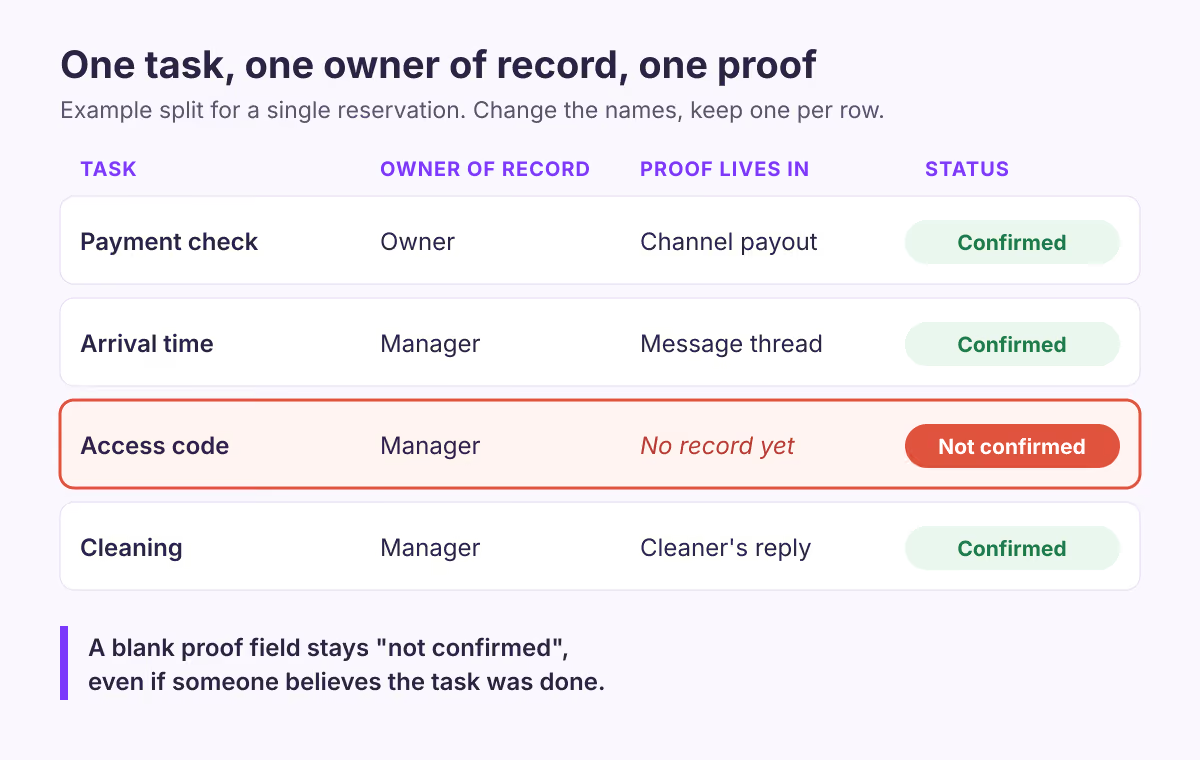
The diagram above is an illustration of the example split, not a screen from any platform. It shows the rule that matters most: a task with no recorded confirmation stays "not confirmed", even if someone believes it was done.
Payment needs particular care because its proof sits in a different place for each channel. On an Airbnb booking, Airbnb collects the guest's payment and pays the host later. Airbnb says in its payout timing article that the timing depends on the length of the stay and that you can check payout status in the Earnings dashboard. That dashboard is where the payment proof lives, so the person checking payment needs access to it. On a direct booking, the proof lives wherever you took the money, such as your Stripe account or bank.
What should a reservation handoff note contain?
A handoff note is a short record per booking that both people can read and update. It should hold the reservation reference, the owner of record for each task, the current status and where the proof is.
Keep it in one shared place both of you already open daily, such as a shared spreadsheet or notes document. Copy this template for each booking:
Reservation: [unit] / [channel] / [channel reference]
Stay: [check-in date] to [check-out date], [guests]

Payment:  owner of record [name] | status [not confirmed / paid / payout seen] | proof [where]
Arrival:  owner of record [name] | ETA [time or not confirmed] | proof [thread or call log]
Access:   owner of record [name] | sent [date, time or not sent] | method [code / key / host]
Cleaning: owner of record [name] | booked [yes/no] | confirmed by cleaner [date or no]

Open issues: [anything waiting on a reply]
Last updated: [date, time] by [name]
Two rules make the template work. Every status field starts as "not confirmed", so a blank never reads as done. And only the owner of record changes a field to confirmed, after seeing the proof.
How do you run the handoff each day?
Run a short check at a fixed time, reviewing every stay that starts within the next few days, and call the owner of record about any field still marked "not confirmed".
Our recommendation is to look 72 hours ahead, because that leaves time to reach a guest or a cleaner before arrival. Pick a window that matches your cleaner's notice period and your guests' booking habits. A simple routine:
- Open the calendar for the review window. List every arrival and departure.
- Open each handoff note. Check each field against its proof, not against memory.
- Chase the gaps. For any field still marked "not confirmed", contact its owner of record that day.
- Record changes at the source. If dates change, change them first in the channel where the booking lives, then check the other calendars.
The last step matters because calendars do not update each other instantly. Airbnb says in its calendar sync article that imported calendars update every three hours, and every other platform imports on its own schedule. Whoever makes a date change should check that the other calendars show it before treating the change as finished.
Where does a shared calendar help, and where does it stop?
A shared calendar view helps both people see the same arrivals, departures and booking statuses. It does not confirm payment, arrival time or cleaning on its own. Those still need an owner of record and a proof.
BookBed's Pro plan includes a multi-channel timeline view, and BookBed's documentation says the timeline shows all units in a single view, with colours for confirmed, pending, checked-in and completed bookings. For bookings made through the BookBed widget, the documentation says a successful payment moves a booking from pending to confirmed, and an expired payment turns a pending booking into a cancellation. That gives the person running your daily check one screen to start from.
The limits are just as important. BookBed connects to Airbnb and Booking.com through two-way iCal, not an API, so an imported OTA booking shows the dates as taken but not the guest's messages or the platform's payout status. BookBed is not a unified inbox, and each platform imports calendar changes on its own schedule. Check whether your plan gives each person their own login: on BookBed's pricing page, multi-team workspaces are listed on the Agency plan. On any plan, the handoff note and the named owner of record still do the confirming. If you are weighing tools for a small operation, our guide to a PMS for small hosts covers what to check first.
When this advice does not apply
- One person does everything. If the manager handles every task and the owner only receives statements, a handoff note per booking adds little. A written list of tasks the owner keeps for themselves is enough.
- A management contract already assigns tasks. Follow the contract. Use the map to find tasks the contract does not name.
- Your platform settings differ. Co-host rules, payout handling and permissions differ by platform and change over time. Check the current help pages for each channel you use, including any user access settings on Booking.com.
- Larger teams. With several cleaners, many units or shift changes, you may need a task tool with assignments and alerts rather than a shared note.
What to do next
- Pick your next three arrivals and fill in a handoff note for each.
- Agree on one owner of record per task with your manager, and write it down.
- Check each person's Airbnb co-host permission against the tasks you assigned them.
- Set a fixed daily time for the review window check.
- Read our guides on calendar overlaps and turnovers across properties and bookkeeping basics to connect the handoff to cleaning and payout records.
Sources
- Airbnb Help Center, "What co-hosts can do" (article 1534). Verified 2026-11-05.
- Airbnb Resource Center, "New Co-Host permissions and simple payouts". Verified 2026-11-05.
- Airbnb Help Center, "Sync your home host calendar to other websites" (article 99). Verified 2026-11-05.
- Airbnb Help Center, "When you'll get your payout" (article 425). Verified 2026-11-05.
- BookBed documentation (Calendar, Booking Statuses, iCal) and pricing page. Verified 2026-11-05.
About BookBed: The Pro plan's multi-channel timeline shows every unit's bookings and their statuses in one view, which gives your daily handoff check one place to start. It does not confirm payments, guest arrivals or cleaning in Airbnb or Booking.com for you, so keep each change verified in its source channel. See BookBed pricing