You've read that a Google Business Profile is the free way to get your vacation rental onto Google Maps, and you're ready to add the property. Stop before you submit it. Google's own eligibility rules name "rental or for-sale properties such as vacation homes" as businesses that aren't eligible for a profile.
That changes the plan, not the goal. Your first action today: write down what you'd actually be listing. Is it a single house or apartment that guests reach with a lockbox code? Or is it a business with an office or front desk where someone meets customers during set hours? The answer decides whether a Google Business Profile for your vacation rental is allowed at all, and what to do instead if it isn't.
Can you create a Google Business Profile for a vacation rental?
Usually not: Google's guidelines list vacation homes as ineligible, because a Business Profile is meant for businesses that make in-person contact with customers during their stated hours at the listed location.
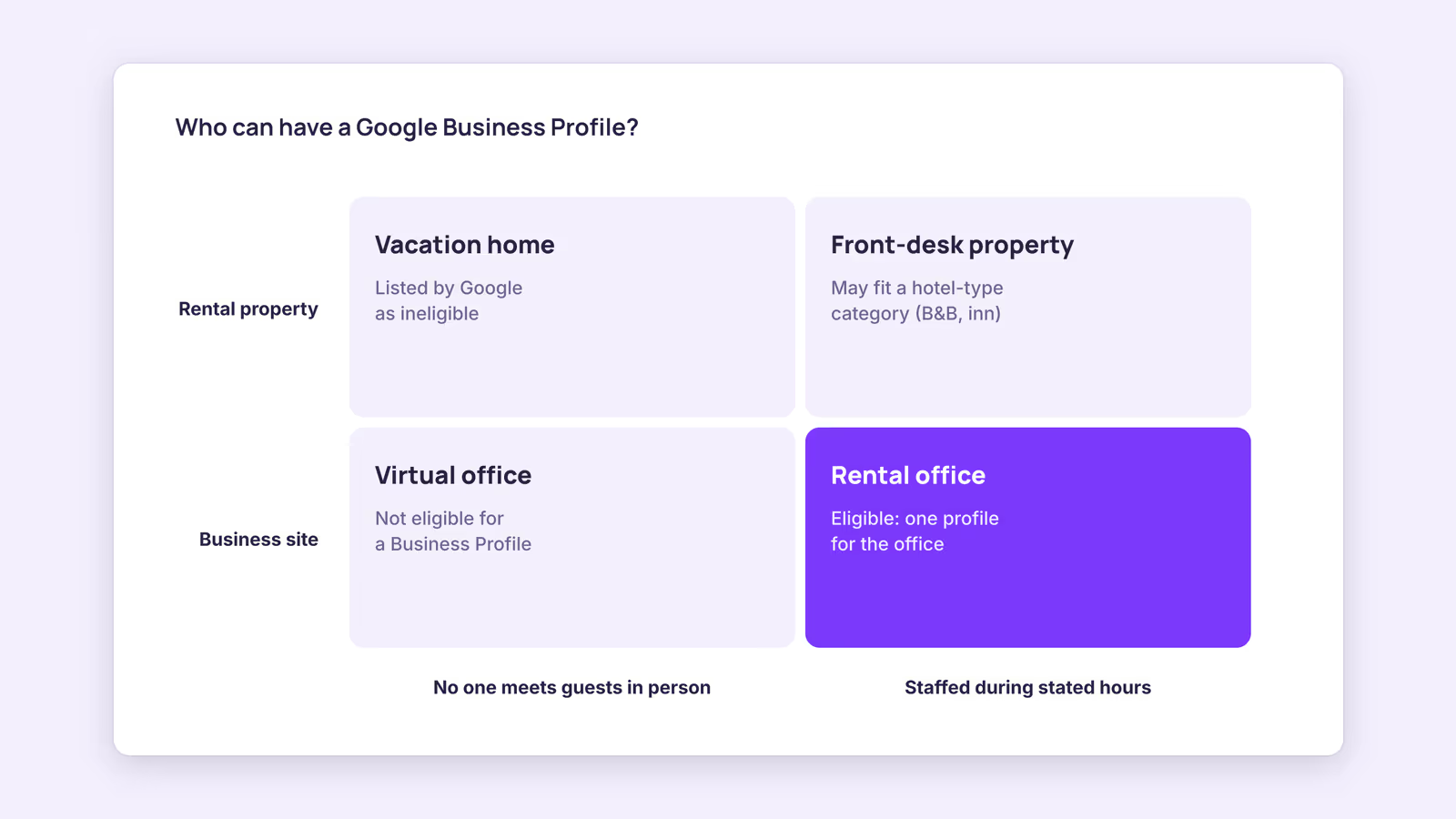
The eligibility page is short and specific. It says a business "must make in-person contact with customers during its stated hours", then lists examples of ineligible businesses. The first example is rental or for-sale properties such as vacation homes, model homes or vacant apartments. The same line adds that "sales or leasing offices, however, are eligible for verification."
So the rule targets the property, not the people behind it. A self-catered apartment you rent by the night doesn't qualify as its own profile. A rental agency with a staffed office where guests pick up keys or book in person may qualify, and that profile represents the office, not each unit.
Older advice, including an earlier version of this post, told hosts to pick a vacation rental category, list the property address and wait for a postcard. Our recommendation: don't. Creating a profile for an ineligible location breaks the guidelines, and Google's separate guidelines for representing your business say that adding unnecessary information to a business name can lead to suspension. A profile that later gets removed can't be relied on for bookings.
How do you tell whether your setup qualifies?
Compare your setup with the table below: if nobody meets customers at a fixed location during set hours, you most likely don't qualify, whatever the property looks like.
This is a diagnostic built from Google's eligibility page and its Hotel Center categories for lodging businesses. It isn't a guarantee. Google makes the final call, and its rules can change.
| Your setup | What Google's guidance says | Likely outcome |
|---|---|---|
| One vacation home or apartment, self check-in | Vacation homes are listed as ineligible | No Business Profile for the property |
| Several units, managed remotely, no office | No in-person contact at a stated location | No Business Profile |
| Management company with a staffed office open to guests | Sales or leasing offices are eligible for verification | One profile for the office, not per unit |
| Property with a front desk and on-site manager or owner | Hotel-type lodging needs a front desk, on-site management and a public address | May fit a hotel-type category such as a B&B or inn |
| Office address you rent but don't work from | Virtual offices aren't eligible | No Business Profile |
Google's lodging page puts it as three questions. Does your business have a front desk or on-site management? Does it accept overnight guests? Are the property and business address listed publicly? If you answer yes to all three, it's a hotel or related category. If you answer no to any, Google says it's likely a vacation rental. Most self-check-in rentals answer no to the first question.
The same page defines what Google treats as a vacation rental: a furnished space that's private to the guest, taking short-term overnight reservations, managed and cleaned between stays. That definition is for Google's vacation rental listings, which are a separate product from Business Profiles.
If you do qualify, how do you set up a Google Business Profile?
If you run a staffed office or a front-desk property, add or claim the business with a Google Account, use your real-world name and precise address, then complete whatever verification Google offers.
A few rules from Google's help pages matter most for rental businesses:
- Name. Google says your name should reflect your real-world business name, as used on your signage, website and stationery. Don't add location keywords or taglines like "best beach rentals".
- Address. Use the precise address of the staffed location. Google says P.O. boxes and virtual offices aren't acceptable, and businesses showing an address should keep permanent signage there.
- Verification. Google's verification page says methods are "automatically determined by Google and can't be changed" and depend on business type, region and other factors. Some businesses need more than one method. Don't plan around a specific method or timeline.
- Website. Point the website field at the page for that office or property. If guests can book directly, send them straight to a page where they can see availability.
A management company with one profile for its office can still link to a site that lists every unit. The profile stands for the office. The website does the job of showing each rental.
How else can you get a vacation rental found on Google?
If you can't have a Business Profile, put your effort into your own booking website and Google's vacation rental listings, which reach travelers searching Google without breaking the eligibility rules.
Three routes are open to a single-property host:
- Your own website. A clear site with the property name, location, photos and a booking page can rank for searches on that name. Our guides on direct booking SEO and getting traffic to a direct booking site cover the practical steps.
- Google's vacation rental listings. Google shows vacation rentals in search and Maps travel results as a separate product. Individual hosts generally reach it through a connectivity partner, not a Business Profile. See how to list on Google Vacation Rentals for the route and its limits.
- Your OTA listings. Airbnb and Booking.com pages already appear in Google search. Keep names and photos consistent so a guest who searches your property name recognizes your own site too.
This suggests a simple split: hosts with a staffed office can use a Business Profile for the office, and everyone else should treat their website as the thing Google finds.
When this advice does not apply
- Hotels, inns and B&Bs with a front desk. If your property meets Google's hotel-type criteria, a profile may be appropriate. Check the lodging categories page before you choose a category.
- Existing profiles. If you already have a profile for a vacation home, this post can't tell you what Google will do with it. Review it against the eligibility page yourself.
- Rules change. Google edits its help pages without notice. Check the linked pages before acting, not just this post.
What to do next
- Write down what you'd list: a property, or a staffed business location.
- Compare it with the diagnostic table and Google's eligibility page.
- If you qualify, set up one profile for the office or front-desk property with your real name and precise address.
- If you don't, make sure your own website has a working booking page and a name that matches your OTA listings.
- Read up on Google's vacation rental listings if you want your units in Google's travel results.
FAQ
How do I add a vacation rental to Google Maps?
Not through a Business Profile if it's a vacation home, since Google lists those as ineligible. Vacation rentals appear in Google's travel results through its separate vacation rental listings, which hosts generally reach via a connectivity partner.
Can a property management company have a Google Business Profile?
It can if it has an office that makes in-person contact with customers during its stated hours. Google says sales or leasing offices are eligible for verification. The profile represents the office, not each rental.
Can I use a virtual office address?
No. Google's guidelines say a physical mailing address you rent but don't operate from isn't eligible for a Business Profile.
About BookBed: When searchers land on your own website, they need a way to book. BookBed's embeddable direct booking widget shows live availability and takes payment through Stripe into your own Stripe account, with 0% booking commission. It doesn't bring traffic by itself; your website and listings still do that job.
Sources
- Google Business Profile Help, "Business eligibility and ownership guidelines" — Verified 2026-09-30
- Google Business Profile Help, "Guidelines for representing your business on Google" — Verified 2026-09-30
- Google Business Profile Help, "Verify your business on Google" — Verified 2026-09-30
- Google Hotel Center Help, "Categories for lodging businesses" — Verified 2026-09-30