A guest has just booked, and you want to send something better than "Thanks for booking!" The trouble is that a warm note doesn't help much if the guest still can't work out where to park, how to get in, or who to call when the keypad beeps twice.
Start with one action today: open your last five guest conversations and list every question a guest asked before or during arrival. That list, not a generic template, tells you what your welcome message has to answer. Then pick the closest template below and adapt it.
What should an Airbnb welcome message include?
A useful welcome message answers the arrival questions a guest would otherwise ask you: when they can arrive, how they get in, where they park, how to reach you, and one property quirk worth knowing.
Airbnb already handles part of this. Guests see your check-in method, such as a keypad or lockbox, before arrival, but according to Airbnb's check-in instructions article they "won't see the detailed check-in instructions until 48 hours before check-in." Your message should point to those instructions, not contradict them. If you change a code, update the listing too.
Use this checklist before you save any template:
| Element | Include it when | Common mistake |
|---|---|---|
| Check-in time and early-arrival option | Always | Stating a time that doesn't match the listing |
| Entry steps, in order | Self check-in or tricky buildings | Burying the code under three paragraphs of welcome |
| Parking and final approach | Car arrivals, gated or rural properties | "Easy to find" with no pin or landmark |
| How and when you reply | Always | Promising 24/7 availability you can't keep |
| One property quirk | Anything guests regularly ask about | Listing ten rules in the welcome message |
| Link to house manual | You have one | Pasting the whole manual into the message |
House rules and full appliance guides belong in the listing and your house manual. The welcome message is the short version a tired guest reads on a train.
When should you send each message?
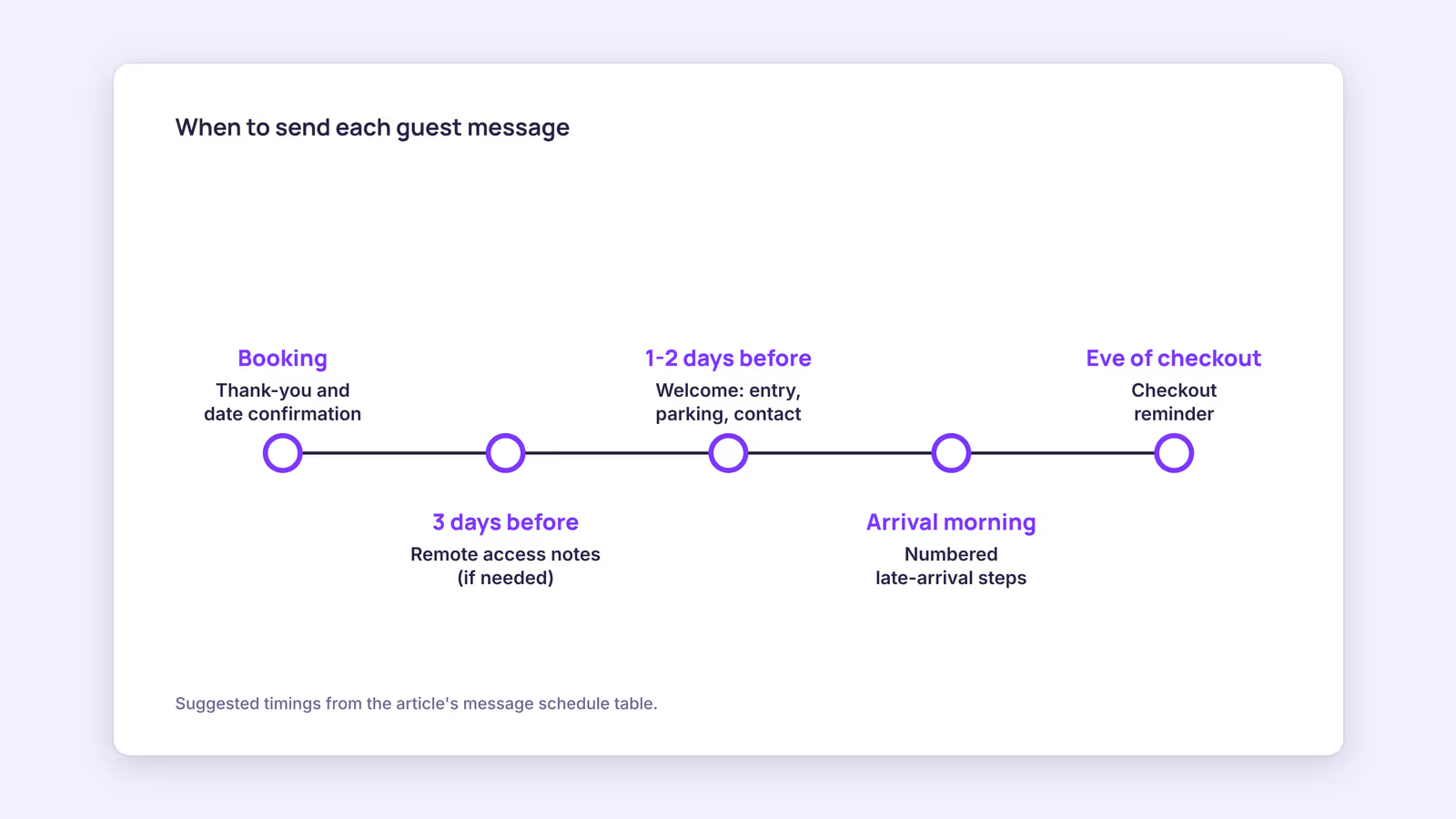
For most stays, send one pre-arrival message a day or two before check-in, timed to land once Airbnb shows guests the detailed check-in instructions, then a short check-in-day note only if arrival is complicated.
Airbnb lets you automate this with scheduled quick replies. Its scheduling article says quick replies "aren't scheduled to be sent by default, but you can schedule them to be sent before or after specific events," and that you can "skip, send early, or modify the content of an upcoming scheduled quick reply before it's sent."
Our recommendation, based on the checklist above rather than on measured response rates:
| Message | Suggested timing | Purpose |
|---|---|---|
| Booking thank-you | Shortly after booking | Confirm dates, invite special requests |
| Pre-arrival welcome | 1–2 days before check-in | Entry, parking, contact, quirk |
| Remote or seasonal access | 3 days before, repeated at 1 day | Road, weather, offline maps |
| Late-arrival steps | Morning of arrival | Numbered entry sequence |
| Checkout reminder | Evening before checkout | See the checkout instructions guide |
The square-bracket fields in the templates below map to Airbnb's "details," which its quick replies article describes as placeholders that pull information from your listing and the guest's reservation. One catch: if the matching listing field is empty, "the detail will display as unavailable in the message." Send each template to yourself or a co-host before you schedule it.
Which welcome message template fits your listing?
Pick the one closest to your property and replace every bracketed field. The business names and distances in these templates are placeholders, not recommendations.
1. City apartment, self check-in
Hi [Guest first name],
The apartment is ready for you on [Check-in date]. Check-in is from [Check-in time]. Your detailed entry steps are in the check-in instructions in your reservation, and the same keypad code opens the lobby door.
A few things to know:
- Coffee, tea and a few breakfast basics are on the counter.
- The wifi details are on the card by the door.
- The building is quiet after 22:00, so please keep voices down in the stairwell.
I reply to messages here between [start time] and [end time].
See you soon, [Host name]
New to keypads and lockboxes? The self check-in guide covers the setup side.
2. Villa, family stay
Hi [Guest first name],
We're getting the villa ready for your group on [Check-in date]. A few things to plan around:
- Driving in: the last stretch is a gravel road. Take it slowly. The gate location is pinned in your check-in instructions.
- Groceries: the nearest supermarket is [name], about [X] minutes by car.
- Pool: [season and any safety notes, such as the gate that must stay closed].
The house guide covers wifi, appliances and an emergency number: [House guide link]
Looking forward to having you, [Host name]
3. Remote cabin
Hi [Guest first name],
Before you drive up, three cabin-specific things:
- The road: the last [X] km is a forest road. Tell me your arrival date and I'll let you know current conditions.
- No mobile signal at the cabin: download offline maps before the last hour of driving.
- Wood stove: it's the main heat source. Wood is on the porch, and the lighting steps are in the cabin guide. Message me before you arrive if you've never used one.
Everything else is in the cabin guide: [Guide link]
[Host name]
4. Boutique room with reception
Hi [Guest first name],
Your room is ready from [Check-in time] today. Reception is staffed [hours]; after hours, ring the bell by the door.
- Breakfast is served [hours] in the front room.
- If you'd like a restaurant booked, message me by [time] and I'll arrange it.
See you later today, [Host name]
5. Studio, business traveler
Hi [Guest first name],
Quick logistics for tomorrow:
- Check-in from [Check-in time]. Entry steps are in your check-in instructions.
- Wifi: [network] / [password]. It's fine for video calls.
- The desk has a monitor and a USB-C cable.
- There's an iron in the wardrobe.
Have a productive trip, [Host name]
Only state an internet speed you've tested yourself. The wifi setup guide explains how to measure it.
6. Late arrival
Hi [Guest first name],
Thanks for letting me know you'll arrive late. Self check-in works at any hour.
- Lobby door: enter the keypad code, then press the green button.
- Take the lift to floor [X]. The apartment is [number], on your right.
- Door keypad: enter the code, then push the handle down.
- The hallway light switch is on the left inside the door.
If any step doesn't work, message or call me at [number]. I'll keep my phone on tonight.
[Host name]
7. Co-host sending for an owner
Hi [Guest first name],
I'm [Co-host name], the local host for [Listing name]. [Owner name] owns the place; I'm the person to message during your stay.
Check-in is from [Check-in time], and your entry steps are in the check-in instructions. The welcome card on the kitchen table has the wifi and my number.
One thing specific to this apartment: the dishwasher needs a two-second press to start. A quick tap doesn't register.
[Co-host name]
8. Returning guest
Hi [Guest first name],
Welcome back. The apartment is ready from [Check-in time]. Please check the entry code in your check-in instructions, in case it has changed since your last stay.
A couple of things are new since your last visit: [change 1] and [change 2].
Glad to have you back, [Host name]
How do you keep templates from sounding generic?
Add one sentence that could only be true of your property, put logistics before pleasantries, and read the message aloud once. Those three edits take minutes and remove most of the canned feel.
Run this pre-send check on each template:
- Is the entry information in the first half? A guest standing at the door shouldn't have to scroll.
- Is there exactly one quirk? One useful warning is remembered. Five read like a rulebook.
- Is the reply promise realistic? "Between 8:00 and 22:00" is honest. "Anytime" isn't, unless you have cover.
- Does every bracketed field resolve? Preview it, because empty listing fields show as unavailable.
- Does the voice match the property? A cabin note can be slower. A business studio note should be brisk.
Our recommendation: if you manage more than a few listings, automate the timing but keep one hand-written line per property. Automation handles when the message goes out; it can't know that your building's lift stalls on floor three.
When this advice does not apply
- Staffed front desks: if guests always meet someone in person, a long pre-arrival message adds little. A short confirmation is enough.
- Other platforms: these timings and features are Airbnb's. Booking.com and direct bookings have their own messaging tools and rules.
- Local registration rules: some countries require guest ID or registration before arrival. Check your local requirements rather than relying on a template.
What to do next
- List the arrival questions from your last five conversations.
- Pick the closest template and replace every placeholder with your own details.
- Fill the listing fields the template's details depend on, then preview it.
- Schedule it as a quick reply for 1–2 days before check-in.
- Revisit it whenever a guest asks something the message should have answered.
FAQ
Should the entry code go in the welcome message?
Our recommendation is to keep detailed entry steps in Airbnb's check-in instructions, which guests see 48 hours before check-in, and refer to them in your message. That keeps one current version of the code.
Can I send the same template to every listing?
You can reuse the structure, but each listing needs its own details, quirk and parking notes. Airbnb applies a scheduled quick reply per listing to current and upcoming reservations, so check which listings each template is attached to.
How long should a welcome message be?
Long enough to answer arrival questions and no longer. If it scrolls past one phone screen, move the extra detail into your house manual.
About BookBed: the Pro plan includes automated guest messaging for pre-arrival, mid-stay and post-stay messages, so you can reuse these templates for the stays you manage in BookBed. You still need to write the property-specific lines yourself. Plans come with a 14-day free trial, no card required. Try BookBed free
Sources
- Airbnb Help Center, "Add check-in and checkout instructions to listings" — Verified 2026-09-30
- Airbnb Help Center, "Create scheduled quick replies and send them to guests automatically" — Verified 2026-09-30
- Airbnb Help Center, "Create and send quick replies to guests" — Verified 2026-09-30
- BookBed, "Pricing" (public/pricing.md) — Verified 2026-09-30