Guest communication is where most avoidable bad stays start: a guest who can't find the door code at 11 p.m., or who finds a broken kettle and never mentions it until the review. You don't need more messages to fix that. You need the right six messages at the right moments, plus fast replies to everything else. Your first action today: open your last three guest threads and write down every question a guest had to ask you. Each one is information a planned message should have delivered earlier.
What does good guest communication look like on Airbnb?
Good guest communication means guests get the information they need before they need it, and get a human reply within hours when something unexpected comes up. Planned messages handle the first part; your response habits handle the second.
Airbnb measures the second part directly. To qualify as a Superhost, you must respond to 90% of new messages within 24 hours, alongside review, cancellation, and stay-count thresholds. Airbnb also says its search algorithm considers "communications between hosts and guests on the platform" when assessing listing quality. It doesn't publish how much weight that carries, so treat responsiveness as one quality signal, not a ranking trick.
For a reader-facing starting point on the first message, see our Airbnb welcome message templates.
Which Airbnb guest messaging timeline should you use?
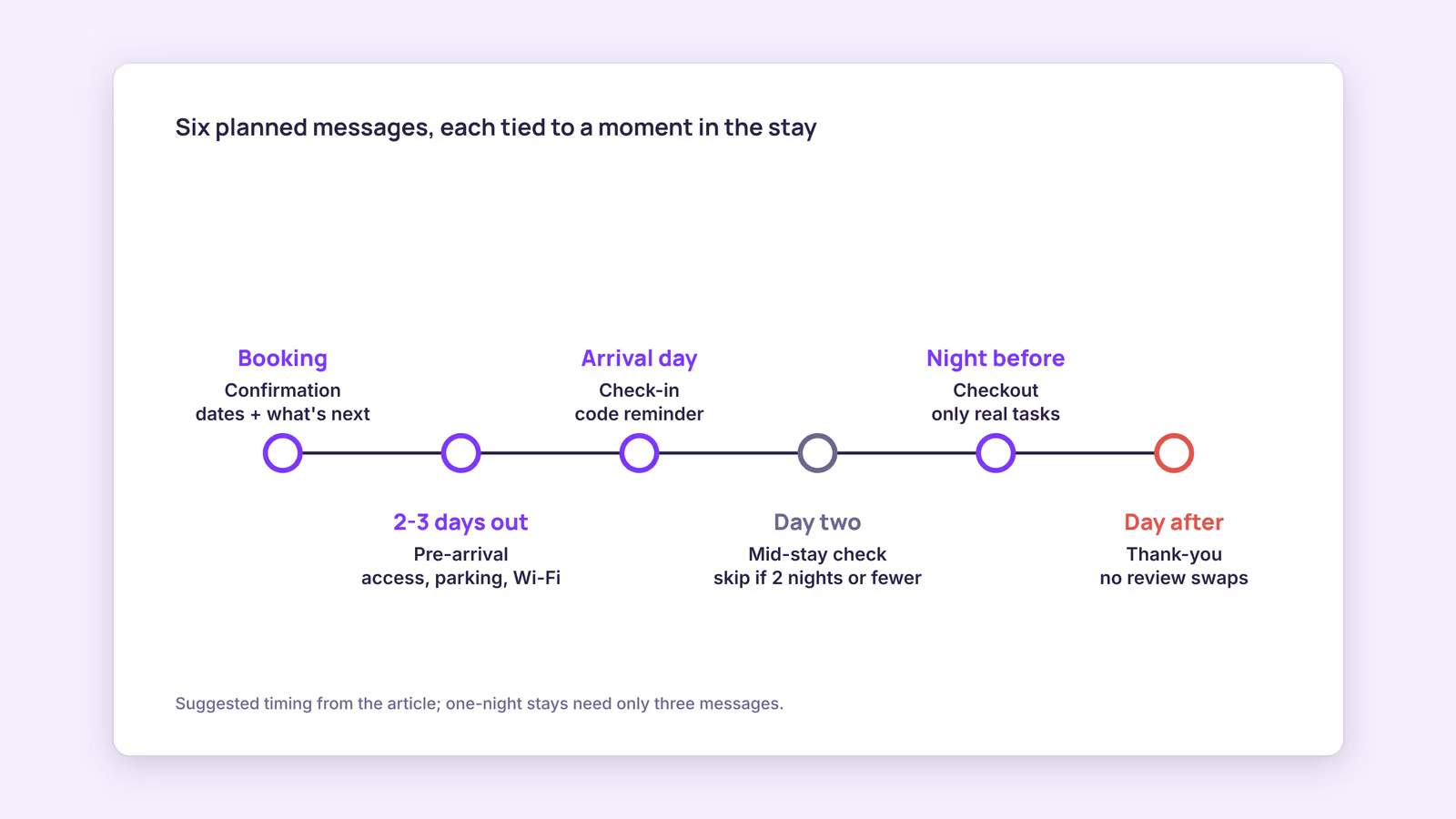
Use a short sequence tied to the stay, not to a fixed count: confirmation, pre-arrival, check-in day, an optional mid-stay check, checkout, and a thank-you. Drop the ones a given stay doesn't need.
Here's the timeline as a decision aid. The "skip when" column matters as much as the timing.
| Message | Suggested timing | Must contain | Skip when |
|---|---|---|---|
| Confirmation | Right after booking | Dates, check-in window, when details will arrive | Never |
| Pre-arrival | Two to three days before check-in | Directions, parking, access method, Wi-Fi, house rules | Same-day bookings (merge with check-in) |
| Check-in day | Morning of arrival | Access code reminder, check-in time, how to reach you | Pre-arrival sent within the last 24 hours |
| Mid-stay check | Day two | One open question about the stay | Stays of two nights or fewer |
| Checkout | Evening before departure | Checkout time, the few tasks you actually need | Never |
| Thank-you | Day after checkout | Thanks, optional review mention | Never |
Our recommendation: keep one-night stays to three messages (confirmation, combined arrival details, checkout). Anything more reads as noise.
Airbnb guest message templates you can adapt
These templates are short on purpose. Guests read on phones, often while carrying bags, so put the one detail they need right now in the first line.
Confirmation
Hi [Guest Name], thanks for booking [Property Name]. Check-in is [Date] from [Time], checkout [Date] by [Time]. I'll send directions, parking, and access details on [Date]. Any questions before then, just message me here.
Pre-arrival
Hi [Guest Name], your stay starts on [Date]. Address: [Address]. Parking: [Details]. Access: [Lockbox / smart lock / meet-and-greet details]. Wi-Fi: [Network] / [Password]. House rules are in the listing and in the guide by the door. Safe travels.
Check-in day (your Airbnb guest check in message)
Good morning [Guest Name]. The place is ready from [Time]. Your access code is [Code]. If anything isn't working when you arrive, message me here and I'll sort it out.
Mid-stay check
Hi [Guest Name], hope the stay is going well. Is anything missing or not working? Small things are easy to fix while you're here.
Checkout
Hi [Guest Name], a reminder that checkout is tomorrow by [Time]. Please [your two or three real tasks, e.g. leave keys in the lockbox, close the windows]. No need to strip beds.
Thank-you (your Airbnb guest review message)
Hi [Guest Name], thanks for staying at [Property Name]. If you have a minute, a review helps future guests know what to expect. Safe travels home.
Two things this post's earlier version recommended that you shouldn't do. First, don't tell guests you've already left them a five-star review in exchange for one: Airbnb's Reviews Policy says reviews may not be provided or withheld in exchange for something of value, including "a reciprocal positive review." Airbnb reviews are hidden until both sides submit or the 14-day window ends, so there's no reason to announce yours. Second, don't message past Airbnb guests offering a discount to book on your own site; see the rules below.
What are Airbnb's communication rules for hosts?
Airbnb's rules bar you from moving bookings off the platform, sharing off-platform links in messages, offering discounts to book elsewhere, and using guest contact details for anything unrelated to the stay.
Those points come from Airbnb's Off-Platform and Fee Transparency Policy, which also prohibits taking people off Airbnb for feedback and reviews, and requiring guests to use other websites or apps to access the listing. In practice that means:
- Avoid external links in Airbnb messages. Write directions out, and never link a booking page.
- Don't send a "book direct next time, 10% off" follow-up to Airbnb guests. The old template in this post did exactly that.
- Ask for reviews inside Airbnb, not through a third-party survey.
Direct-booking marketing is fine for guests who found you directly, through your own site, repeat word of mouth, or local channels. Other platforms, including Booking.com, set their own messaging rules.
Should you automate guest messages or write them by hand?
Automate the predictable, time-based messages and answer real questions yourself. Scheduled templates stop you forgetting the pre-arrival note; a person should handle complaints, special requests, and anything that needs judgment.
Airbnb itself offers quick replies and scheduled quick replies in the host inbox, which is enough for many single-listing hosts on one channel. Once you run several units or several channels, keeping separate template sets in each inbox gets error-prone, and that's usually when hosts look at software. Our guide to how to automate guest messaging compares the setup options in more detail.
Before you automate anything, run this checklist on each template:
- Does it send at a time the guest is likely awake in their time zone?
- Does every placeholder have a value for every unit (Wi-Fi, parking, access)?
- Would it still make sense if the booking was changed or shortened?
- Is there a human fallback if the guest replies with a problem?
When this advice does not apply
- Hotels, hostels, and staffed properties with a front desk handle arrival in person, so the pre-arrival and check-in messages shrink.
- Long stays of 28 nights or more need a different rhythm: fewer scheduled messages, a clear maintenance contact, and periodic check-ins agreed with the guest.
- Rules differ by channel. The Airbnb policies above don't govern bookings made through your own website, and other platforms set their own messaging rules.
What to do next
- Pull your last three guest threads and list every question guests had to ask.
- Fold those answers into the pre-arrival and check-in templates above.
- Set up Airbnb's scheduled quick replies for confirmation, pre-arrival, and checkout.
- Remove any review-swap wording or off-platform booking offers from your existing templates.
- Check your response rate on your Airbnb performance page each month.
FAQ
How many messages should I send per stay?
Enough to cover the timeline above and no more. For most stays that's four to six planned messages; for one-night stays, three.
Should I leave my review first?
It doesn't matter for visibility, because Airbnb publishes both reviews together or when the 14-day window ends. Just don't tie your review to the guest's.
How do I respond to a bad review?
You can post one public response under the review; Airbnb publishes it immediately. Keep it factual and short. Our Airbnb review response templates cover common cases.
Automated guest messaging on BookBed Pro: set pre-arrival, mid-stay, and post-stay messages once and let them send on schedule for each booking. See the Pro plan →
Sources
- Airbnb, "What's required to be a Superhost" — Verified 2026-09-30
- Airbnb, "How search results work" — Verified 2026-09-30
- Airbnb, "Managing guest messages" — Verified 2026-09-30
- Airbnb, "Off-Platform and Fee Transparency Policy" — Verified 2026-09-30
- Airbnb, "Reviews Policy" — Verified 2026-09-30