You've got an Airbnb listing and a second place guests can book, and you want one channel manager to hold the calendar so the same night can't sell twice. Connecting a channel manager to Airbnb through iCal takes two links per listing: one from Airbnb into your tool, one from your tool back into Airbnb. Your first action is to open your Airbnb calendar and find the calendar-connection screen described below.
This guide covers the iCal route most small hosts use, how to test it, and where it falls short. If you want the background on how calendar feeds work, start with what iCal sync is.
How do you connect a channel manager to Airbnb with iCal?
You copy Airbnb's calendar link into your channel manager, then paste your channel manager's .ics link back into Airbnb, so bookings and blocks flow in both directions between the two calendars.
Airbnb's own help page on syncing your calendar to other websites gives the desktop path:
- Click Calendar and select the listing calendar you want to connect.
- Click Availability, then Connect calendars, then Connect to another website.
- Copy the Airbnb calendar link. This is the export: it sends your Airbnb bookings and blocked nights to the other calendar.
- In your channel manager, paste that link into the import field for the matching property or unit and save.
- Back in Airbnb, paste your channel manager's export link into the calendar address field. Airbnb says the link must end in .ics.
- Name it something you'll recognize later (for example "Channel manager") and click Add calendar.
Skip step 5 and you only have one-way sync: your channel manager sees Airbnb bookings, but Airbnb never learns about bookings from Booking.com or your website. That's the most common reason hosts still get double-booked after "connecting."
Treat the Airbnb link like a key. Anyone who has it can read which dates are booked, so don't post it in shared docs or support forums.
If you run several listings, each one has its own calendar and its own link. Repeat the process per listing and map each link to exactly one unit in your channel manager. Two listings pointed at the same unit, or one link mapped to the wrong unit, will block the wrong nights.
How do you test that Airbnb calendar sync actually works?
Block a date in your channel manager, refresh the connected calendar in Airbnb, and confirm that night shows as blocked; then check the reverse direction with an Airbnb block before you rely on it.
The key detail is timing. Airbnb states that your calendar "automatically updates every 3 hours" from connected calendars, and that you can select Refresh on a connected calendar to pull sooner (Airbnb Help, article 99). It also warns that it can only request updates from the other website so many times, so repeated refreshing can hit a limit. Your channel manager reads Airbnb's link on its own schedule, which varies by tool.
Here's a test checklist you can run in about ten minutes per listing:
| Step | What you do | What you should see | If you don't |
|---|---|---|---|
| 1 | Block a future night in your channel manager | Night blocked in the channel manager | Check you're on the right unit |
| 2 | Click Refresh on that calendar in Airbnb | Same night shows blocked on Airbnb | Re-copy the .ics link; confirm it ends in .ics |
| 3 | Block a different night directly on Airbnb | Night appears in the channel manager after its next import | Confirm the Airbnb link is saved on the correct unit |
| 4 | Unblock both nights | Both clear on both sides after the next refresh | Look for a second, stale imported calendar in Airbnb |
| 5 | Paste both links into the iCal feed checker | Feeds parse, no duplicate or overlapping events | Fix the feed the checker flags before going live |
Airbnb also notes that nights you block on another calendar "may or may not be blocked" on Airbnb, including preparation time or advance-notice settings set elsewhere (article 99). Our recommendation: set buffer rules like preparation time inside Airbnb itself rather than assuming they'll carry over.
Why does Airbnb still allow double bookings after I connect a channel manager?
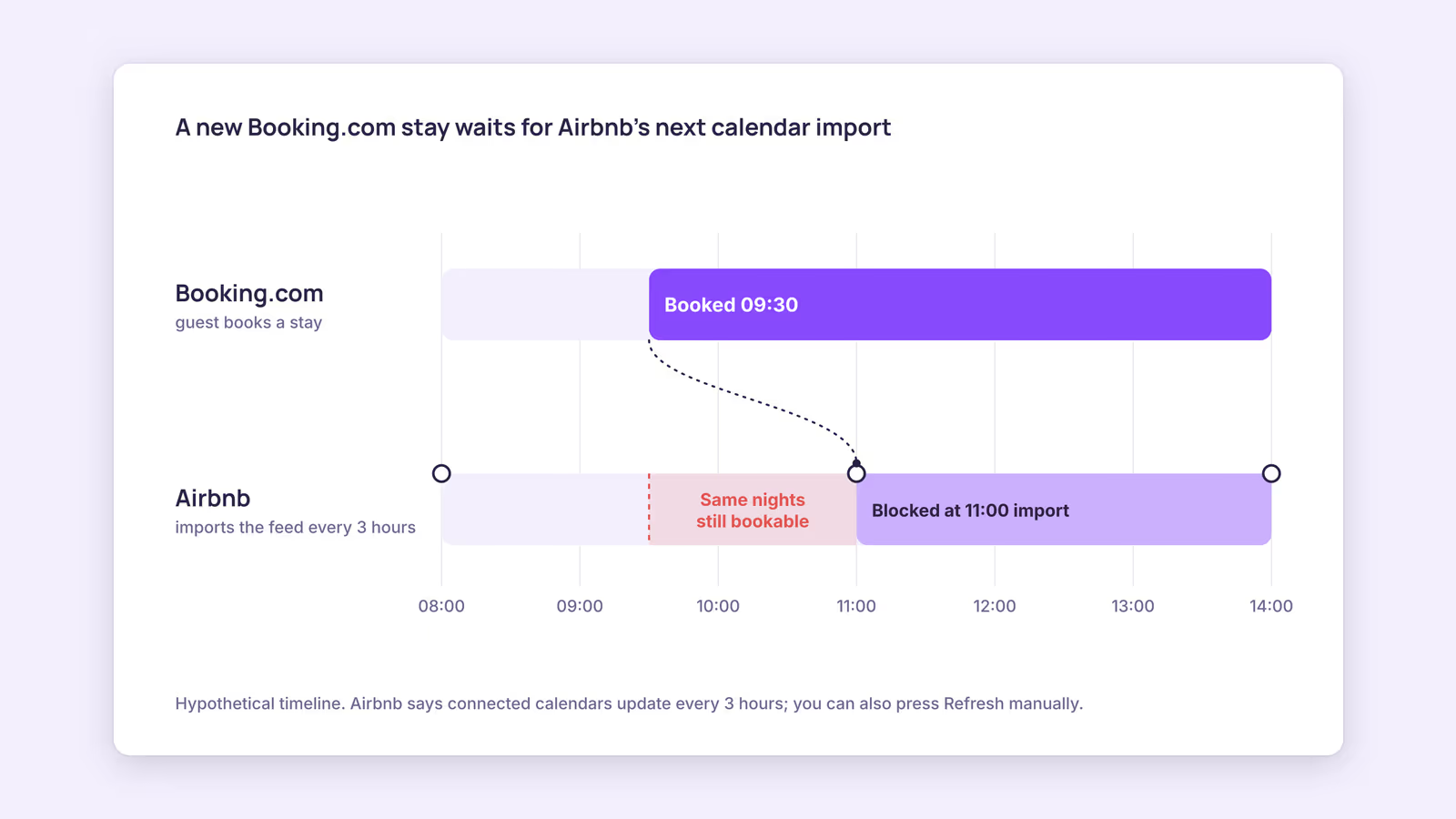
Because iCal is a polling system: each side fetches the other's calendar on a timer, so a booking made on another channel can sit invisible to Airbnb for up to three hours between automatic updates.
A worked example makes the gap concrete. Consider a hypothetical host with one apartment on Airbnb and Booking.com. A guest books Friday on Booking.com at 10:05. Booking.com says it imports connected calendars every two hours and that iCal sync is not real time (Booking.com Partner Help). Your channel manager has to pick up that booking, and then Airbnb has to fetch your channel manager's feed. If Airbnb last refreshed at 10:00, its next automatic update may not come until about 13:00. Anyone on Airbnb who books Friday in that window creates a double booking.
The practical fixes, in order of effort:
- Hit Refresh after any off-Airbnb booking for dates in the next few weeks. It's manual, but it closes the gap for the dates that matter most.
- Watch short-notice dates closely. A booking for next weekend leaves little time to fix a clash, so check the Airbnb calendar yourself.
- Remove stale imports. An old calendar you forgot about can keep blocking or unblocking nights. In Airbnb's connected calendars list, delete any link you no longer use.
- Consider an API connection if you have many units or frequent last-minute bookings (see the next section).
If a clash does happen, cancelling on Airbnb has a cost: Airbnb's host cancellation policy describes cancellation fees and says your calendar may be blocked for those dates. That's why the manual checks above are worth the minutes.
Should you use an Airbnb channel manager API connection instead of iCal?
Use iCal if you have a handful of listings and mostly need availability kept in step; look at an API-connected tool if you need rates, messages, and bookings to move faster than a scheduled calendar fetch allows.
iCal only carries dates. Guest names, prices, and messages don't travel through it. Some channel managers connect to Airbnb through its software partner program instead; Smoobu, for example, describes itself as an Airbnb Preferred Partner using an API connection. Read each vendor's page for the exact scope of what it syncs.
One money point before you switch: Airbnb's service fee page says the single host-only fee (15.5% for most hosts) is mandatory for hosts who use property management software, and that you can't revert after migrating. Run your numbers through the Airbnb fee calculator before you connect one.
To remove a channel manager from Airbnb later, delete the imported calendar in Airbnb's connected calendars and remove the Airbnb link from the tool. API connections are usually disconnected from the tool's side or Airbnb's account settings; follow the vendor's instructions.
When this advice does not apply
- Co-hosts may not have permission to change calendar settings. Ask the listing owner to share the Airbnb link or add the import.
- Hotels and serviced apartments on Airbnb often use API-based software rather than iCal, and different fee rules apply per article 1857.
- Very high-turnover listings with many same-day bookings may find a three-hour polling window too loose for iCal alone.
- Menu labels in Airbnb change over time; if the steps don't match, search Airbnb Help for "sync calendar."
What to do next
- Open each Airbnb listing's calendar and list every calendar already connected there.
- Set up both directions (Airbnb into your tool, your tool into Airbnb) for every listing, one link per unit.
- Run the five-step test table above and check both feeds in the iCal feed checker.
- Add a habit: after any booking from another channel for the next few weeks, click Refresh in Airbnb.
- If you're adding Booking.com too, follow the matching guide on connecting a channel manager to Booking.com.
FAQ
How often does Airbnb sync an imported calendar?
Airbnb says it automatically updates connected calendars every three hours, with a manual Refresh option that is limited in how often it can be used (article 99).
Can I connect multiple Airbnb listings to one channel manager?
Yes. Each listing has its own calendar link, so connect each listing separately and map it to one unit.
Does iCal sync send guest details to my channel manager?
No. iCal transfers booked and blocked dates. Guest names, messages, and payouts stay in Airbnb.
BookBed offers two-way iCal sync with Airbnb and Booking.com, so your Airbnb calendar and your other channels share one availability view. It uses iCal, not a direct Airbnb API, and Airbnb still fetches on its own schedule. Start a 14-day free trial →
Sources
- Airbnb, "Sync your home host calendar to other websites" — Verified 2026-09-30
- Airbnb, "Airbnb service fees" — Verified 2026-09-30
- Airbnb, "Host cancellation policy" — Verified 2026-09-30
- Booking.com, "Updating your availability calendar in the extranet" — Verified 2026-09-30
- Smoobu, "Channel manager for Airbnb" — Verified 2026-09-30