You pasted Airbnb's calendar export link into another calendar months ago, and it worked. Older Airbnb stays still sit on that calendar, so everything looks connected. Then a guest books on Airbnb, and the other calendar never shows it. The dates stay open there, and a second guest can book them.
Stays that are already on the importing calendar prove only that the link worked once. To know whether it works today, you need to check three things in order: does the link still return a calendar, does that calendar contain your newest Airbnb stay, and has the importing side actually read it recently. This guide walks through each check, then gives you a test that proves the chain is working again.
What should you do first when an Airbnb stay is missing elsewhere?
Block the affected nights by hand on every other channel and calendar where the unit can be booked, before you start diagnosing anything.
Open the unit's Airbnb calendar and list every reservation and blocked night for the next few months. Compare that list with the calendar that imports Airbnb's link. Any Airbnb night that is open on the other side is a night someone else can book. Close those nights directly on each channel. You can remove the manual blocks once the link is fixed and the imported stays appear.
Write down the newest Airbnb reservation that is missing, with its dates. You will use it as your marker in every check below.
Where can an Airbnb export link break?
The chain has three parts: the link itself, the calendar file Airbnb serves at that link, and the calendar or tool that reads the file. A fault in any one looks the same from the outside.
Airbnb's calendar sync help page describes the export as a URL: "To export, we'll give you a URL that you'll paste into the other website's calendar." Airbnb publishes the file at that address, and the other calendar has to come back and read it. Nothing is pushed. If the address is wrong, if the file no longer holds what you expect, or if the reader has stopped reading, the newest stays never arrive, while the stays it read earlier stay visible. We infer that this is why a broken link so often goes unnoticed.
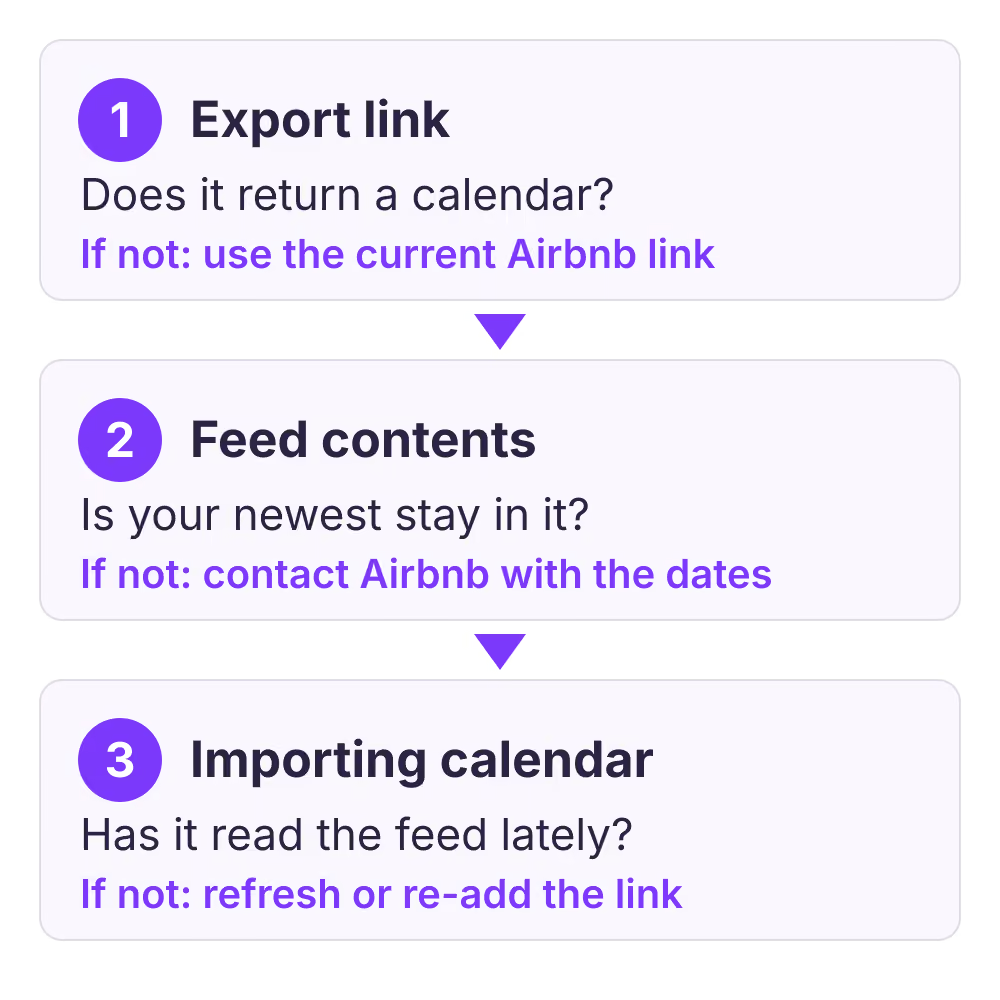
The diagram follows the order of the checks below. It shows where to look, not how often any platform reads a feed: each importing platform decides that itself.
How do you check whether the export link still works?
Open the exact link the importing calendar is using and see what comes back. A working link returns a calendar file, not a login page, an error or nothing.
Copy the link from the importing side, not from Airbnb, because that is the address actually in use. Look for it in that calendar's settings or on the unit's import or sync screen. Then test it:
- Check that the link looks complete. A link cut off during copying, or one with a space or line break inside it, points somewhere else. The iCalendar standard, RFC 5545, names
icsas the file extension for calendar files, and Airbnb's help page asks for links ending in.icswhen you import into Airbnb, so a link that has lost its ending deserves suspicion. - Paste the link into a calendar validator such as BookBed's iCal checker. It fetches the feed once and reports the server's response, or the reason it could not read the file.
- Read the result as a calendar. A valid feed shows a count of events and the earliest and latest dates it contains. An error, a timeout or "not a calendar" means the importing side cannot read this address either.
Our checker does not follow redirects, for security reasons. If it reports a redirect, open the link in a private browser window to see where it lands, and test that final address.
Compare it with the link Airbnb shows today
Airbnb's help page gives the path: open Calendar, select the listing, click Availability, then under Connect calendars click Connect to another website. Copy the export link shown there and compare it, character by character, with the one the importing side uses.
If the two differ, the importing side is reading an old or wrong address. Common reasons include copying from a different listing, from a listing you later duplicated or deactivated, or from a note made long ago. When you manage several units, check the listing name carefully: a link from the wrong listing still returns a perfectly valid calendar, just for another unit. Airbnb's help page does not describe a way to reset or regenerate the export link, so treat the link Airbnb currently shows as the one to use. That is our inference from the page, not an Airbnb rule.
Does the feed contain your newest Airbnb stay?
If the link returns a calendar, look for the marker stay you wrote down. Whether it is present tells you which side of the chain to fix.
The checker lists sample events with their start and end dates, plus the latest date in the file. Find your marker's dates. Keep in mind what Airbnb puts into the export: the help page says it includes "nights that are blocked for your availability settings, preparation time, advance notice, and minimum stays", as well as booked nights. So the feed usually holds more blocked nights than reservations. That is expected and is not a fault.
Use this table to read what you find:
| What you find | Where the fault sits | Next step |
|---|---|---|
| Link returns an error or no calendar | The link | Replace it with the current Airbnb link |
| Valid feed, but for another listing | The link | Copy the link from the correct listing |
| Feed has the marker, importer does not | The importing side | Check its last update and errors |
| Feed lacks a confirmed marker stay | Airbnb's export | Contact Airbnb support with the dates |
| Marker shows on both, other nights missing | Date range or blocks | Check range and block settings |
Each calendar event in the file should carry a UID, which RFC 5545 defines as "the persistent, globally unique identifier for the calendar component", and a start date. The checker flags missing UIDs or start dates, and duplicate UIDs. Those problems are uncommon in a platform's own feed, but if they appear, include them in your report to Airbnb.
Why would the importing calendar stop reading a working link?
When the feed is correct but the importing calendar is still missing the stay, the reader is the problem. Each importer decides when to fetch, and some stop quietly after a failure.
Look for a "last updated" time or an error message next to the imported calendar. Airbnb shows this for the calendars it imports. Other tools vary. If the last update is old, use the tool's manual refresh or import button if it has one. If it has none, remove the imported link and add the current one again. Airbnb's own help page notes that its imported calendars cannot be paused, only disconnected and reconnected. Other tools have their own rules, so check theirs.
Some importers have limits of their own. Google's help page for subscribing by URL says you must use a computer web browser to subscribe, not the mobile app, and it does not state how often Google refreshes a subscribed calendar. If timing matters for your bookings, don't rely on a personal calendar as your source of truth for availability.
Also check for doubled or looping feeds. Two imported copies of the same Airbnb link on one unit can disagree after you replace only one of them. A loop, where calendar A imports B and B imports A, can return stays late or twice. Keep one path for each channel.
How do you prove the link works again?
Make a change on Airbnb that you can recognise, then watch it arrive. Seeing a recent change on the other side is stronger evidence than seeing old stays.
- On Airbnb, block one night far in the future that no guest is likely to want.
- Run the export link through the checker and confirm the blocked night now appears in the feed.
- Wait for the importing calendar's next scheduled read, or use its manual refresh.
- Confirm the night is blocked on the importing side, then unblock it on Airbnb and repeat to confirm it clears.
- Remove the manual blocks you added in the first step only after your real marker stay also appears.
If step 2 fails, the problem is on Airbnb's side or the link. If step 2 passes and step 4 fails, the problem is on the importing side. Repeat the test after any change to your listings, such as adding, duplicating or archiving a unit.
When this advice does not apply
This guide covers Airbnb's iCal export link. If your channel manager connects to Airbnb through an approved API connection, it does not use this link, and its own connection status is where to look. If Airbnb is the side that stopped receiving stays from your other calendar, the direction is reversed: see what to do when a direct booking does not reach Airbnb. If a stay vanished from a Booking.com feed, see finding a booking that disappeared from an iCal feed.
iCal sync also has a delay that no fix removes. Each platform reads feeds on its own schedule, so a booking made on one channel can stay open on another for a while even when every link is correct. Our explainer on iCal versus API sync covers that window and how to plan around it.
What to do next
- Block any Airbnb nights that are open on your other channels, and note your newest missing stay.
- Put the exact link the importing side uses through the iCal checker.
- Compare it with the link on Airbnb's Connect calendars screen for the correct listing.
- Find out whether the feed contains your marker stay, then fix the side the table points to.
- Run the block-a-night test, and repeat it whenever you add or archive a unit.
FAQ
Does Airbnb's export link expire?
Airbnb's help page does not say that export links expire, and it does not describe a reset. If the link no longer returns a calendar, copy the current one from the listing's Connect calendars screen and replace the old one.
Why does the other calendar show more blocked nights than I have bookings?
Airbnb's export includes nights blocked by availability settings, preparation time, advance notice and minimum stays, not only reservations. Those blocks are expected.
Sources
- Airbnb Help Center, "Sync your home host calendar to other websites". Verified 2026-10-30.
- Google Calendar Help, "Subscribe to someone else's calendar". Verified 2026-10-30.
- IETF, RFC 5545, "Internet Calendaring and Scheduling Core Object Specification (iCalendar)". Verified 2026-10-30.
About BookBed: BookBed's free iCal checker fetches any calendar feed once and shows whether it responds, how many events it holds, and its date range, and it flags missing or duplicate UIDs. It reads the file only; it can't see another platform's import settings. Check your iCal feeds