
You pay every month for a property management system with owner statements, team roles, rate rules and a reporting tab you've never opened. Meanwhile the things you actually do each week, such as checking who arrives Friday, whether the deposit came in and which dates are still free, happen in a spreadsheet, your phone's notes or the Airbnb app.
That gap is the real problem. The question isn't whether your software has enough features. It's whether it does the few jobs three rentals need well enough that you stop keeping a second record. This guide gives you a short list of those jobs, a way to measure what your current tool costs you, and a safe order for leaving it if the numbers say you should.
What does a host with one to three units actually need software to do?
For one to three units, we'd reduce it to seven jobs the software has to do reliably: hold true availability, keep one reservation record, track payment status, store guest details, take direct bookings, export your data and recover from mistakes.
Everything else is optional until a specific situation makes it necessary. Use this list as the yardstick for any tool you're paying for:
| Job | Done well when | Warning sign |
|---|---|---|
| Trustworthy availability | One calendar per unit matches every channel | You check two apps before accepting |
| One reservation record | Every stay lives in one place | Bookings copied into a sheet |
| Payment status | You see paid, due and refunded | You open Stripe or bank to confirm |
| Guest details | Name, contact and arrival notes sit with the stay | Details scattered across inboxes |
| Direct booking | Repeat guests can book and pay you | Direct guests pay by manual transfer |
| Export | You can download stays and guests | Data exists only inside the tool |
| Recoverability | A mistake can be found and undone | A wrong block silently costs nights |
Notice what's missing: owner statements, user roles, API access, webhooks, revenue dashboards and multi-property reports. Those solve problems that start when other people are involved, such as paying property owners, splitting work across a team or wiring the system into other software. If nobody else logs in and nobody else is paid from your bookings, those features are cost, not capability.
How can you tell your current PMS is too complex for your setup?
Your PMS is too complex when you're paying for features you don't use while still doing core jobs somewhere else. A parallel spreadsheet is the clearest symptom, because it shows you don't trust the tool for that job.
Measure it instead of guessing. For two weeks, write down every booking-related task you do, where you did it and how long it took. Keep it rough: "Tue, checked Friday arrival, Airbnb app, 2 min" is enough. If you can, pick a stretch that includes at least one check-in and one payment.
At the end, sort each entry against the seven jobs above. You're looking for three patterns:
- Jobs done outside the tool. If availability or payment checks happen in another app, the tool isn't doing that job for you, whatever its feature list says.
- Features never touched. Anything that didn't appear once in two weeks, and that you can't name a seasonal reason for, is something you're paying to carry.
- Double entry. Copying a booking from one place to another is an easy place for a wrong date or a missed stay to creep in.
Keep, trim, switch or cancel: how do you decide?
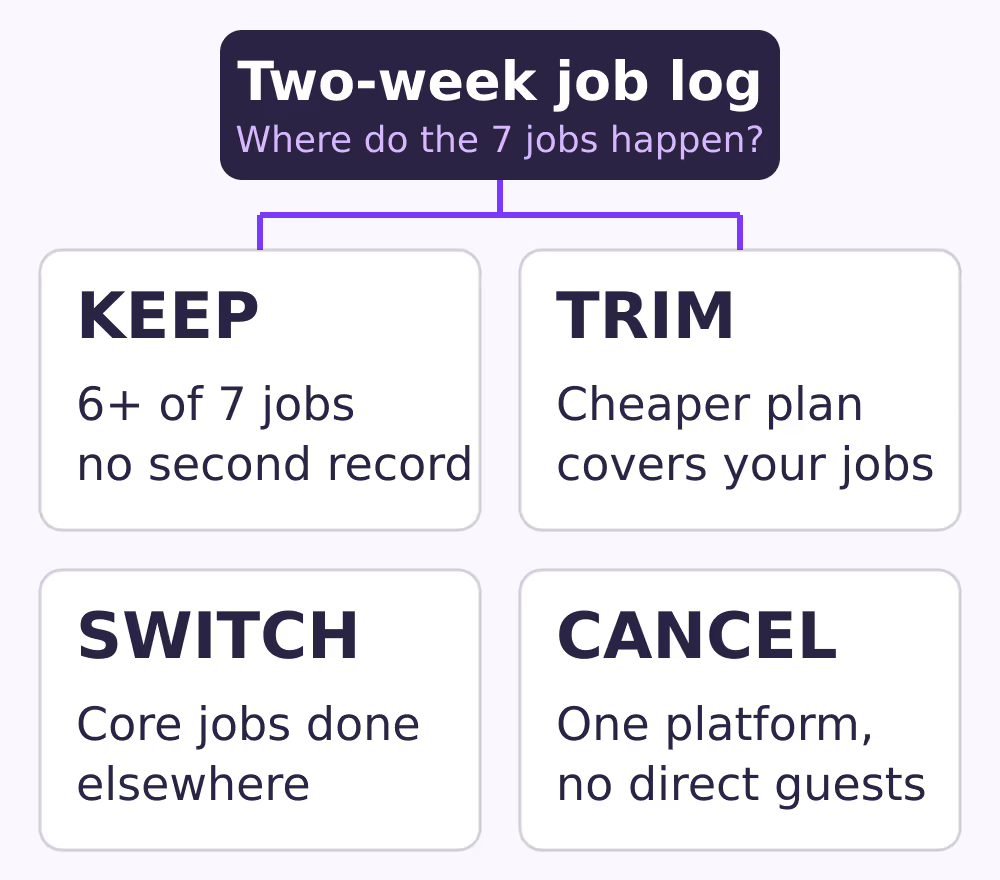
Decide by comparing the full monthly cost of your current setup with the jobs it actually performs. Keep a tool that covers most of the seven jobs, trim plans you can downgrade, and switch only when core jobs still happen elsewhere.
The diagram below maps those four outcomes to the condition behind each one, starting from your two-week job log.
Start with the real monthly cost, not the plan price:
Monthly cost = subscription + per-unit or per-booking fees + paid add-ons + (hours spent on workarounds × what an hour is worth to you)
For example, suppose a plan costs €45 a month, a channel add-on costs €15, and you spend three hours a month reconciling a spreadsheet, which you value at €20 an hour. The real cost is 45 + 15 + (3 × 20) = €120 a month. These figures are illustrative, not typical prices; use your own invoices and your own job log.
Then score your current tool:
| Question | If yes | If no |
|---|---|---|
| Does it do at least six of the seven jobs? | Lean keep | Lean switch |
| Is there a cheaper plan with the jobs you use? | Trim | Go on |
| Do you keep a parallel record? | Lean switch | Lean keep |
| Do you use an agency-only feature monthly? | Keep that tier | Drop it |
| Do you list on only one platform, no direct guests? | Consider cancelling | Keep some tool |
The last row matters. If a unit is listed on a single platform and you take no direct bookings, that platform's own calendar and messaging may cover the jobs, and the existing guide on whether you need a PMS for one to three properties walks through that case. Cancelling is a real option, not a failure.
What changes if you leave an API-connected PMS for a simpler tool?
Leaving an API-connected PMS changes how your channels get availability. Most simpler tools for small hosts sync through iCal, which works on each platform's import schedule rather than instantly, and that affects how you plan the switch.
The difference between a channel manager and a PMS is worth knowing here. A tool connected through an OTA's API pushes changes directly. An iCal link is a calendar file that the other platform fetches on its own timetable. Airbnb's help center says your Airbnb calendar updates every 3 hours and pulls in your connected calendars. Booking.com says it imports connected calendars every two hours, offers an Import now button, and states that calendars aren't synced in real time.
Two platform rules shape the order you do things in:
- Booking.com. Its calendar sync guide lists eligibility requirements, including that you don't use a connectivity provider, that the property has 20 room types or fewer, and that each room type has at most one unit. Its connectivity provider page says you deactivate under Account, Connectivity provider, and that your previous settings are then reset and you manage rates, availability and bookings manually again. It also tells you to check with the provider whether you need to cancel your agreement with them separately.
- Airbnb. Its guide to switching software says to disconnect each listing under Sync settings, remove the old provider's access under Connected Apps, and connect the new software immediately, or temporarily unlist or snooze the listing if you aren't ready, so availability and pricing stay accurate.
Put together, a cautious cutover looks like this:
- Export reservations and guest details from the old tool, and note every future stay.
- Set up units and future stays in the new tool before disconnecting anything.
- Pick a quiet day, ideally with no same-day or next-day arrivals.
- Disconnect Airbnb and deactivate the Booking.com connection, then add the iCal links straight away in both directions.
- Compare each platform's calendar against your list of future stays, and block any gap by hand until the next imports have run.
- Check rates, minimum stays and other settings on Booking.com, since deactivation resets them.
- Cancel the old subscription only once a full day of imports looks right.
Our full PMS data migration plan covers the export side in more detail.
Where does BookBed fit, and where doesn't it?
BookBed Starter is aimed at solo hosts with one to three properties: it covers up to three active units with two-way iCal sync with Airbnb and Booking.com, an embeddable direct-booking widget and Stripe checkout.
According to the BookBed pricing page, Starter costs €9 a month billed annually or €12 billed monthly, takes 0% commission on bookings, and lets you export your data as CSV. Each unit has one calendar, and direct-booking payments go to your own Stripe account, with Stripe's processing fees applying.
It doesn't cover everything a complex PMS might, and some of that is deliberate:
- It isn't connected to Airbnb or Booking.com through their APIs. Sync runs through iCal, so each platform still imports on its own schedule, which BookBed doesn't control, and a booking can arrive before the other calendar has updated.
- There's no unified inbox. Guest messages stay in each platform's own messaging.
- Automated guest messaging, auto-invoicing and VAT reports are Pro features, and owner statements, team workspaces and API access sit in the Agency tier.
If your job log shows you rely on any of those, factor that in before switching.
When this advice does not apply
- You pay other owners. If you manage units for someone else, owner statements and payouts are core jobs, not extras.
- Your Booking.com setup isn't eligible for iCal. Several identical units under one room type, or more than 20 room types, rule out Booking.com calendar sync under its own guide.
- You depend on API-only features. If you use dynamic pricing pushed to channels, or channels beyond Airbnb and Booking.com, check how a simpler tool would handle them before you leave.
- Your contract has a notice period. Read your current terms before you plan dates.
What to do next
- Start a two-week job log today, one line per task.
- Mark each line against the seven jobs and count the ones done outside your tool.
- Pull your last three invoices and calculate the real monthly cost, including workaround hours.
- Fill in the scorecard and pick keep, trim, switch or cancel.
- If switching, export your data and list every future stay before you disconnect anything.
About BookBed: If your job log shows that availability and direct bookings are the jobs your current tool isn't doing for you, BookBed Starter covers up to three units with two-way iCal sync with Airbnb and Booking.com and Stripe checkout for direct guests, on a flat subscription. See BookBed pricing
Sources
- Airbnb Help Center, "Sync your home host calendar to other websites" — Verified 2026-10-05
- Airbnb Help Center, "How do I switch to a new software?" — Verified 2026-10-05
- Booking.com for Partners, "How to synchronise your calendars across channels" — Verified 2026-10-05
- Booking.com for Partners, "Setting up and working with a connectivity provider" — Verified 2026-10-05
- BookBed, public pricing and plan scope (pricing page and pricing.md) — Verified 2026-10-05