Bookings keep arriving, and the work between them lives in your head and your text messages: who's cleaning Saturday, whether the new door code went out, when the smoke alarm was last tested. That's vacation rental operations, and it usually breaks at the handoffs, not because anyone isn't trying.
Start with one exercise before reading further. Take your last three stays and write down every task that happened around them. Next to each, note what triggered it and who did it. Any task where the answer is "I remembered" is a task that will eventually get missed.
This guide is the map. It shows how the pieces fit together and points you to the detailed guides for each one.
What does vacation rental operations actually cover?
Vacation rental operations covers every task between a confirmed booking and a closed-out stay: calendar accuracy, guest access, turnovers, repairs, supplies, compliance, insurance and the money that follows each stay.
It helps to sort that work by rhythm, because each rhythm needs a different kind of reminder:
- Per booking. Confirming the calendar, sending arrival details, preparing access, the turnover clean, the post-stay inspection and review. These repeat with every reservation, so they belong in a fixed sequence.
- Monthly or seasonal. Supply counts, payout reconciliation, maintenance checks, seasonal servicing. These are easy to forget because nothing forces them.
- Yearly or when rules change. Permits and registration, tourist tax setup, insurance renewal. These fail quietly and cost the most when they do.
Whether you do all of it yourself or hire a vacation rental operations manager, the job is the same: every task needs a trigger, one owner and a way to confirm it's done.
How do you turn each booking into a repeatable set of tasks?
Tie every task to a trigger you can see, such as a new booking, a date before arrival or a checkout, and give it one named owner and a visible proof that it's done.
Here's a per-booking operations map. The timings are our recommendation for a typical short stay, not a platform rule. Fill in the owner column with real names, including a backup for each row.
| Stage | Trigger | Task | Proof it's done | What goes wrong if it's skipped |
|---|---|---|---|---|
| Booking confirmed | New reservation on any channel | Check dates on every calendar, block manually if needed | Same dates blocked everywhere | Double booking |
| Cleaner scheduled | Same day as the booking | Add the turnover to the cleaner's schedule | Cleaner confirms in writing | No clean before arrival |
| Pre-arrival | A few days before check-in | Send arrival details, prepare the access code | Message sent, code tested | Guest stuck at the door |
| Arrival day | Check-in time | Confirm the guest got in | Guest reply or lock log | Silent problems until the review |
| During the stay | Day after arrival | Short check-in message | Reply logged | Small issue becomes a complaint |
| Checkout | Checkout time | Clean, restock, inspect, photograph | Photos per room | Damage found too late to claim |
| After checkout | Within a day or two | Review, damage note, record income and costs | Entries in your books | Lost claim window, messy taxes |
The turnover row carries the most detail, so it has its own printable turnover checklist for cleaners. Access codes and lock choices are covered in the self check-in setup guide.
Two rules make the map hold up. First, one owner per row, because a task that two people own is a task nobody owns. Second, proof beats memory: a photo, a confirmation text or a lock log settles "did it happen?" without a phone call.
How much time does a turnover window really give you?
The usable turnover window is the time between checkout and the next check-in, minus travel, cleaning, restocking and inspection. Whatever is left is your buffer for late checkouts, laundry delays and surprises.
Use this formula:
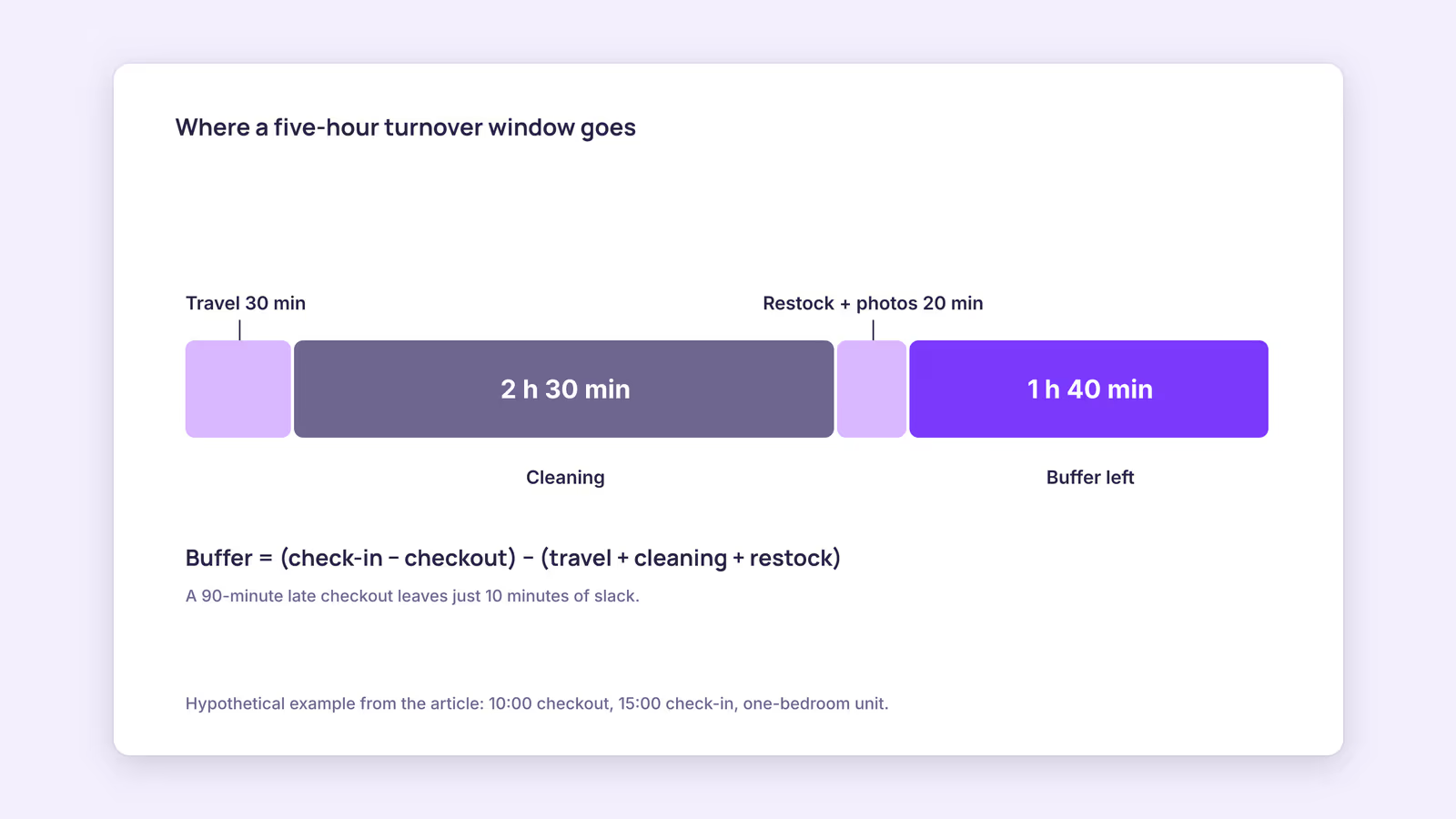
Buffer = (next check-in − checkout) − (travel + cleaning + restock and inspection)
Consider a hypothetical one-bedroom apartment with a 10:00 checkout and a 15:00 check-in, which gives a five-hour window. Plug in your own cleaner's real times:
| Input | Hypothetical value |
|---|---|
| Window (10:00 to 15:00) | 5 h 00 min |
| Cleaner travel | 30 min |
| Cleaning | 2 h 30 min |
| Restock, inspection and photos | 20 min |
| Buffer left | 1 h 40 min |
On these example numbers, a late checkout of an hour and a half leaves just 10 minutes of slack, and a late checkout plus an early check-in request can wipe out the buffer entirely. Our recommendation: decide in advance which requests you'll accept on back-to-back days, and time your cleaner once instead of guessing.
The window only helps if you know about it. If you list on more than one platform, a new booking can take hours to show up elsewhere. Airbnb says it updates connected calendars every 3 hours, and Booking.com says it imports connected calendars every two hours, with a manual refresh on both. A same-day booking can therefore create a turnover your cleaner hasn't heard about.
The cost of a miss is real. Airbnb's host cancellation policy sets fees of 10%, 25% or 50% of the reservation amount depending on timing and can block your calendar for those dates. On Booking.com, if an overbooking happens, you're expected to find the guest a place of the same or better standard and cover the costs.
Which recurring checks belong on your operations calendar?
Put anything that doesn't repeat with each booking on a fixed calendar: supply counts and payout checks monthly, safety and appliance checks each season, and permits, taxes and insurance at least yearly.
Monthly. Count consumables against a par level so you reorder before you run out. Match each payout against its booking, and log every cost by stay. Short term rental operating expenses usually include cleaning, laundry, consumables, platform and payment fees, utilities and repairs. Tracking them per stay shows which bookings actually paid.
Each season. Test smoke and carbon monoxide alarms, service heating or cooling before the months you need it, and walk the property as a guest would. Keep a simple maintenance log with the date, the issue, who fixed it and what it cost.
Yearly, or when rules change. Rules on permits, registration, guest reporting and tourist tax depend on where your property is, so check with your local authority rather than relying on a general list. The short-term rental regulations guide explains what to look for.
Insurance belongs here too. Airbnb describes AirCover for Hosts damage protection as covering damage "during an Airbnb stay," so stays booked through other channels or directly need their own cover. The vacation rental insurance guide covers the gaps to ask your insurer about.
When this advice does not apply
- Properties with on-site staff. A front desk or resident manager changes who owns access and arrival tasks.
- Long stays. Monthly rentals have fewer turnovers, so the per-booking map matters less and maintenance matters more.
- Management agreements. If a management company runs your property, its contract decides who owns which task. Check it before building your own map.
- Local law. Registration, guest reporting and safety rules vary by country and city.
What to do next
- List every task from your last three stays, with its trigger and owner.
- Copy the operations map above and put one name and one backup in every row.
- Time one real turnover and calculate your buffer for back-to-back days.
- Put monthly, seasonal and yearly checks on a calendar with reminders.
- Check how long a new booking takes to appear on your other calendars before your next busy period.
FAQ
What does a vacation rental operations manager do?
They own the recurring work between bookings: scheduling cleaners, handling access and guest issues, organizing repairs and restocking, and keeping records. The map above is a reasonable job outline for one.
Can a virtual assistant handle short term rental operations?
A remote assistant can cover messages, scheduling and record-keeping. Someone local still has to handle anything physical, such as a lockout, a leak or a missed clean, so plan for both roles.
How do you manage a vacation rental remotely?
Use self check-in, a reliable cleaner with a named backup, a local contact for repairs and emergencies, and photo proof after every turnover. Vacation rental management software helps with calendars and messages, but it can't replace the local contact.
One timeline for every unit: BookBed Pro's multi-channel timeline shows bookings across all your units and connected calendars in one view, so same-day turnovers stand out before you message your cleaner. It reads other channels through iCal, so it's as current as the latest calendar update. Try BookBed free
Sources
- Airbnb Help Center, "Sync your home host calendar to other websites" — Verified 2026-09-30
- Booking.com for Partners, "Updating your availability calendar in the extranet" — Verified 2026-09-30
- Airbnb Help Center, "Host Cancellation Policy for homes" — Verified 2026-09-30
- Booking.com for Partners, "Guide on handling double bookings effectively" — Verified 2026-09-30
- Airbnb Help Center, "Getting protected through AirCover for Hosts" — Verified 2026-09-30